40+ AI Animation Ideas to Create Viral Social Media Videos in 2026
Running out of AI animation ideas is one of the fastest ways to lose momentum on social media. You’ve refreshed your notes app a dozen times, and nothing new comes to mind - meanwhile your feed is full of animated videos racking up thousands of views while your last few posts are just photos with captions. You know animation grabs attention that static content can’t, but staring at a blank timeline waiting for inspiration isn’t a strategy.
Below, we’ve rounded up 40+ ready-to-use concepts, organized by content type - from brand marketing to trending memes - so you always have something worth posting, and a simple way to turn each one into a finished video.
Why AI Animation Ideas Go Viral on Social Media?
Animation isn’t just “nice to look at” - as a content format, it has a few built-in advantages that make these ideas easier to spread than a typical photo or talking-head video. A few reasons they tend to perform well:
- Instant visual distinction: Animated content looks different from the wall of real-life photos and talking-head videos in most feeds, so it naturally stands out and earns a second look.
- Built-in shareability: Ideas like memes, mascots, and relatable skits translate a feeling or joke into something visual and easy to send to a friend - which is exactly the kind of content platforms reward with extra reach.
- Trend-friendly by design: Formats like lyric visualizers, challenge remixes, or reaction skits can be quickly adapted to whatever sound or meme is currently trending, giving you a shot at riding the algorithm’s current wave.
- No creative ceiling: Because you’re not limited by real-world locations, actors, or props, animation ideas can go anywhere - surreal, absurd, exaggerated - which is often what makes a video memorable enough to rewatch or share.
Coming up with the idea is the fun part - actually producing it used to be the hard part. That’s the gap tools like Anijam are built to fill: describe the idea, and the AI handles the animation itself, so the only real bottleneck left is your creativity, not your production skills.
40+ AI Animation Ideas for Social Media Videos
Here are 40+ animation ideas organized into six categories, so you can jump straight to whatever fits your niche or the trend you’re chasing.
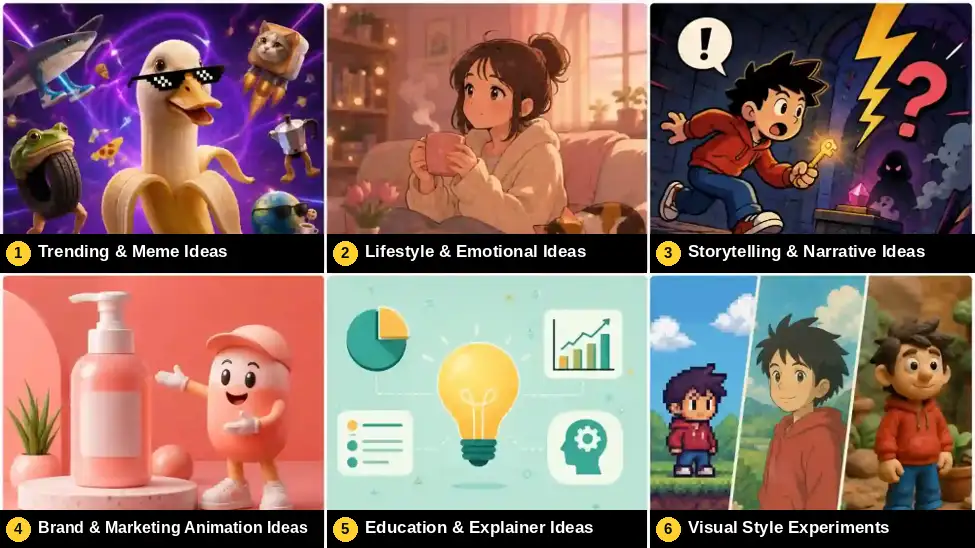
Trending & Meme Ideas
- Meme-to-animation - take a viral meme format and rebuild it as a short animated scene. (Best for: TikTok, Instagram)
- Lyric visualizer - animate a scene synced to a trending audio’s lyrics or beat. (Best for: Instagram Reels, TikTok)
- Character swap parody - reimagine a trending skit with animated characters instead of live actors. (Best for: TikTok)
- Challenge remix - animate a popular dance, transformation, or POV challenge instead of filming it. (Best for: TikTok, Reels)
- “POV” animated skits - animate a first-person point-of-view scenario tied to a trend. (Best for: TikTok, Shorts)
- AI brainrot animals - create surreal, absurdist animal mashup characters (like Italian brainrot memes) with exaggerated voices and chaotic energy. (Best for: TikTok, YouTube Shorts)
Lifestyle & Emotional Ideas
- Cozy daily-life loop - a short, calming animated scene of a character’s daily routine. (Best for: Instagram, aesthetic accounts)
- Pet, but animated - turn your pet into an animated character with an exaggerated personality. (Best for: TikTok, Instagram)
- Seasonal or holiday shorts - animate a small scene tied to a season or holiday. (Best for: All platforms)
- Personal growth mini-story - a short, motivational animated story about overcoming a small struggle. (Best for: YouTube Shorts, Reels)
- Nostalgic throwback style - animate a scene in a retro aesthetic, like a 90s cartoon or VHS look. (Best for: TikTok, YouTube)
- Animated travel memories - transform travel photos or experiences into animated travel stories. (Best for: Travel creators, lifestyle accounts)
- Animated friendship or relationship stories - create emotional short animations about human connections. (Best for: Instagram, TikTok)
Storytelling & Narrative Ideas
- 60-second micro-fable - a tiny animated story with a twist ending and a moral. (Best for: YouTube Shorts, Reels)
- Character reaction skits - an animated character reacting to trending topics or news. (Best for: TikTok, X (Twitter) clips)
- Looping story - a short clip designed to loop seamlessly, encouraging repeat views. (Best for: Instagram Reels, TikTok)
- Plot-twist short - build up a scenario, then subvert expectations in the final 3 seconds. (Best for: TikTok, YouTube Shorts)
- “What if” scenario - animate an absurd hypothetical, like what if cats could talk. (Best for: Entertainment accounts)
- Cliffhanger series - a multi-part animated story released across several posts to build a returning audience. (Best for: Series/episodic content)
- Animated diary or personal story - turn everyday experiences, memories, or personal thoughts into animated storytelling videos. (Best for: Personal brands, lifestyle creators)
Brand & Marketing Animation Ideas
- Product transformation animation - turn a static product photo into a short scene showing it in use. (Best for: Instagram Reels, product drops)
- Mascot origin story - a 15-30 second animated short introducing your brand mascot’s personality. (Best for: Brand awareness campaigns)
- Animated unboxing - re-create the “unboxing” trend with fully animated packaging and reveal. (Best for: TikTok, product launches)
- Before/after transformation - animate a dramatic before-and-after using smooth morphing transitions. (Best for: Skincare, fitness, home improvement brands)
- Day-in-the-life of your product - show your product “living its life” in a whimsical animated world. (Best for: Lifestyle brands)
Education & Explainer Ideas
- Concept visualization - animate an abstract idea, like black holes or compound interest, in simple visuals. (Best for: YouTube, educational accounts)
- Animated data story - turn a stat or chart into a short motion-graphics explainer. (Best for: LinkedIn, business accounts)
- Step-by-step how-to - animate a quick tutorial instead of filming it live. (Best for: TikTok, Instagram Reels)
- Historical moment recreation - animate a key historical event in a stylized way. (Best for: History and education pages)
- Myth-busting explainer - animate a common misconception, then reveal the truth. (Best for: YouTube Shorts)
- Compare & contrast animation - animate two concepts side-by-side to highlight the differences. (Best for: YouTube Shorts)
- Animated book summaries - transform key ideas from books into short animated explanations. (Best for: Education creators, knowledge channels)
- Animated language learning scenes - create animated conversations to teach vocabulary, phrases, or cultural situations. (Best for: Language learning accounts)
Visual Style Experiments
- Pixel-art short - recreate a scene in a retro pixel-art style. (Best for: Gaming and niche accounts)
- 2D/3D hybrid scene - mix flat 2D characters with a 3D background, or vice versa. (Best for: Creative portfolios, Reels)
- Cyberpunk / futuristic short - animate a scene in a neon, futuristic aesthetic. (Best for: TikTok, YouTube Shorts)
- Hand-drawn doodle style - animate in a loose, sketch-like visual style for a personal feel. (Best for: Personal brand accounts)
- Studio Ghibli-inspired short - use a soft, painterly animation style for emotional or nostalgic scenes. (Best for: Instagram, YouTube)
- Claymation-style short - animate with a stop-motion clay look for a tactile, nostalgic feel. (Best for: Creative/art accounts)
- Watercolor/painterly animation - use soft, blended color transitions for a dreamy, artistic look. (Best for: Instagram, portfolio content)
- Paper cutout animation style - create a handmade visual style with layered paper-like characters and backgrounds. (Best for: Creative brands, educational content)
Quick Reference: Ideas by Platform
| Category | Best Platforms |
|---|---|
| Brand & Marketing | Instagram Reels, TikTok, YouTube Shorts |
| Storytelling & Narrative | YouTube Shorts, TikTok, Instagram Reels |
| Education & Explainer | YouTube, LinkedIn, TikTok |
| Trending & Meme | TikTok, Instagram Reels |
| Lifestyle & Emotional | Instagram, TikTok, YouTube Shorts |
| Visual Style Experiments | TikTok, YouTube, personal brand accounts |
How to Generate Anime Art and Animation with Anijam
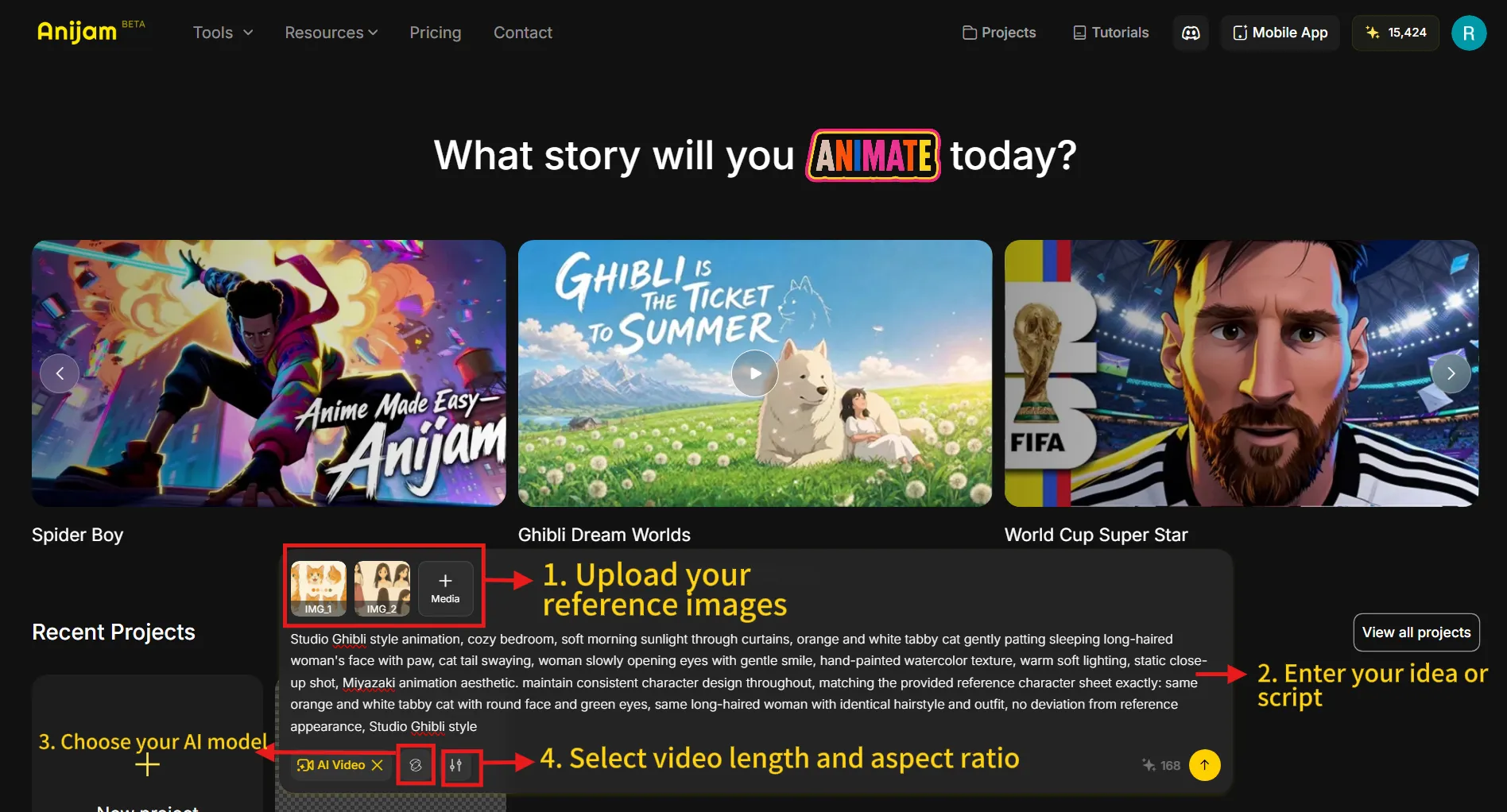
Having a list of ideas is only half the job - the other half is actually making the video without it taking all week. That’s where Anijam AI comes in: an all-in-one AI animation platform that handles the entire production pipeline - from script and scene generation to character consistency, lip sync, and timeline editing — all from a single canvas. Here’s a simple workflow to go from idea to finished video.
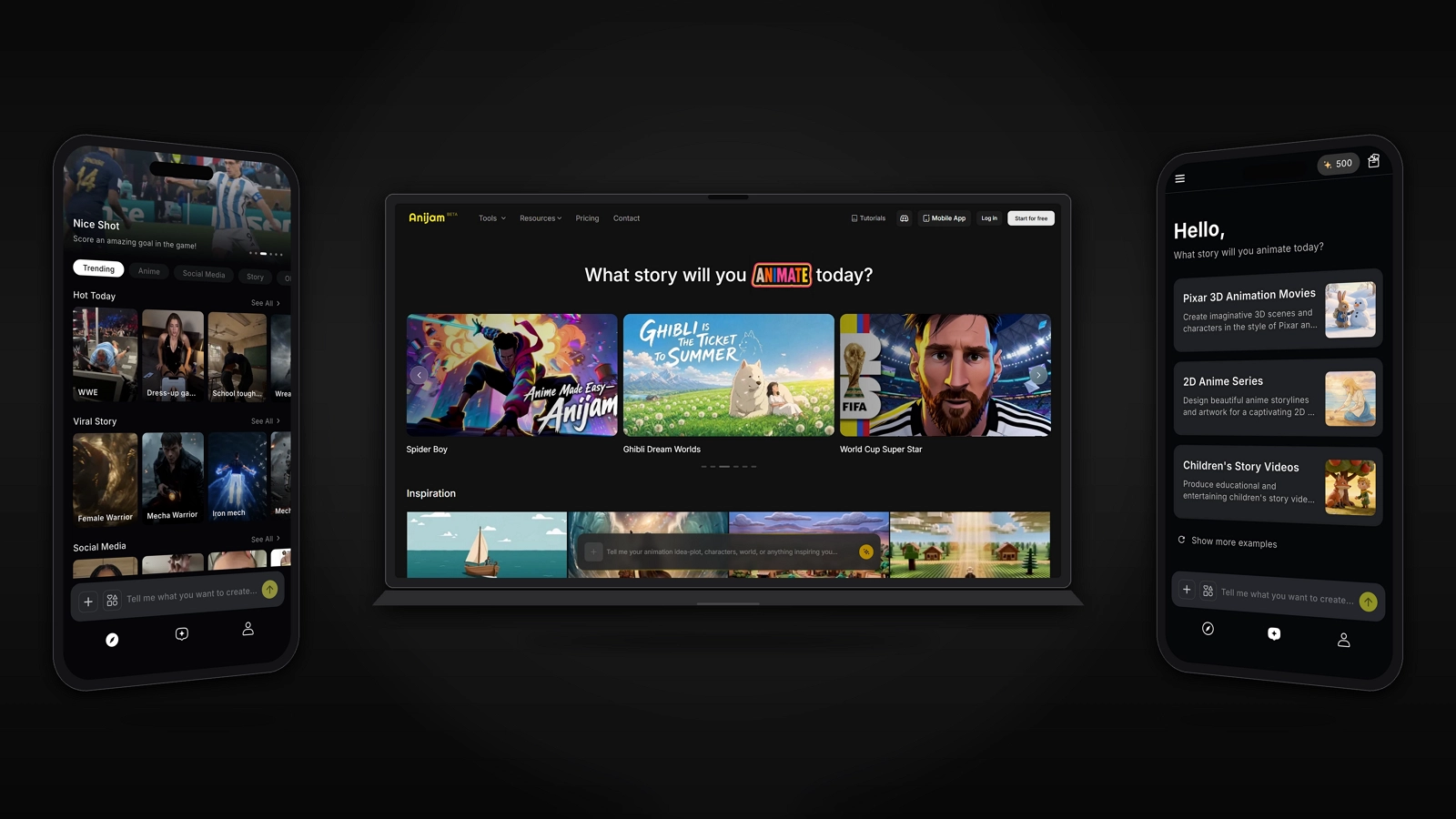
Step 1: Describe your scene
type your concept in plain language and Anijam generates a story outline and initial assets.
Step 2: Pick a style
choose from Anijam’s style library - cartoon, Ghibli-inspired, 3D, and more - or provide a reference image
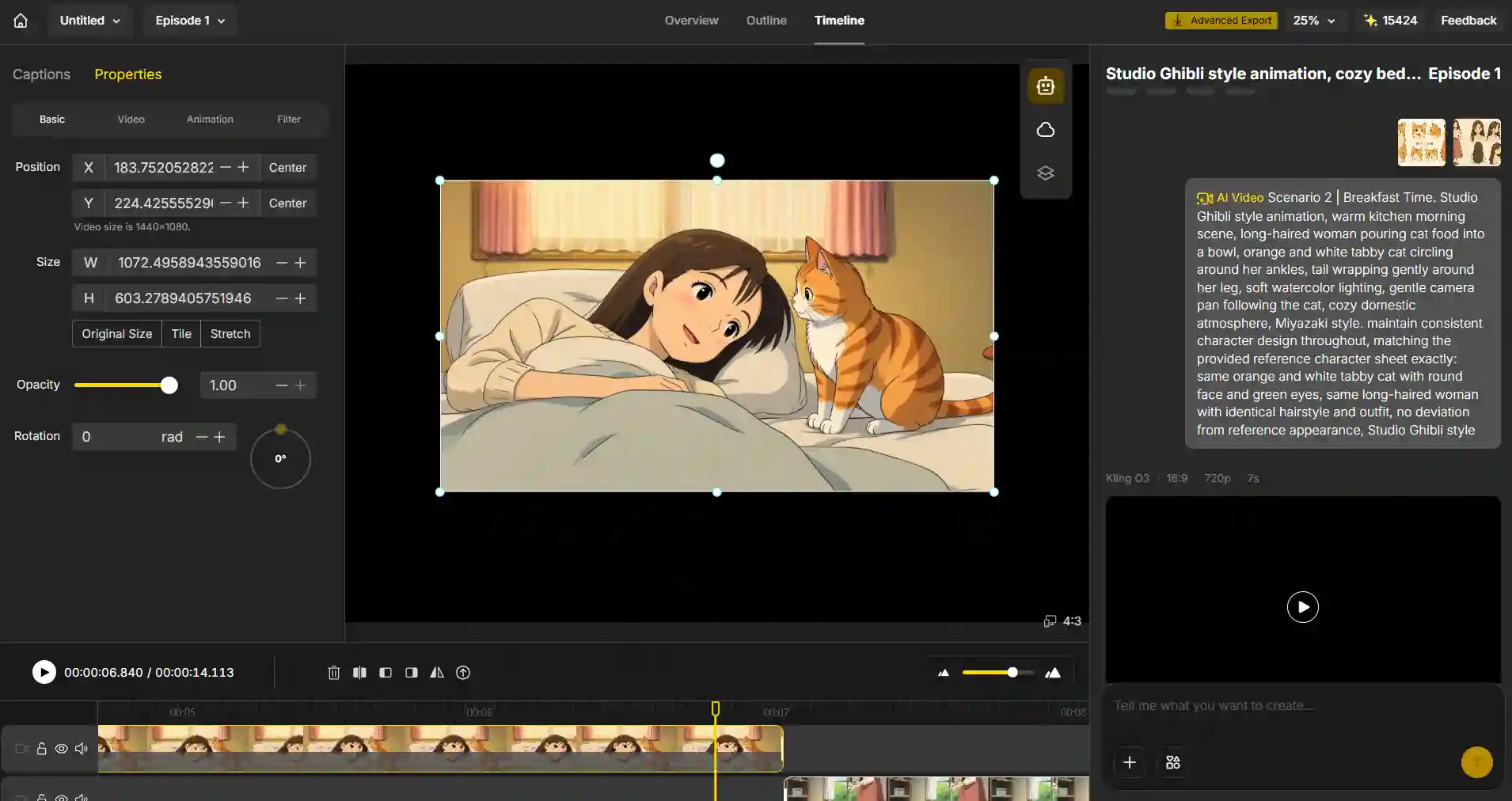
Step 3: Generate the animation
Anijam builds a shot-by-shot storyboard and turns it into keyframes and a finished animated video.
Step 4: Add voice and motion
sync dialogue with AI lip-sync, and fine-tune character movement or camera work with simple text commands.
Step 5: Polish and export
adjust timing and transitions in the timeline editor, then export your animation.
Tips: Optimize for Each Platform
The same idea can perform very differently depending on how it’s formatted. A few quick adjustments before you post:
| Platform | Best Aspect Ratio | Ideal Length |
|---|---|---|
| TikTok | 9:16 (vertical) | 15-30 sec |
| Instagram Reels | 9:16 (vertical) | 15-30 sec |
| YouTube Shorts | 9:16 (vertical) | Up to 60 sec |
| Instagram Feed | 1:1 (square) or 4:5 | 15-45 sec |
| YouTube (standard) | 16:9 (horizontal) | 1-3 min |
- Hook in the first 3 seconds: open on the most visually interesting moment, not a slow build-up.
- Add captions: some viewers watch with sound off, so on-screen text keeps the story clear.
- Match the trend’s pacing: if you’re remixing a trending format, keep your cuts and timing close to the original for recognizability.
Conclusion
Coming up with an idea and actually producing it used to be two separate hurdles. The 40+ concepts above solve the first one - and AI animation tools like Anijam AI solve the second, turning a short description into a finished, platform-ready video in minutes instead of days.
Ready to bring one of these ideas to life? Visit Anijam AI and start creating your first AI animated video for free.
Frequently Asked Questions
What are the best animation ideas for social media?
The best-performing animation ideas are short, visually distinct, and easy to understand within the first few seconds - think product transformations, meme-to-animation clips, character skits, or looping scenes. Rather than one universal “best” idea, it’s about matching the format to your niche: brands do well with product and mascot animations, while entertainment accounts lean into trending or meme-based formats.
What makes an animation go viral on social media?
Virality usually comes down to a strong hook in the first 3 seconds, a format that’s instantly readable even with the sound off, and content that taps into something already trending - a sound, a meme, or a challenge. Looping animations and unexpected plot twists also tend to encourage repeat views, which platforms reward with more reach.
Can I make an animated video with AI without drawing skills?
Yes. AI animation tools like Anijam are built so you can describe your idea in plain language - the AI handles character design, scene generation, and motion for you. No drawing, rigging, or animation software experience is required.
What is the best AI animation generator for social media in 2026?
The right tool depends on what you need, but for creators who want a complete pipeline - script, scene generation, character consistency, lip sync, and editing - in one place, Anijam AI is built specifically for this kind of end-to-end animated video production, rather than generating single disconnected clips.
What’s the ideal video length for social media animation?
For TikTok, Instagram Reels, and YouTube Shorts, 15-30 seconds is the sweet spot for most content types. Educational or storytelling animations can stretch to 60 seconds if the pacing stays tight, but shorter almost always outperforms longer for pure engagement and completion rate.
How much does it cost to make an animated video for social media?
Traditional animation typically costs $1,500 to $50,000+ per minute depending on style and complexity, which puts it out of reach for most creators and small brands. AI animation tools like Anijam dramatically cut both the cost and turnaround time, making it realistic to produce multiple animated videos per week on a creator-level budget.
by Evan
Evan is an AI content creator and video technology writer at Anijam AI, focused on how generative AI is transforming storytelling and video production. He shares social trends, creative workflows, prompt strategies, and practical insights to help creators turn ideas into engaging videos and visual content.