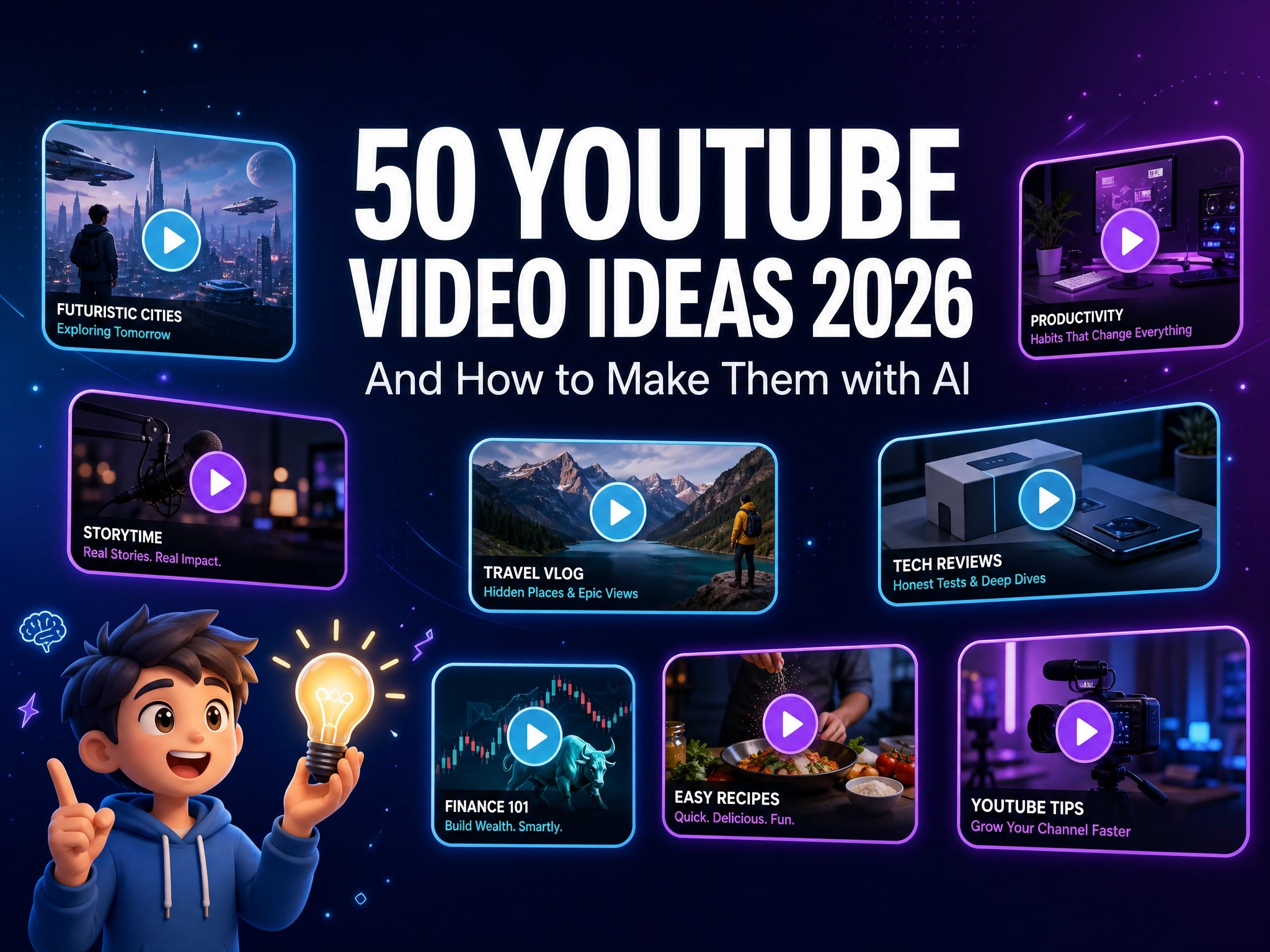
50 YouTube Video Ideas 2026 (And How to Make Them with AI)
You’ve refreshed your notes app a dozen times, and nothing new comes to mind.
Meanwhile, channels in your niche keep posting - and the ones that grow aren’t necessarily the ones with the best equipment. They’re the ones that never seem to run out of things to make.
Below, we’ve rounded up 50 ready-to-use YouTube video ideas, organized by category - from storytelling to faceless narration - so you always have somewhere to start, and a simple way to turn each one into a finished video with AI.
Why Now Is the Easiest Time to Start a YouTube Channel
Every year feels like the “right time” was three years ago - but a few real shifts make right now a genuinely easier starting point than most creators think.
- You don’t need to be on camera. Faceless channels have gone from a niche workaround to one of the fastest-growing formats on the platform. The algorithm doesn’t distinguish between a filmed video and a well-made one - what matters is watch time, not who’s on screen.
- Consistency matters more than production value. YouTube rewards channels that post reliably far more than it rewards any single high-budget video. A channel that posts something solid every week will consistently outgrow one that posts something impressive once a month.
- Niches are more fragmented, which means more room. Audiences have split into smaller, more specific interests than they were a few years ago. That fragmentation cuts both ways - it’s harder to go broad, but far easier to find and own a specific corner of the platform.
- The idea pool is bigger than it looks. Formats that used to require a studio, actors, or a full production crew - animated storytelling, stylized explainers, narrated fiction - are realistic for a single person to attempt now, which means the list of things worth trying has quietly gotten a lot longer.
None of this makes starting effortless. But the specific things that used to stop people - needing to be on camera, needing a crew, needing months of runway before the first upload - matter a lot less than they used to.
What’s left is the question every creator eventually asks: what do I even make, and how do I actually make it? That’s what the rest of this guide is for.
50 YouTube Video Ideas for 2026
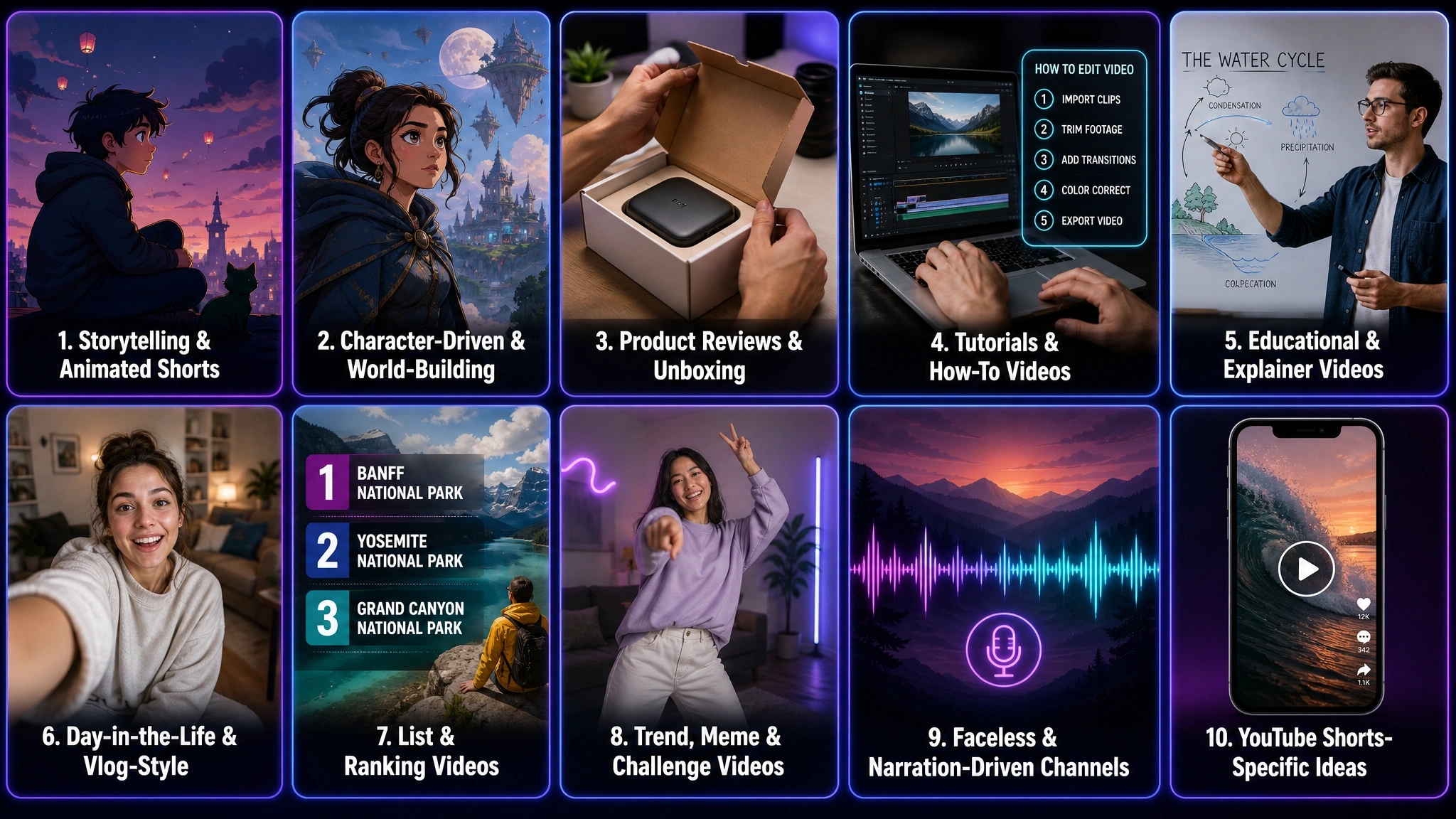
Here are 50 video ideas organized into ten categories, so you can jump straight to whatever fits your niche.
Quick Reference: Ideas by Format
| Category | Best Format | Why |
|---|---|---|
| Storytelling & Animated Shorts | Either | Works as a standalone short or a serialized long-form story |
| Character-Driven & World-Building | Long-form, with Shorts spin-offs | Builds over time, but individual moments clip well |
| Product Reviews & Unboxing | Long-form | Comparisons and detail need more than a few seconds |
| Tutorials & How-To Videos | Long-form | Step-by-step instruction needs room to breathe |
| Educational & Explainer Videos | Long-form | Explaining a concept properly takes more than a quick clip |
| Day-in-the-Life & Vlog-Style | Long-form | Vlogs are inherently a longer, paced format |
| List & Ranking Videos | Either | Easy to publish long-form and cut a Shorts teaser from it |
| Trend, Meme & Challenge Videos | Shorts | Trend-driven content is built for quick, disposable formats |
| Faceless & Narration-Driven Channels | Either | Works as a 10-minute narration or a narrated Short |
| YouTube Shorts Ideas | Shorts | Built for the format by definition |
Storytelling & Animated Shorts
- 60-second micro-fable - a tiny animated story with a twist ending and a moral.
- Serialized micro-drama - a multi-part story released across several videos to build a returning audience.
- Animated adaptation of a real story - turn a personal experience, diary entry, or reader-submitted story into a short animated piece.
- “What if” scenario - animate an absurd hypothetical, like what if cats could talk.
- Silent short film - tell a story using only visuals and music, no dialogue.
Character-Driven & World-Building Content
- Original character origin story - a short introducing a recurring character’s backstory and personality.
- In-character Q&A or interview - answer audience questions as if your character were being interviewed.
- Ongoing lore series - slowly build out the rules, history, or geography of an original world over multiple episodes.
- Character reaction videos - an original character reacting to trending topics or news.
- Ensemble skit series - short recurring skits between two or three original characters.
Product Reviews & Unboxing
- Standard unboxing and first impressions - the classic format, still reliable for new or trending products.
- Side-by-side comparison - put two or three competing products head-to-head on the same criteria.
- “Worth it or not” budget vs. premium - test whether the expensive option actually earns its price difference.
- Long-term follow-up review - revisit a product after 30-90 days of real use, not just first impressions.
- Stylized or animated unboxing - give a standard unboxing format a more visual, illustrated spin.
Tutorials & How-To Videos
- Beginner step-by-step tutorial - walk through a task in your niche from zero prior knowledge.
- Common mistakes video - troubleshoot the errors beginners typically make, and how to fix them.
- Tool or software walkthrough - a practical tour of a tool your audience is likely trying to learn.
- Before-and-after transformation tutorial - show a process by contrasting the starting point with the result.
- Quick-tip series - a recurring format delivering one short, specific tip per episode.
Educational & Explainer Videos
- Concept explainer - break down a complex idea in your niche using simple visuals and language.
- Historical event recreation - animate or narrate a key historical moment in a stylized way.
- Myth-busting explainer - present a common misconception, then reveal the accurate version.
- Data or statistic storytelling - turn a stat or chart into a short, visual explainer.
- Compare & contrast explainer - put two concepts side-by-side to highlight what actually separates them.
Day-in-the-Life & Vlog-Style Content
- Standard day-in-the-life - a paced walkthrough of a typical day in your niche or role.
- “A week in my life” compilation - condense a full week into one video.
- Behind-the-scenes of a project - show the process behind something you’re building or working on.
- Routine breakdown - a focused look at one specific routine, like mornings or a work setup.
- Workspace or studio tour - walk viewers through where and how you create.
List & Ranking Videos
- “Top 10” list in your niche - a straightforward, high-searchable ranking format.
- Tier list video - rank a set of items, tools, or examples into tiers with reasoning.
- “X things I wish I knew before Y” - a lessons-learned format built around your own experience.
- Ranking audience submissions - have viewers submit entries, then rank or react to them.
- Yearly roundup or recap - summarize the best, worst, or most notable moments from the past year.
Trend, Meme & Challenge Videos
- Trending audio remix - build a short video around a currently trending sound.
- Meme-to-video adaptation - rebuild a viral meme format as a short video scene.
- Existing challenge video - take part in a trend that’s already circulating in your niche.
- Reaction video - respond to a piece of trending content relevant to your audience.
- Duet or response-style video - build a video directly responding to another creator’s clip or claim.
Faceless & Narration-Driven Channels
- Narrated story format - narrate a compelling real or fictional story over illustrated or generated visuals.
- Narrated top-facts or list video - pair a narrated list with supporting visuals instead of on-camera delivery.
- True story with animated illustration - narrate a real account while animated visuals illustrate the key moments.
- Narrated explainer with screen visuals - combine narration with screen recordings, diagrams, or generated scenes.
- Commentary or compilation narration - narrate your take over a compilation of relevant clips or examples.
YouTube Shorts Ideas
- Single hook-and-payoff Short - one clear hook and one payoff, nothing else, built for under a minute.
- Quick tip or hack Short - one specific, useful tip delivered as fast as possible.
- Before/after reveal Short - build anticipation, then reveal the result in the final seconds.
- Loop-style Short - design the ending to flow back into the beginning, encouraging replays.
- “POV” scenario Short - a first-person point-of-view scenario tied to a relatable situation or trend.
Trend cycles on Shorts move fast enough that a list like this one is really a starting point, not a snapshot. For a closer look at what’s actually performing right now - including specific formats like song-timed animation memes and AI-avatar channels - see our breakdown of current YouTube Shorts trends, updated monthly.
From Idea to Finished Video: Why the Idea Was Never the Hard Part
Coming up with an idea and actually producing it have always been two separate hurdles. The list above solves the first one - but for most creators, especially working alone, the second one is where momentum actually dies.
That’s the real bottleneck for most solo creators - not the idea itself, but everything between the idea and a finished, watchable video: filming, editing, voicing, syncing.
Here’s a simple workflow for closing that gap.
How to Turn Any of These Ideas Into a Finished Video with Anijam AI
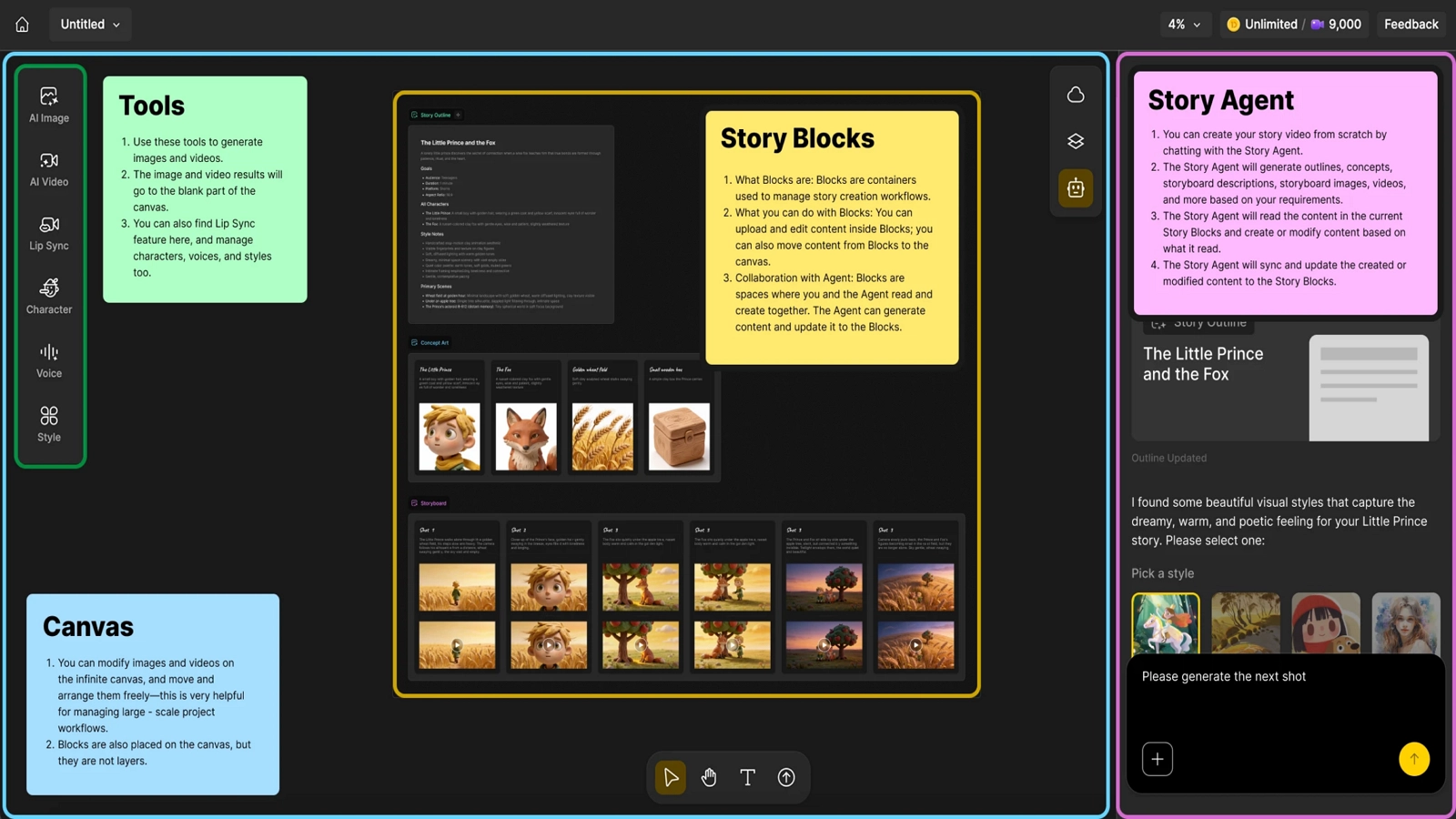
Having a list of ideas is only half the job - the other half is actually making the video without it taking all week. That’s where Anijam AI comes in: an all-in-one AI video maker that takes a project from a written idea to a finished, polished video - handling story outlining, character consistency, lip sync, and timeline editing within a single workspace. It’s available on both web and app, so you can create wherever you are, without switching between separate platforms or accounts.
Here’s what that looks like in practice, using one of the ideas above - a 60-second animated micro-fable.
Step 1: Describe Your Concept
Type your idea in plain language - a scene, a story beat, or a full concept. Anijam interprets the input and generates a story outline along with initial assets, such as characters, settings, and a rough shot breakdown.
Step 2: Choose Your Style
For each shot, select the underlying style that best fits the look or motion you’re after - depending on the visual style your video calls for.
Step 3: Generate the Shot
Anijam sends your prompt and any reference materials - images, video, or audio - to the selected model and returns the generated clip directly inside the canvas.
Step 4: Add Narration, Music & Lip Sync
Add narration and background music, then let Anijam automatically sync dialogue to your characters’ lip movements.
Step 5: Polish in the Timeline & Export
Fine-tune pacing and transitions in the timeline editor so the twist lands at the right moment, then export your finished fable - or keep going and start the next episode in the series.
Tips: Optimize for YouTube
- Hook in the first 3 seconds. Open on the most visually interesting moment, not a slow build-up - this matters even more on Shorts, where completion rate drives distribution.
- Add captions. Many viewers watch with sound off, so on-screen text keeps the story clear regardless of format.
- Match the format to the content. Not every idea needs to be a Short - save vertical, sub-3-minute formats for quick hooks, and use horizontal long-form for anything that needs room to build.
| Format | Aspect Ratio | Length Limit | Best-Performing Range |
|---|---|---|---|
| YouTube Shorts | 9:16 (vertical) | Up to 3 minutes | 30-60 seconds for most content |
| YouTube long-form | 16:9 (horizontal) | No fixed cap | Matched to how much the topic actually needs |
Platform details like algorithm behavior and format specs shift over time - the YouTube Creators hub is a good place to check for the latest official guidance directly from YouTube.
Conclusion: Pick One, Start Today
You don’t need all 50 of these ideas - you need one, made well enough to post.
Pick the category that’s closest to what you already care about, take one idea from the list above, and run it through the workflow: describe it, generate it, refine it, publish it. The next one gets easier once the first one exists.
Start with Anijam AI and see how far the first idea takes you.
Frequently Asked Questions
Which topic is best for YouTube videos? There’s no single “best” topic - the strongest ones sit at the overlap of three things: something you actually know or care about, a specific question or gap your audience has, and reasonable search demand without oversaturated competition. Evergreen niches like reviews, personal finance, self-improvement, gaming, and day-in-the-life content tend to perform consistently because they keep attracting new viewers over time, not just a one-time spike.
What makes a YouTube video go viral? There’s no reliable formula for virality - the honest answer is that most creators can’t predict it, and chasing it directly tends to produce weaker, more generic content. What consistently helps is a strong hook in the first few seconds, a clear payoff that matches what the title and thumbnail promised, and topics tied to something people are already searching for or talking about. Consistent, well-made videos are a far more reliable growth strategy than trying to engineer a single viral hit.
What kind of YouTube videos are easiest to make with AI in 2026? Narration-driven, list-based, and storytelling formats tend to be the easiest starting points, since they rely less on live footage and more on visuals, voice, and pacing - all of which AI tools can generate directly from a written concept.
Do I need to show my face to grow a YouTube channel? No. Faceless channels are one of the fastest-growing formats on the platform, and YouTube’s recommendation system is built around watch time and retention, not whether a creator appears on camera.
What’s the best video length for YouTube in 2026? For Shorts, the platform allows up to 3 minutes, but most 2026 performance data still points to roughly 30-60 seconds as the range with the strongest completion rates. Long-form videos don’t have a fixed ideal length - the right length is whatever a topic actually needs to cover well, without padding.
How often should I post on YouTube to grow a channel? Consistency matters more than volume. A channel that posts something solid once a week will typically outgrow one that posts five videos, then goes quiet for a month - YouTube’s recommendation system reads a steady upload pattern as a signal of an active, reliable channel.
by Evan
Evan is an AI content creator and video technology writer at Anijam AI, focused on how generative AI is transforming storytelling and video production. He shares social trends, creative workflows, prompt strategies, and practical insights to help creators turn ideas into engaging videos and visual content.