12 Principles of Animation & How to Use Them in AI Video
Your AI-generated character just delivered the perfect line. The face is right. The lighting is right. The style is exactly what you asked for. And it still looks wrong. Not “broken” wrong - just… stiff. A little lifeless. Like a puppet instead of a performance.
Here’s the thing: animators have known how to fix that feeling for almost 100 years. Long before AI, long before computers, a small group of Disney animators wrote down the exact rules that separate motion that feels alive from motion that feels robotic. They called them the 12 Principles of Animation.
The tools have changed completely - you’re not drawing frame by frame anymore, you’re typing a prompt. But what actually makes a shot believable hasn’t changed at all.
Below, we’ll break down each principle: what it originally meant for hand-drawn animation, and exactly what it looks like when you’re creating with AI instead.
What Are the 12 Principles of Animation?
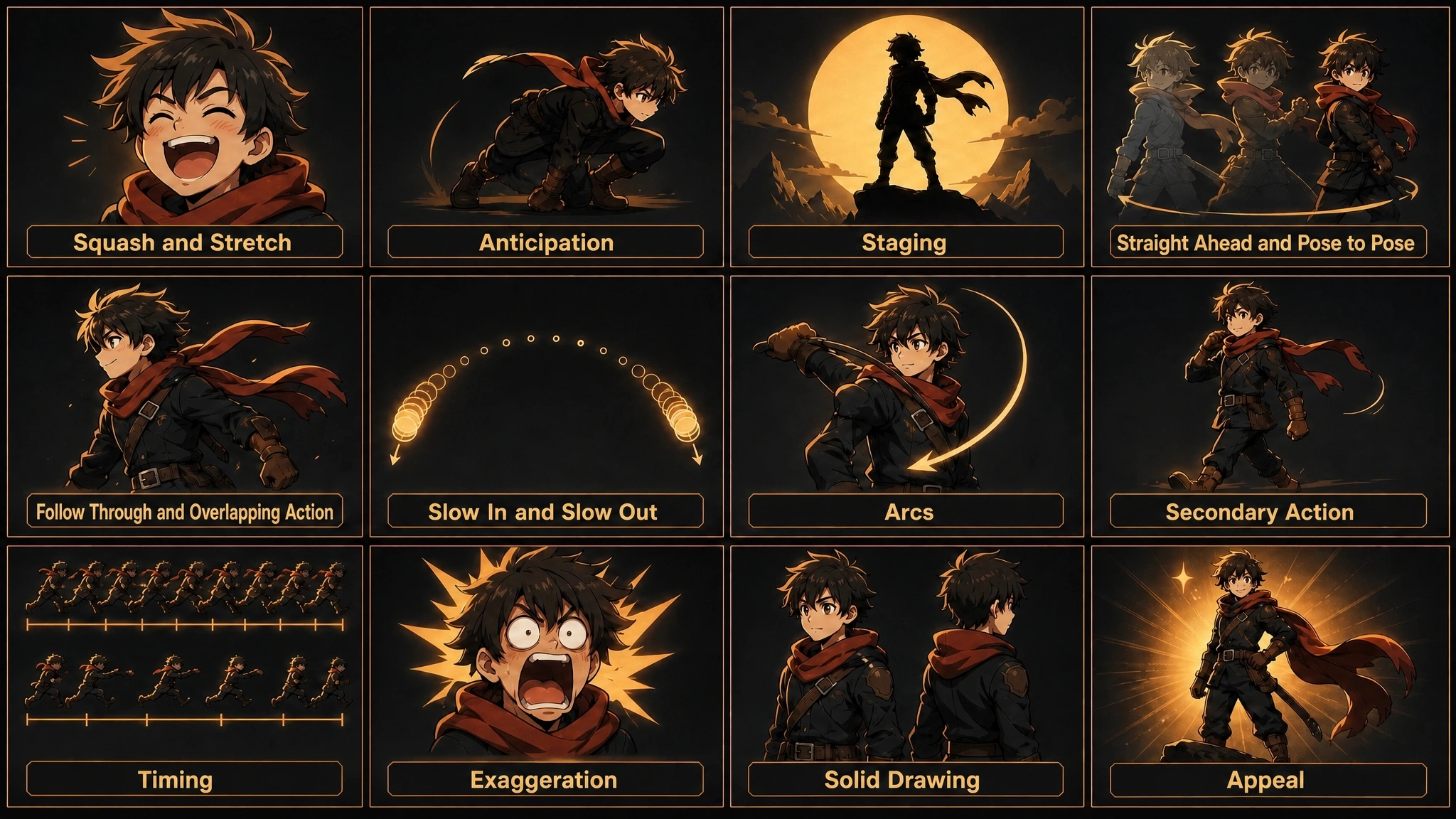
The 12 Principles at a Glance
If you just want the short version before diving in, here’s a one-line summary of each principle.
| Principle | In One Line | |
|---|---|---|
| 1 | Squash and Stretch | Widely considered the most important of the 12 principles, squash and stretch gives an object or character a sense of weight, flexibility, and physical material. |
| 2 | Anticipation | Anticipation is the small preparatory movement that happens right before a main action - a wind-up before a punch, a crouch before a jump. |
| 3 | Staging | Staging is how a scene is composed - camera angle, character placement, and silhouette - so the viewer’s attention lands exactly where the animator wants it, on exactly one idea per shot. |
| 4 | Straight Ahead Action and Pose to Pose | These are two different animation workflows. |
| 5 | Follow Through and Overlapping Action | Follow through describes how parts of a body or object keep moving briefly after the main motion has stopped. |
| 6 | Slow In and Slow Out | Real-world motion almost never moves at a constant speed. |
| 7 | Arcs | Most natural, living motion follows a curved path rather than a straight line - a swinging arm, a turning head, a thrown ball. |
| 8 | Secondary Action | Secondary action is a smaller, supporting movement that enriches the main action without competing with it - a character’s facial expression or hand gesture while they’re walking, for example. |
| 9 | Timing | Timing refers to how many frames an action takes, and how that maps to a sense of speed and weight. |
| 10 | Exaggeration | Exaggeration means pushing a pose, expression, or action slightly beyond strict realism to make its meaning clearer and more entertaining, while staying grounded enough to remain believable. |
| 11 | Solid Drawing | Solid drawing means a character keeps a consistent sense of volume, weight, and anatomical structure from every angle, avoiding “twinning” - symmetrical, lifeless poses - and keeping forms three-dimensional even within a 2D style. |
| 12 | Appeal | Appeal is the quality that makes a character compelling to watch, regardless of whether they’re a hero, a villain, or a background character - it comes from clear design, clarity of expression, and charisma. |
A Brief History - From Disney’s “Illusion of Life” to Today
The 12 principles come from The Illusion of Life: Disney Animation, a book published in 1981 by Ollie Johnston and Frank Thomas - two animators who had worked at Disney since the 1930s. The book distilled decades of trial and error from Disney’s golden age of animation into a shared vocabulary for what makes movement believable.
It’s not a piece of design trivia. These principles became - and remain - the standard curriculum in animation schools and studios worldwide, referenced across hand-drawn, stop-motion, and 3D animation alike.
Why These Principles Still Apply to AI-Generated Videos
The 12 principles were never really about the pencil or the software - they’re about how the human eye reads weight, timing, and intention in motion. That perceptual bar doesn’t move just because the production method changed from hand-drawn frames to an AI model.
AI video tools are trained on huge amounts of real footage and animation, so they’ve absorbed some of these patterns already - but output quality still varies a lot from clip to clip. Understanding the principles gives you a concrete way to describe what you want in a prompt, and a concrete way to judge whether a generated clip actually looks right or just looks busy.
The 12 Principles of Animation and How to Apply Them with AI
Here’s each principle in turn - what it means in traditional animation, and what applying it looks like when you’re working with AI video tools.
1. Squash and Stretch
What It Means: Widely considered the most important of the 12 principles, squash and stretch gives an object or character a sense of weight, flexibility, and physical material. The classic example is a bouncing ball that stretches as it falls and flattens as it hits the ground - while its overall volume stays roughly constant throughout the deformation.
Applying It in AI Video: In AI-generated video, this principle shows up most in facial and speech animation - a mouth stretching wide on a loud syllable, cheeks compressing into a laugh.
2. Anticipation
What It Means: Anticipation is the small preparatory movement that happens right before a main action - a wind-up before a punch, a crouch before a jump. It gives the audience a cue for what’s about to happen, which makes the following action easier to read and more satisfying to watch.
Applying It in AI Video: Many raw AI video clips skip straight to the main action because the prompt never described a lead-in beat. You can compensate by writing the setup gesture directly into your scene description - for example, “she glances down and takes a breath before jumping” - so the AI has an actual beat to animate before the payoff, rather than cutting straight to the result.
3. Staging
What It Means: Staging is how a scene is composed - camera angle, character placement, and silhouette - so the viewer’s attention lands exactly where the animator wants it, on exactly one idea per shot.
Applying It in AI Video: Since most social videos are watched at small size, often with the sound off, staging matters even more than in film. A clear silhouette and one obvious focal action per shot go a long way. When describing a scene to an AI tool, specifying the framing (close-up vs. wide shot) and where the character should sit in the frame gives the model much clearer direction than a general description.
4. Straight Ahead Action and Pose to Pose
What It Means: These are two different animation workflows. Straight ahead means drawing frame by frame in sequence, which tends to produce more spontaneous, fluid motion. Pose to pose means planning the key poses first and filling in the frames between them, which gives the animator more control over timing and composition.
Applying It in AI Video: This maps closely onto two ways AI video tools generate motion today: a single prompt that produces one continuous, less controllable clip, versus a keyframe-based workflow where you set the start and end points and the system fills in the motion between them.
5. Follow Through and Overlapping Action
What It Means: Follow through describes how parts of a body or object keep moving briefly after the main motion has stopped. Overlapping action describes how different parts of a character move at different rates - hair, clothing, or accessories that lag behind and settle after the body itself has stopped.
Applying It in AI Video: This is one of the fastest ways to spot stiff, “AI-looking” motion, since many models freeze secondary elements the instant the main action ends. Look for hair, capes, or loose clothing that should keep swaying briefly after a character stops moving. Tools that track a full, locked character model across frames - rather than regenerating each frame independently - are far more likely to preserve this kind of natural settle.
6. Slow In and Slow Out
What It Means: Real-world motion almost never moves at a constant speed. Objects accelerate out of stillness and decelerate into a new position, which is why traditional animators pack more drawn frames near the start and end of a movement, and fewer in the middle.
Applying It in AI Video: AI clips that feel “floaty” or oddly mechanical are usually missing this easing curve - everything moves at one uniform speed. When you’re reviewing a generated clip, look for an easing curve at the start and end of each movement rather than constant speed throughout; a frame-level timeline editor lets you nudge the timing manually if the first generation comes out too linear.
7. Arcs
What It Means: Most natural, living motion follows a curved path rather than a straight line - a swinging arm, a turning head, a thrown ball. Straight-line movement tends to read as mechanical.
Applying It in AI Video: Full-body or multi-character motion generated from a short prompt can sometimes take an unnaturally straight, clipped path, especially during quick turns. Describing motion in terms of a natural arc - or manually adjusting the path of a generated shot in a scene editor - keeps the movement readable and believable.
8. Secondary Action
What It Means: Secondary action is a smaller, supporting movement that enriches the main action without competing with it - a character’s facial expression or hand gesture while they’re walking, for example.
Applying It in AI Video: It’s tempting to prompt for one big action at a time, but layering in a secondary detail is often what makes a character read as alive rather than a moving pose. When a platform can combine an expression, a gesture, and a walk cycle in a single generation, the result reads as far more natural than stitching together isolated clips of each.
9. Timing
What It Means: Timing refers to how many frames an action takes, and how that maps to a sense of speed and weight. Fewer frames read as fast or light; more frames read as slow or heavy.
Applying It in AI Video: On social platforms, pacing decisions matter as much as the animation itself - an emotional beat needs more time to register than a quick comedic gag. When adjusting a generated video, it’s worth extending or compressing individual beats rather than uniformly speeding up or slowing down the entire clip.
10. Exaggeration
What It Means: Exaggeration means pushing a pose, expression, or action slightly beyond strict realism to make its meaning clearer and more entertaining, while staying grounded enough to remain believable.
Applying It in AI Video: This is where stylized formats - anime, cartoon, chibi - have a natural advantage over photorealistic ones, since the style itself gives permission for bigger expressions and poses. Picking a more stylized preset from a style library, rather than a “realistic” one, is often the fastest way to get more expressive, shareable motion out of an AI-generated scene.
11. Solid Drawing
What It Means: Solid drawing means a character keeps a consistent sense of volume, weight, and anatomical structure from every angle, avoiding “twinning” - symmetrical, lifeless poses - and keeping forms three-dimensional even within a 2D style.
Applying It in AI Video: The AI-video equivalent of a solid-drawing failure is “character drift” - a character’s face, proportions, or outfit subtly changing from shot to shot. This is exactly what character-consistency features are built to prevent.
12. Appeal
What It Means: Appeal is the quality that makes a character compelling to watch, regardless of whether they’re a hero, a villain, or a background character - it comes from clear design, clarity of expression, and charisma.
Applying It in AI Video: Appeal is ultimately why a viewer keeps watching past the first two seconds, and it’s less a standalone technique than the sum of every other principle done well - consistent design, expressive motion, clear staging. It’s worth testing a couple of style and character options before committing to a full video, since appeal is often decided before a single frame of motion even plays.
How Anijam Helps You Apply These Principles Automatically
Knowing the 12 principles helps you write better prompts and spot what’s missing from a generated clip - but it’s still work to fix by hand, shot by shot. Anijam AI is an AI video creation platform built to simplify that entire process, from character design to the finished clip. Several of the principles above are handled automatically as part of its core workflow, rather than left for you to patch up in editing.
Automatic Lip Sync That Preserves Squash and Stretch in Expressions
Anijam’s lip-sync engine maps each phoneme in a line of dialogue to a matching mouth shape, frame by frame, across a multilingual voice library. Because it’s tuned specifically for animation rather than adapted from talking-head video tools, mouths stretch, compress, and hold shape the way an animated expression should - instead of flapping open and shut on a rigid loop.
Natural Motion Curves for Timing and Slow In/Slow Out
Rather than generating one uncontrollable clip from a single prompt, Anijam builds a shot-by-shot storyboard and keyframes first, then renders the motion between them. The built-in Scene Editor lets you scrub through a generated animation frame by frame and adjust pacing directly, so an action that comes out too linear can be re-timed with proper easing instead of being regenerated from scratch.
Character Consistency That Solves Solid Drawing
Once you design a character in Anijam, its face, proportions, outfit, and personality are locked and reused across every scene - whether that’s one shot or a hundred. Paid plans include 10, 60, or 120 stored Consistent Character slots depending on your tier (Creator, Master, or Master Pro), which eliminates the “character drift” that shows up in tools that re-generate a character’s appearance from scratch on every clip.
How to Use Anijam to Create Your Videos
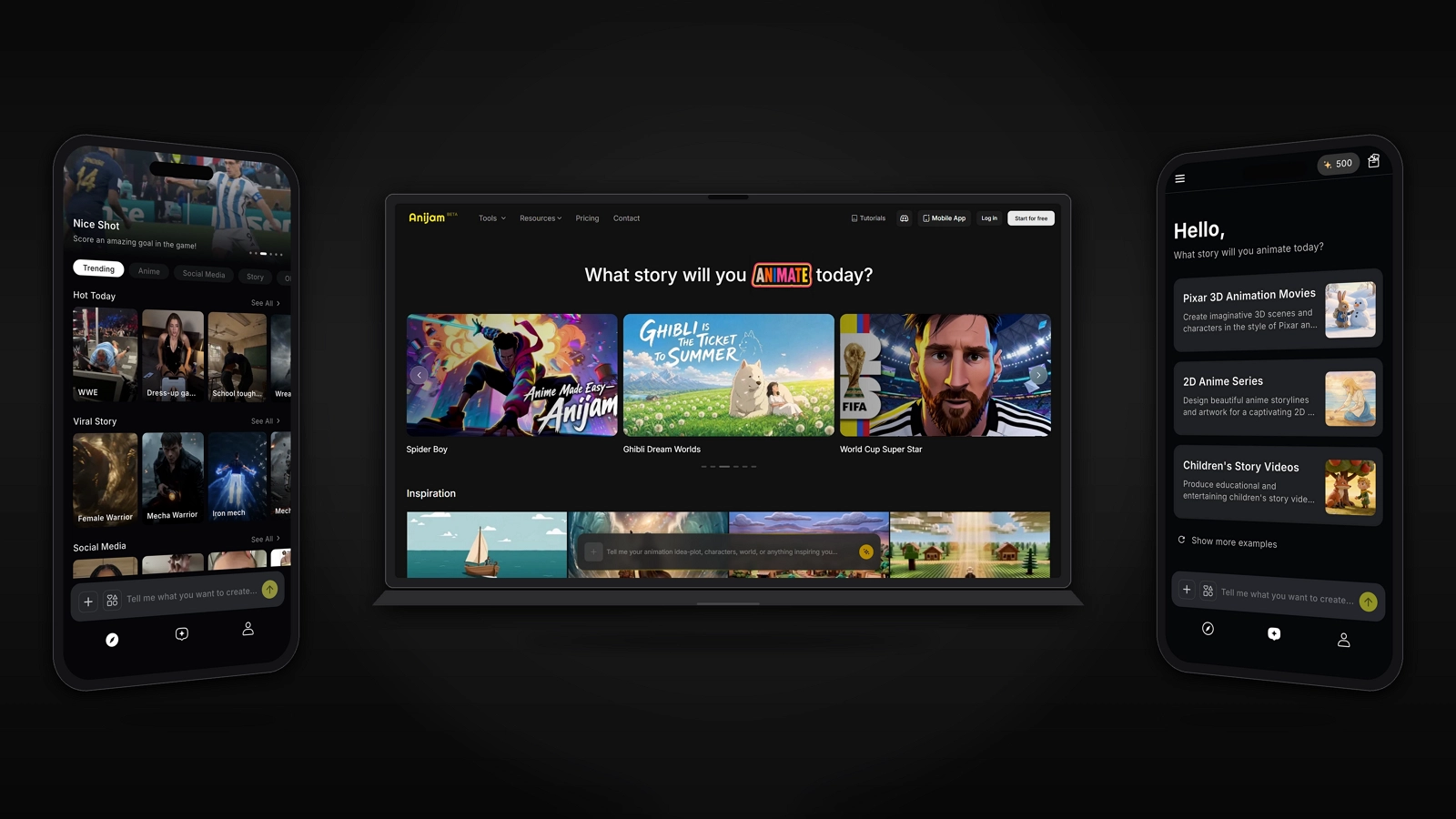
- Describe your scene: start with a prompt, a script, a reference image, or even just a rough idea - Anijam turns any of these into a story outline and initial assets.
- Pick a style: choose from Anijam’s style library - anime, Ghibli-inspired, 3D cinematic, cartoon, chibi, and more - or provide a reference image.
- Generate the animation: Anijam builds a shot-by-shot storyboard and turns it into keyframes and a finished animated clip.
- Add voice and motion: sync dialogue with AI lip sync, and fine-tune character movement or camera work with simple text commands.
- Polish and export: adjust timing and transitions in the Scene Editor, then export your finished video.
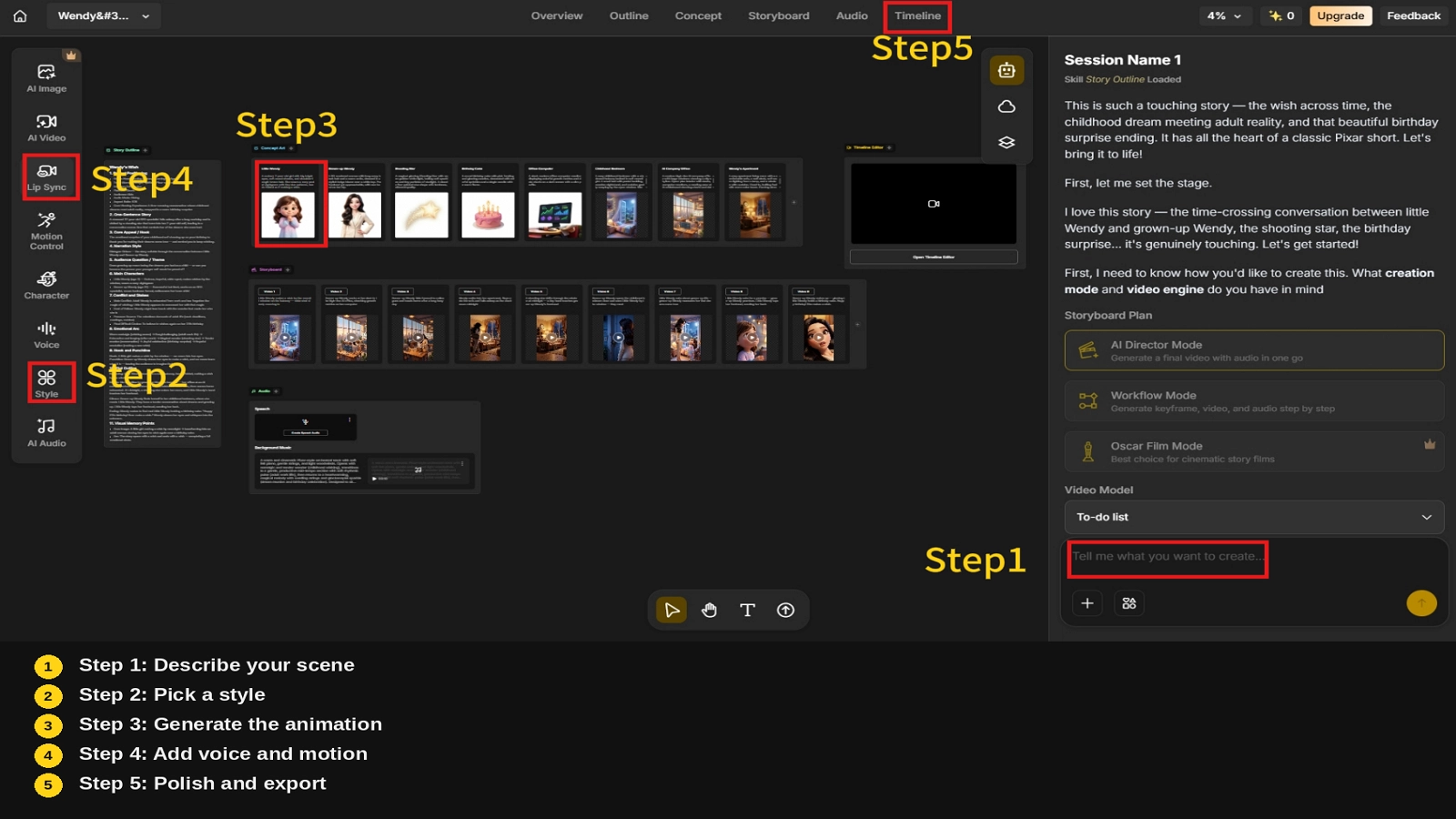
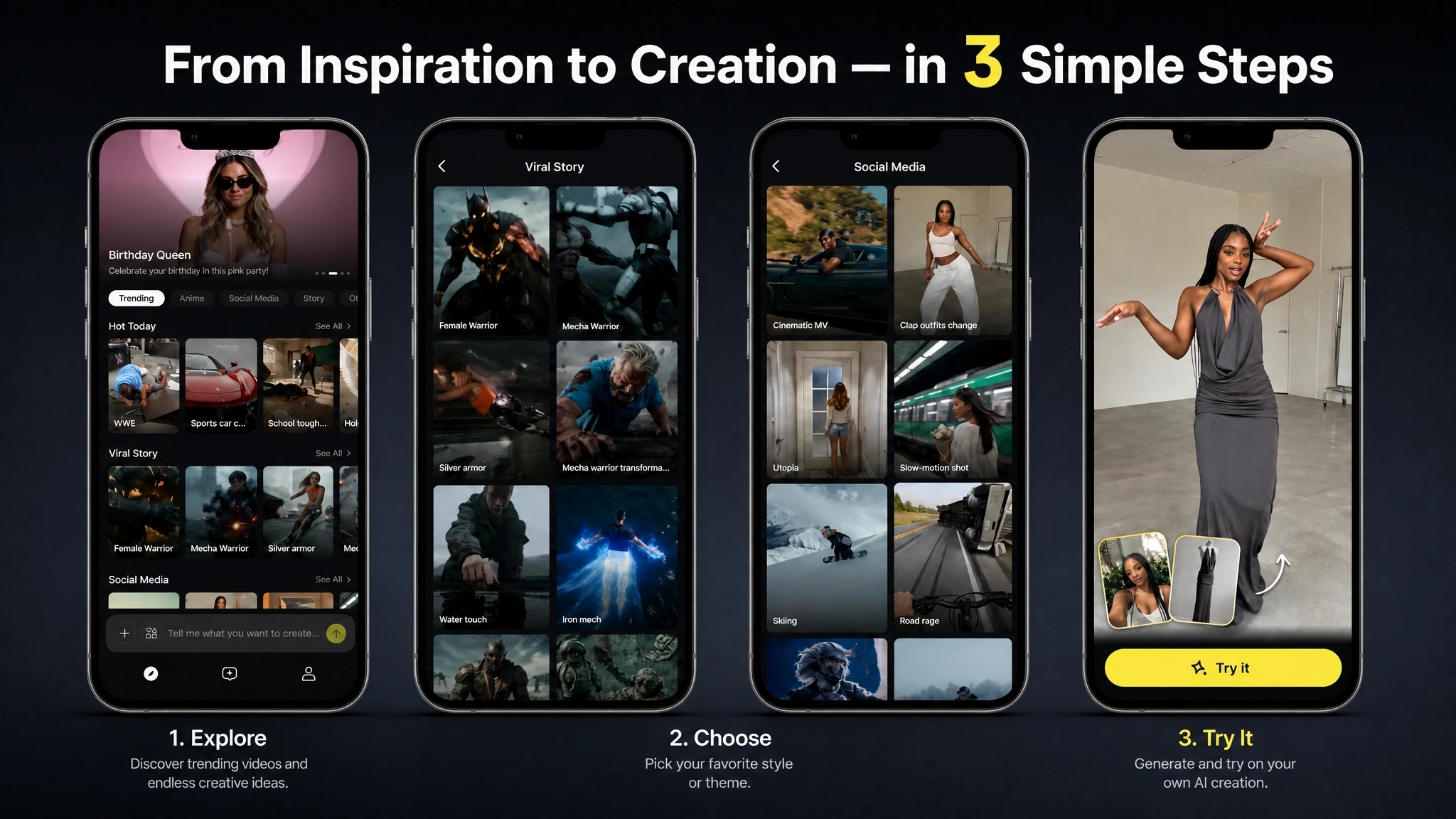
Anijam is also available as a mobile app, with ready-made templates for the most popular trending social media formats, and a style library that includes Ghibli-inspired, Minecraft-style, Pixar-like 3D, and more. Start from a template or a style, generate a clip, and make quick edits right from your phone. Create anywhere, anytime, without needing to sit down at a desktop.
Conclusion
The 12 principles of animation are, at their core, a description of what makes motion believable - weight, timing, intention, and life. That’s true whether a character is hand-drawn, built in 3D, or generated by AI.
Understanding them changes how you work with AI animation tools. Instead of judging a generated clip on vibes alone, you have twelve concrete things to check. And instead of vague prompts, you can describe exactly the quality you want: more follow-through in the hair, a clearer arc on that turn, more exaggeration in the expression.
If you’d rather start with a platform where several of these - character consistency, natural lip sync, controllable timing - are already built into the workflow, you can try Anijam AI.
Frequently Asked Questions
What are the 12 principles of animation? The 12 principles of animation are squash and stretch, anticipation, staging, straight ahead action and pose to pose, follow through and overlapping action, slow in and slow out, arcs, secondary action, timing, exaggeration, solid drawing, and appeal. They were first written down by Disney animators Ollie Johnston and Frank Thomas in their 1981 book The Illusion of Life, and are still taught as the foundation of animation today.
Who created the 12 principles of animation? The 12 principles were introduced by Disney animators Ollie Johnston and Frank Thomas in their 1981 book The Illusion of Life: Disney Animation. The principles themselves were distilled from techniques Disney’s animators developed decades earlier, starting in the 1930s, while working on films like Snow White and the Seven Dwarfs, Pinocchio, and Bambi.
Which is the most important principle of animation? Squash and stretch is the principle most animators and animation schools point to as the most fundamental, since it’s the one that gives a character or object a believable sense of weight and flexibility. That said, the 12 principles work as a system - most professional animation draws on several of them at once rather than leaning on just one.
Do AI animation tools follow the 12 principles of animation? It depends on the tool and the clip. Because AI video models are trained on large amounts of real footage and animation, they pick up some of these patterns naturally, but consistency varies - especially for principles like follow through, solid drawing, and slow in/slow out, which are easy for a model to skip. Platforms built specifically around character animation, rather than general-purpose video generation, tend to handle these more reliably.
Can AI automatically apply the 12 principles of animation for me? Some of them, yes. Principles like solid drawing and squash and stretch can be handled automatically by features like character-consistency locking and phoneme-based lip sync. Others, like staging, secondary action, and exaggeration, are more about how you describe a scene, so understanding the principles still helps you write a better prompt even when the tool is doing most of the technical work.
by Evan
Evan is an AI content creator and video technology writer at Anijam AI, focused on how generative AI is transforming storytelling and video production. He shares social trends, creative workflows, prompt strategies, and practical insights to help creators turn ideas into engaging videos and visual content.