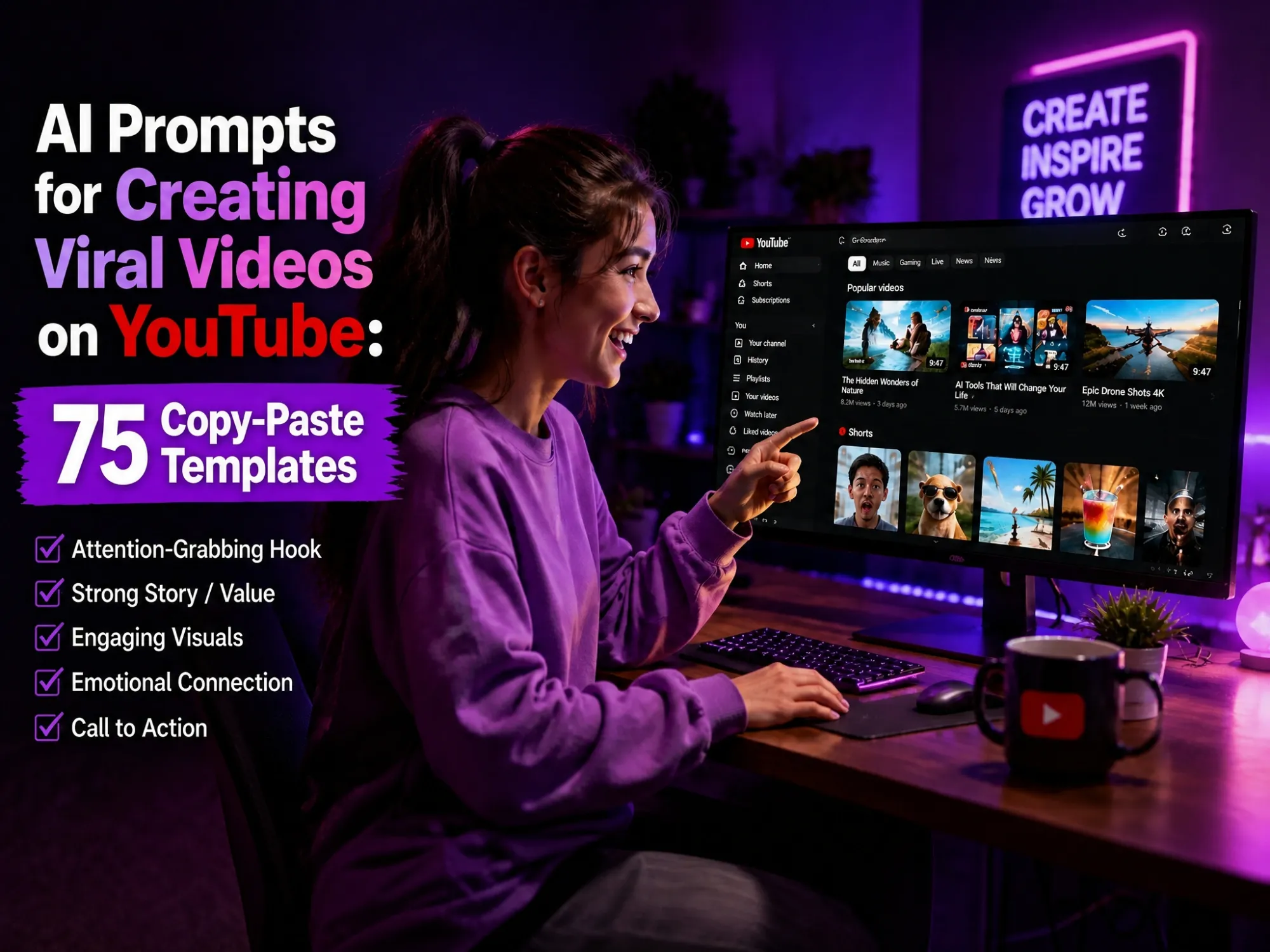
AI Prompts for Creating Viral Videos on YouTube: 75 Copy-Paste Templates
Somewhere between your fifteenth abandoned Notes app draft and your third all-nighter before an upload, it becomes obvious: coming up with fresh hooks, titles, and scripts by hand doesn’t scale. That’s exactly the gap the right ai prompt for creating viral videos on YouTube is built to close.
A well-built prompt turns a blank page into a working hook, a stack of title options, or even a fully storyboarded scene in seconds, as long as you know what to feed the AI. This guide collects 75+ copy-paste AI prompts to create viral YouTube videos, organized by production stage and content category, plus the mistakes that quietly wreck most people’s results.
Why Good AI Prompts Matter for YouTube Videos
YouTube’s own creator guidance and independent retention data agree on one thing: viewers decide whether to stay within the first few seconds, and a large share of viewers can drop off in the first 10 seconds alone. That puts a lot of pressure on a handful of decisions, the hook, the title, the thumbnail, and the pacing of the script, for every single upload. A specific, well-structured AI prompt is what makes hitting all four consistently possible. Here’s what it actually does for you:
-
Saves time on the blank page: turns an empty doc into a working hook, a stack of title options, or a full script draft in seconds instead of an hour.
-
Makes real testing possible: generates a dozen hook variations or ten title options at once, so you’re picking the strongest one instead of settling for your first idea.
-
Keeps quality consistent across uploads: gives every video the same structure and pacing discipline, without you re-solving the same problem from scratch each time.
-
Speeds up the whole pipeline: a good prompt for the script or thumbnail concept can be reused and tweaked for the next video, not just the current one.
-
Extends past writing into production: the same prompting skill also drives AI video generators, turning a script straight into finished footage.
The catch is that AI output is only as good as the prompt behind it. A vague prompt produces a generic, forgettable script. A specific one produces something you can actually use. The rest of this guide is built around that difference.
What Makes a Good AI Prompt for Creating Viral Videos on YouTube
Before jumping into templates, it helps to see the shape of a good prompt, because the same underlying structure repeats across every stage of production.
The 5-Stage YouTube Viral Video Framework
Every viral YouTube video, whether it’s a 60-second short or a 20-minute deep dive, moves through the same five decision points. Treat each one as its own prompting task for your AI writing assistant, rather than trying to solve everything in a single mega-prompt.
1. Hook Prompts
Use these to generate multiple hook options for your first 10-15 seconds, built on proven patterns like curiosity gaps, bold statements, and story teasers.
-
Write 8 fifteen-second YouTube video hooks for a video about [TOPIC]. Use these hook types: a curiosity-gap question, a bold or counterintuitive statement, a shocking statistic, a story teaser, and a pain-pleasure hook. Keep each under 30 words and written in a conversational, spoken tone.
-
I’m making a YouTube video about [TOPIC] for an audience of [AUDIENCE]. Write 5 opening lines that create tension in the first sentence, without saying “hey guys” or introducing the channel.
-
Rewrite this hook 5 different ways, each one testing a different emotion - curiosity, fear of missing out, surprise, disbelief, and urgency: “[YOUR HOOK]”.
-
Based on this video topic - [TOPIC] - write a hook that opens mid-action, as if the viewer just walked in on something already happening.
-
Write a hook for [TOPIC] that promises a specific, measurable outcome (a number, a time frame, or a result) within the first two sentences.
2. Title Prompts
Titles need to balance searchability with intrigue. These prompts push your AI assistant to generate both types so you can compare and test.
-
Generate 10 YouTube titles for a video about [TOPIC]. Give me 5 searchable titles built around the keyword “[KEYWORD]” and 5 curiosity-driven titles that don’t reveal the outcome. Keep each under 60 characters.
-
Take this title - “[YOUR TITLE]” - and rewrite it 6 ways using different proven YouTube title formulas: a number list, a question, a “how I” story, a warning, a comparison, and a superlative claim.
-
Write 5 YouTube titles for [TOPIC] that create a specific curiosity gap without slipping into clickbait the video doesn’t deliver on.
-
I want a YouTube title for [TOPIC] aimed at [AUDIENCE]. Give me 5 options between 40 and 60 characters that read well on both desktop and mobile.
-
Score these 5 title options for click-through potential and explain the reasoning behind each: [LIST TITLES].
3. Script Prompts
Once the hook and title are locked in, use these prompts to build out the rest of the script.
-
Write a full YouTube script outline for a video about [TOPIC], [LENGTH] minutes long, using this structure: hook, promise, first act, mid-video pattern interrupt, payoff, and call to action.
-
Turn this rough outline into a conversational YouTube script written the way a real person talks on camera, with short sentences and natural pauses: [OUTLINE].
-
Add 2 pattern interrupts to this script draft - a visual change, a tone shift, or a direct question to the viewer - placed where retention typically drops: [SCRIPT].
-
Write a script section explaining [TOPIC/CONCEPT] to someone with zero background knowledge, using one clear analogy and no jargon.
-
Tighten this script section to remove filler and repetition while keeping the same information: [SCRIPT SECTION].
4. Thumbnail Concept Prompts
You’ll still design the actual thumbnail yourself, or with an image tool, but these prompts help you land on a concept first.
-
Suggest 6 YouTube thumbnail concepts for a video about [TOPIC]. For each, describe the facial expression, the main visual element, the color palette, and a short text overlay of 3 words or fewer.
-
Based on this video’s hook - “[HOOK]” - suggest a thumbnail concept that visually represents the same tension or curiosity gap without giving away the payoff.
-
Give me 4 high-contrast color palette options for a thumbnail in the [NICHE] niche, and explain why each would stand out in a YouTube feed.
-
Suggest a thumbnail concept for [TOPIC] built around an expressive face plus one supporting visual element, following the rule of thirds.
-
Write 5 short thumbnail text overlays (3 words or fewer) for a video about [TOPIC] that create curiosity without repeating the title word-for-word.
5. Description Prompts
A description won’t make a video go viral on its own, but it supports search and gives you another place to reinforce your keywords naturally.
-
Write a YouTube video description for a video about [TOPIC]. Start with a 2-sentence hook that includes the keyword “[KEYWORD]”, followed by a short summary, timestamp placeholders, and a call to action.
-
Write 3 versions of the first line of a YouTube description for [TOPIC], each leading with a different keyword variation: [KEYWORD 1], [KEYWORD 2], [KEYWORD 3].
-
Summarize this script into a 100-150 word YouTube description that reads naturally and doesn’t feel keyword-stuffed: [SCRIPT].
-
Suggest 8 relevant tags and keywords for a YouTube video about [TOPIC] targeting [AUDIENCE].
-
Write a closing call-to-action line for a YouTube description that encourages [SPECIFIC ACTION - subscribe, comment, or watch the next video].
The Core Elements of an Effective AI Video Prompt
Whichever tool you’re prompting, whether it’s a writing assistant or an AI video generator, the strongest prompts tend to include the same building blocks.
-
Subject: who or what the video focuses on, specific enough that the AI isn’t left guessing at an appearance, outfit, or species
-
Action & motion: what is actually happening, and how it moves. A purely descriptive prompt tends to produce a static-feeling clip
-
Setting & environment: where the scene takes place, and how much background detail matters
-
Camera movement: for example a drone shot, a handheld shot, a slow zoom, or a close-up
-
Lighting: golden hour, dramatic side lighting, soft natural light, or neon lighting
-
Mood & tone: mysterious, energetic, peaceful, epic, or emotional
-
Style & reference: cinematic, anime, claymation, documentary, or a specific studio-inspired look
The Master Prompt Formula (Copy-Paste Template)
Once you know the building blocks, you can string them into one reusable formula for almost any AI video generator:
[SUBJECT], [ACTION/MOTION], in [SETTING], [CAMERA MOVEMENT], [LIGHTING], [MOOD], in [STYLE] style.
Filled-in example:
“A young detective in a rain-soaked trench coat, walking cautiously through a flickering alley, low-angle tracking shot following behind her, soft neon pink and blue lighting reflecting off wet pavement, tense and mysterious mood, in a cinematic noir style.”
This same formula is what the category prompts below are built from, so once it clicks here, the rest of the list should feel familiar.
AI Video Prompts for Viral YouTube Videos [by Category]
The prompts above help you plan a video in words. These are for the AI video generator itself, the tool that actually turns a written scene description into moving footage. Pick the category that matches your content, then swap in your own details.
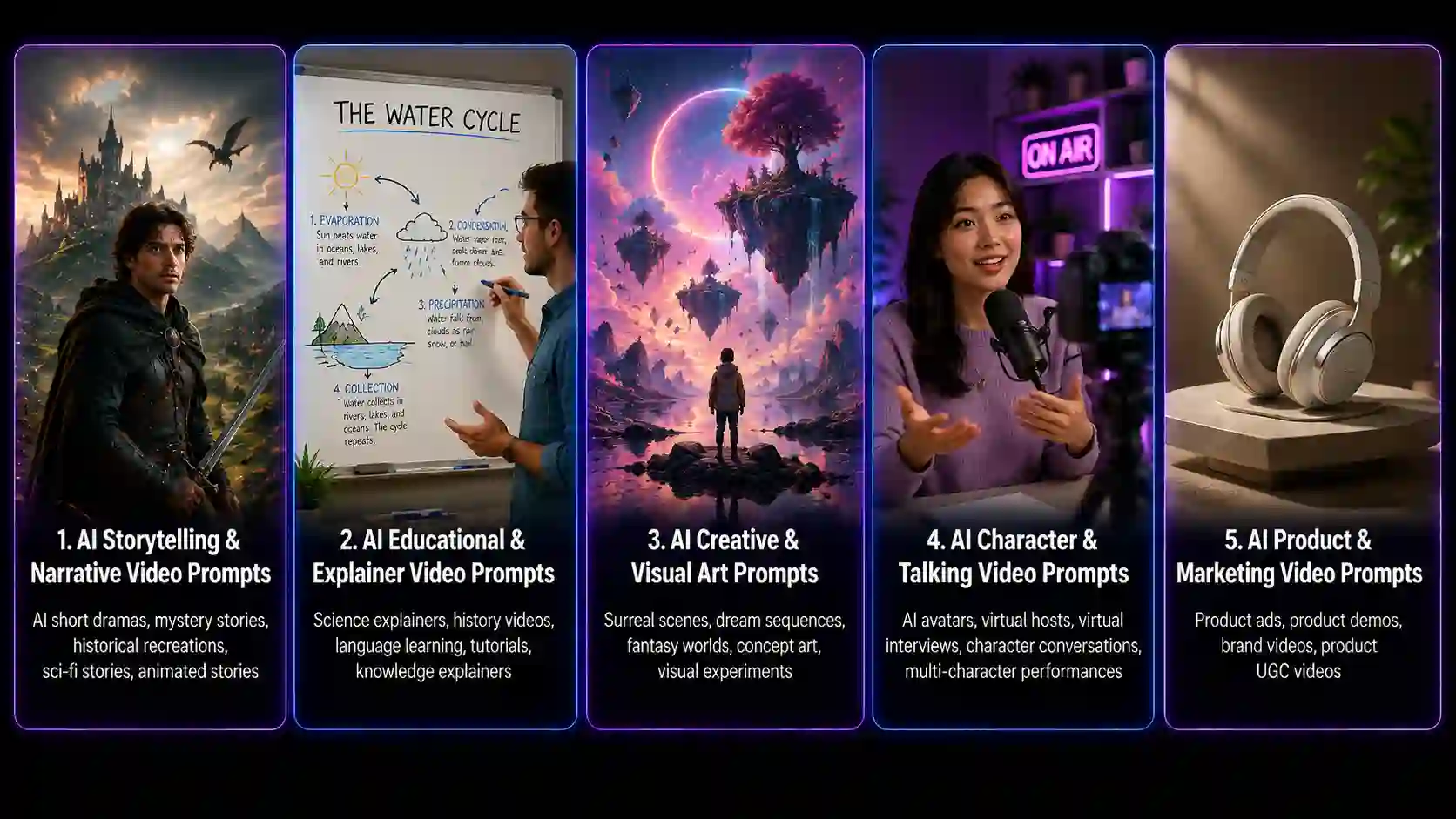
AI Storytelling & Narrative Video Prompts
Narrative videos live or die on a consistent character and a visual style that matches the emotion of the scene. If you’re not sure which look fits your story best, our breakdown of different types of animation is a useful starting point before you lock in a prompt.
Popular formats in this category:
- AI short dramas
- Mystery and suspense stories
- Historical reenactments
- Sci-fi stories
- Animated story shorts
Where creators usually get stuck:
- Keeping the character consistent from scene to scene
- Keeping scenes connected into one coherent story
- Pacing action and emotion so the story doesn’t drag or rush
What your prompt needs to nail:
- Character setup
- Scene description
- Action
- Emotion
- Camera language
Prompt templates:
-
A [CHARACTER DESCRIPTION] discovering [OBJECT/SECRET] inside [LOCATION], slow push-in camera, dim warm lighting, suspenseful mood, cinematic animated style.
-
Two characters - [CHARACTER A] and [CHARACTER B] - arguing in [SETTING], handheld camera shake, overcast lighting, tense mood, 2D animated style.
-
A [CHARACTER] running through [SETTING] being chased by [THREAT], fast tracking shot from behind, harsh contrasty lighting, frantic mood, cinematic style.
-
A flashback scene of [CHARACTER] as a child in [SETTING], soft desaturated color grade, slow dolly-in, nostalgic and bittersweet mood, hand-drawn animated style.
-
A [CHARACTER] opening a door to reveal [REVEAL], camera positioned behind the character’s shoulder, single warm light source, mysterious mood, cinematic style.
-
A montage of [CHARACTER] preparing for [EVENT] across three quick cuts - packing a bag, checking a mirror, walking out a door - upbeat pacing, natural daylight, hopeful mood, animated style.
-
A [CHARACTER] standing at the edge of [LOCATION] making a difficult decision, wide establishing shot slowly zooming in, golden hour lighting, emotional and reflective mood, cinematic animated style.
-
A voiceover-driven scene of [CHARACTER] narrating their backstory while walking through [SETTING], slow lateral tracking shot, muted color palette, reflective mood, stylized 2D animation.
-
A twist reveal where [CHARACTER] realizes [TWIST], quick zoom-in on the character’s face, sudden lighting shift from warm to cold, shocked mood, cinematic style.
-
A final scene of [CHARACTER] walking away from [SETTING] into [DESTINATION], wide receding shot, warm sunset lighting, hopeful and resolved mood, cinematic animated style.
AI Educational & Explainer Video Prompts
Explainer content usually needs to make an idea click fast, which is why simple, uncluttered visuals tend to outperform anything busy. Prompts like these work especially well with a dedicated whiteboard animation tool, which handles the hand-drawing motion and pacing automatically instead of you animating it stroke by stroke.
Popular formats in this category:
- Science explainers
- History breakdowns
- Language-learning content
- Knowledge and how-it-works videos
- Step-by-step tutorials
Where creators usually get stuck:
- Matching the visuals to the information being explained
- Managing how much information appears on screen at once
- Choosing visual aids that actually support understanding
What your prompt needs to nail:
- Scene-to-content matching
- B-roll
- Visual elements like icons, diagrams, or charts
- Transitions
- On-screen captions
Prompt templates:
-
An animated whiteboard-style hand drawing a diagram that explains [CONCEPT] step by step, simple line-drawing style, plain white background, clear and instructional mood.
-
A simplified 2D animation showing how [PROCESS] works, using arrows and icons to represent each step, clean flat design, bright even lighting, educational mood.
-
A character explaining [CONCEPT] directly to camera, gesturing to illustrate key points, medium shot, soft studio lighting, friendly and confident mood, explainer video style.
-
An animated comparison between [OPTION A] and [OPTION B], split-screen layout, minimal color palette, neutral and objective mood, motion graphics style.
-
A step-by-step tutorial animation showing how to [ACTION], numbered on-screen labels for each step, bright clean lighting, encouraging mood, flat vector style.
-
An animated analogy comparing [COMPLEX CONCEPT] to [SIMPLE EVERYDAY OBJECT], smooth morphing transition between the two, soft lighting, curious and clarifying mood.
-
A data visualization animation showing [STATISTIC/TREND] changing over time, animated bar or line chart, clean minimal background, informative and credible mood.
-
A myth-busting animation showing a common misconception about [TOPIC] being corrected on screen with a visual “X” and checkmark, bold clear typography, confident mood.
-
An animated timeline walking through the history of [TOPIC], camera slowly panning left to right across key milestones, warm even lighting, informative mood.
-
A recap animation summarizing the 3 key takeaways from a video about [TOPIC], simple bullet-point graphics appearing one at a time, upbeat pacing, clear and satisfying mood.
AI Creative & Visual Art Video Prompts
This category is where AI video tools tend to shine, since surreal transitions and stylized worlds are far easier to describe than to build by hand. For the handmade, slightly imperfect look specifically, a dedicated claymation generator can add that texture without you touching a single piece of clay.
Popular formats in this category:
- Surreal scenes
- Dreamlike sequences
- Fantasy worlds
- Concept art pieces
- Visual experiments
Where creators usually get stuck:
- Making the visuals striking enough to stop the scroll
- Translating an abstract creative idea into a clear scene
- Getting the texture and finish of the footage to feel intentional
What your prompt needs to nail:
- Visual style
- Composition
- Lighting
- Material and texture
- Atmosphere
- Surreal or fantastical elements
Prompt templates:
-
A surreal dreamlike sequence of [SUBJECT] morphing into [OBJECT], slow continuous camera drift, soft glowing lighting, dreamlike and hypnotic mood, painterly animated style.
-
A claymation-style scene of [CHARACTER] doing [ACTION] in [SETTING], slightly imperfect stop-motion movement, warm tactile lighting, whimsical and charming mood.
-
A stylized 3D scene of [SUBJECT] in [SETTING] with exaggerated proportions, slow orbiting camera, dramatic rim lighting, playful and bold mood, Pixar-inspired style.
-
An abstract motion piece using only shapes and color to represent the feeling of [EMOTION], smooth flowing transitions, saturated color palette, immersive mood.
-
A stop-motion-style animation of everyday objects - [OBJECT LIST] - arranging themselves into [SHAPE/PATTERN], top-down camera angle, bright even lighting, satisfying mood.
-
A Ghibli-inspired scene of [CHARACTER] walking through [NATURAL SETTING], gentle handheld-style camera drift, soft painterly lighting, peaceful and wistful mood.
-
A stylized transformation sequence where [SUBJECT] turns into [NEW FORM] across a few seconds, dynamic swirling camera movement, high-contrast lighting, dramatic mood.
-
A miniature-world scene of [SUBJECT] inside a tiny diorama-style [SETTING], tilt-shift camera effect, soft natural lighting, charming and nostalgic mood, claymation style.
-
A kinetic collage of cutout-style shapes representing [TOPIC], quick rhythmic cuts synced to an implied beat, bold flat colors, energetic mood.
-
A slow-motion close-up of [OBJECT/MATERIAL] reacting to [ACTION - being poured, crushed, unfolding], macro camera angle, dramatic side lighting, satisfying and mesmerizing mood.
AI Character & Talking Video Prompts
Podcasts, reaction content, and direct-to-camera commentary all depend on a character whose mouth actually matches the words being spoken. Because that timing has to be precise, this is where an automatic lip-sync animation tool saves the most manual work.
Popular formats in this category:
- AI digital humans
- Virtual hosts
- Virtual interviews
- Character dialogue scenes
- Multi-character performances
Where creators usually get stuck:
- Keeping the character looking the same across scenes
- Matching lip movement to the voice track
- Making expressions and gestures feel natural rather than stiff
What your prompt needs to nail:
- Character appearance
- Dialogue
- Expression
- Gestures and movement
- Shot framing
Prompt templates:
-
A close-up of [CHARACTER] talking directly to camera about [TOPIC], subtle head and hand movement, soft key lighting, warm and conversational mood, lip-synced to a voice track.
-
An animated podcast-style scene of two characters - [CHARACTER A] and [CHARACTER B] - seated across from each other discussing [TOPIC], medium two-shot, even studio lighting, casual mood.
-
A character reacting with surprise while listening to [STATEMENT/NEWS], exaggerated facial expression, quick zoom-in, punchy lighting, comedic mood.
-
An animated narrator character walking the viewer through [TOPIC] while gesturing at on-screen graphics, medium shot, bright even lighting, confident and friendly mood.
-
A character delivering a dramatic monologue about [TOPIC], slow push-in camera, low warm lighting, intense and emotional mood.
-
A stylized avatar of [CHARACTER TYPE] greeting the viewer directly, subtle idle animation and blinking, front-facing camera, soft lighting, welcoming mood.
-
A character explaining a mistake they made with [TOPIC/SITUATION], self-deprecating tone, medium shot with slight camera sway, warm lighting, relatable and honest mood.
-
An animated interview-style scene of [CHARACTER] answering a question about [TOPIC], subtle head nod and hand gesture, three-point studio lighting, credible mood.
-
A character building excitement while counting down [LIST/RANKING], increasing pace and energy in gesture and expression, bright lighting, energetic mood.
-
A calm, direct-to-camera character delivering a call to action at the end of a video, steady medium shot, soft flattering lighting, warm and trustworthy mood.
AI Product & Marketing Video Prompts
Product content like product ads, product demos, brand short films, and product-style UGC usually needs to look polished without looking like a full ad shoot. These prompts lean on clean lighting and simple camera moves that make almost any product feel more premium on screen.
Popular formats in this category:
- Product ads
- Product demos
- Brand short films
- Product-style UGC videos
Where creators usually get stuck:
- Representing product features accurately
- Keeping the product the clear focus of the shot
- Making the footage feel commercially polished
What your prompt needs to nail:
- Product details
- Product display and angles
- Camera movement
- Composition
- Lighting
- Commercial style
Prompt templates:
-
A slow rotating 360-degree shot of [PRODUCT] on a clean [COLOR] background, soft studio lighting, premium and polished mood.
-
A [CHARACTER] unboxing and reacting to [PRODUCT] for the first time, medium shot, warm natural lighting, excited and genuine mood.
-
A before-and-after video showing [PROBLEM] transforming into [SOLUTION] using [PRODUCT], split-screen or wipe transition, bright clean lighting, satisfying mood.
-
A close-up macro shot of [PRODUCT DETAIL] highlighting its texture and materials, slow camera pan, dramatic side lighting, premium mood.
-
An animated demonstration of [PRODUCT] being used in [REAL-WORLD SCENARIO], natural handheld-style camera, everyday lighting, relatable and practical mood.
-
A [CHARACTER] comparing [PRODUCT] against [COMPETITOR/OLD METHOD], side-by-side split screen, neutral lighting, confident and informative mood.
-
A lifestyle scene of [CHARACTER] using [PRODUCT] as part of their daily routine in [SETTING], soft morning light, warm and aspirational mood.
-
An animated feature callout sequence highlighting 3 benefits of [PRODUCT], one at a time with on-screen labels, clean lighting, upbeat mood.
-
A testimonial-style scene of [CHARACTER] talking about their experience with [PRODUCT], warm lighting, direct-to-camera medium shot, sincere and trustworthy mood.
-
A closing brand scene showing [PRODUCT/LOGO] with a short tagline appearing on screen, slow zoom-out, polished studio lighting, confident and memorable mood.
How to Turn These Prompts into Viral YouTube Videos with Anijam AI
Writing the prompt is only half the job. Turning it into an actual video needs a tool that can interpret the subject, motion, camera direction, and style together, and keep a character looking the same from one scene to the next. Anijam AI is built for exactly that: an all-in-one AI video platform that takes a written prompt from idea to a finished, polished video.
Here’s what that workflow looks like once you have a prompt ready:
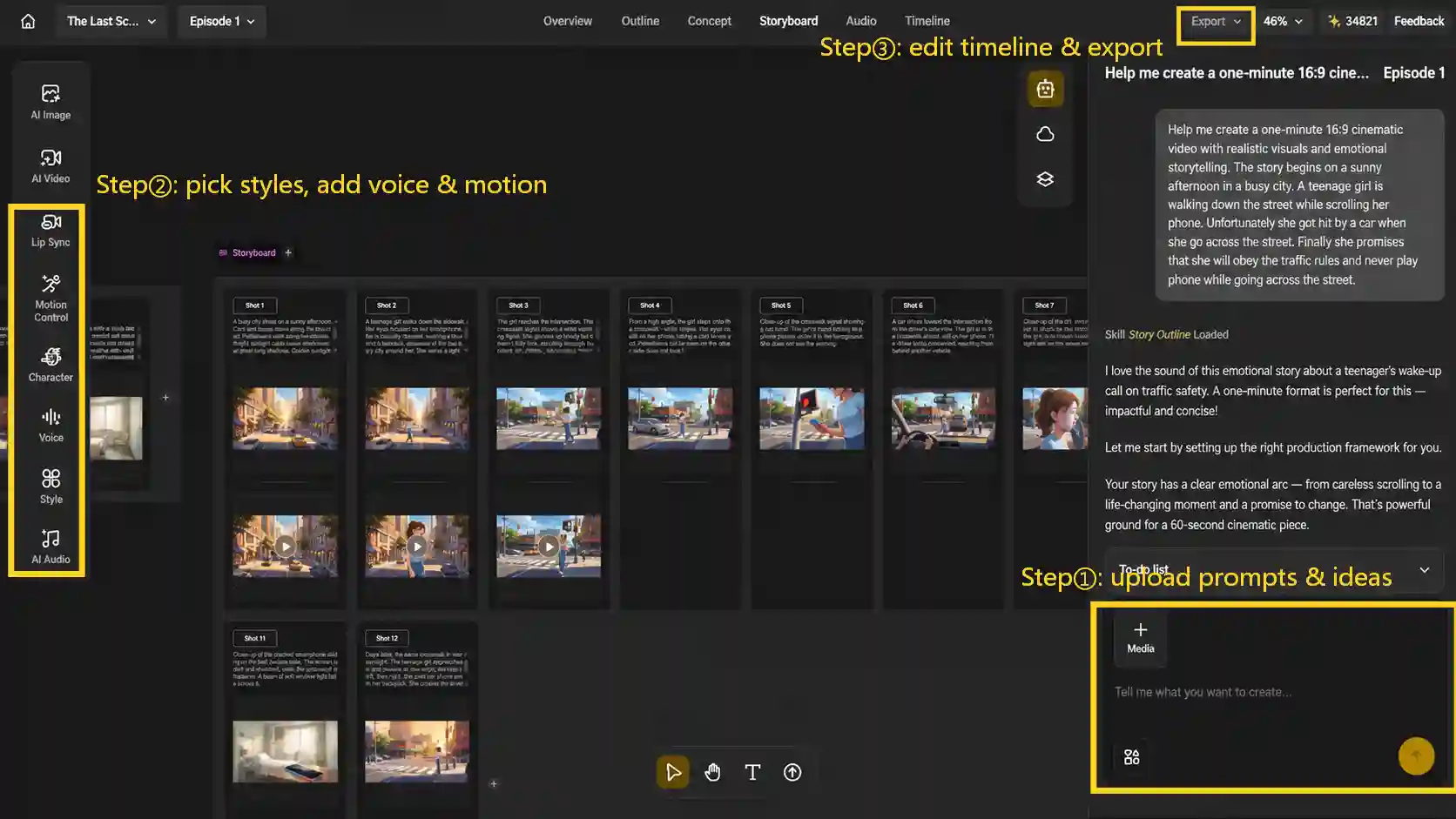
Step 1: Upload Your Prompts or Ideas
Paste ready-use category prompts above into the scene box, or describe your story idea and let it generate a scene-by-scene outline automatically.
Step 2: Pick a Style, Add a Voice and Motion
-
Pick a style that matches your content category from the style library from Ghibli-inspired, realistic to 3D cinematic;
-
Upload a voice track, or generate one, and let it automatically lip-sync your character to the script.
Step 3: Edit the Timeline and Export
Head to the Timeline tab to adjust the pacing in the timeline editor, export in HD, watermark-free, and then export the finished video for YouTube.
Common AI Video Prompt Mistakes to Avoid
Most disappointing AI video results trace back to one of these seven habits. Fixing them usually matters more than switching tools.
Writing Prompts That Are Too Vague
A prompt like “a dog running” can produce hundreds of completely different results, because the AI has to invent the breed, setting, and pace on its own. Naming the breed, the environment, and the pace turns a guess into a direction.
Adding Too Many Details at Once
Stacking conflicting adjectives, such as “beautiful cinematic epic stunning realistic amazing,” confuses the model instead of guiding it. It’s stronger to pick one style and one mood, then build the rest of the description in layers around them.
Not Describing the Subject or Character Clearly
If a character’s appearance, outfit, and age aren’t spelled out, most AI video tools will quietly invent a slightly different-looking character in every new scene, which breaks continuity fast. Reusing the same specific description across every prompt for that character, or using a tool with built-in character consistency, keeps them recognizable.
Ignoring Action and Motion
A purely descriptive prompt gives the AI nothing to animate, so the clip ends up feeling static even when it technically “moves.” Every prompt should include a verb describing what’s physically happening in the frame, not just what’s in it.
Ignoring Camera Movement and Composition
Without any camera direction, most tools default to a generic, static-feeling shot. Naming a shot type, such as a close-up, a tracking shot, a slow zoom, or a wide establishing shot, gives the scene actual cinematic intent.
Mixing Conflicting Visual Styles or Instructions
Asking for photorealistic, anime, and watercolor in the same prompt is a bit like asking for a hot iced coffee: the instructions contradict each other, and the AI has to pick a side. One primary style reference per scene produces far more consistent results.
Expecting One Prompt to Generate a Complete Long Video
Most AI video tools generate short clips of a few seconds at a time, so treating a single prompt as an entire 10-minute video won’t work. Breaking the script into individual scenes, generating each one separately, and editing them together is exactly what a scene-based tool like Anijam AI is designed to handle.
Final Thoughts
The prompts in this guide are starting points, not scripts to use word for word. Swap in your own topic, audience, and details, then test a few variations the way any experienced creator tests thumbnails or titles. Whether you write your own from scratch or start from the templates above, pairing a specific prompt with Anijam AI Video Generator turns an idea into a finished video today instead of next week.
Frequently Asked Questions
What is the best AI prompt for creating viral videos on YouTube? There isn’t a single magic prompt, but the strongest ones follow the master formula in this guide: a clear subject, a specific action, a setting, camera direction, lighting, mood, and style, paired with a hook written around curiosity, tension, or a clear promise.
Where can I find AI video prompt ideas for viral YouTube videos? The category prompts above cover storytelling, educational, creative, character-driven, and product content, so most video ideas fit into one of those five buckets. Copy the closest match and swap in your own details.
Are viral YouTube video AI prompts different for Shorts versus long-form videos? The core structure is the same, but the pacing changes. Shorts need the hook to land almost instantly, often in the first couple of seconds, while long-form videos have a bit more room to build tension before the payoff.
Can AI-generated videos actually go viral on YouTube? Yes. Channels built entirely around AI-generated visuals and voices have picked up millions of views, and YouTube doesn’t penalize a video simply for being AI-made. What it does penalize is content that looks mass-produced, repetitive, or low-effort. To have a real shot at going viral, and to stay eligible for the YouTube Partner Program, an AI video still needs an original angle, real editing decisions, and enough value that a viewer doesn’t feel like they wasted a click.
Do I need to disclose AI-generated content on YouTube? Only when the content looks photorealistic - YouTube requires disclosure in the “AI use” field for things like making a real person appear to say or do something they didn’t, or generating a realistic scene that never happened. Clearly animated content and AI help with scripts, thumbnails, or captions don’t need disclosure. Disclosing doesn’t hurt a video’s reach or monetization; skipping a required disclosure is what carries the risk.
by Evan
Evan is an AI content creator and video technology writer at Anijam AI, focused on how generative AI is transforming storytelling and video production. He shares social trends, creative workflows, prompt strategies, and practical insights to help creators turn ideas into engaging videos and visual content.