How to Make 3D Animation with AI: A Beginner’s Guide (2026)
A minute of 3D animation used to mean weeks of work: a modeler sculpting a character, a rigger building its skeleton, an animator keyframing every movement, and a render farm chewing through frames overnight. Studios still work this way for feature films. But for everyone else - creators, marketers, indie storytellers - that pipeline was always the barrier standing between an idea and a finished video.
AI has quietly removed that barrier. Instead of learning specialized 3D software and a technical pipeline, you can now describe a scene in plain language - “a fantasy warrior charging into battle, cinematic lighting, dramatic camera pan” - and an AI model generates the full 3D-style animation in minutes.
This guide breaks down what 3D animation actually involves, how AI is changing the way it’s made, how it compares to the traditional process, and exactly how to create your own AI-generated 3D animation step by step.
What Is 3D Animation?
Understanding the Basics of 3D Animation
3D animation is the process of creating movement inside a three-dimensional digital space. Instead of drawing each frame by hand, artists build digital models with depth - width, height, and depth (the X, Y, and Z axes) - then apply textures and lighting, rig them with a virtual skeleton, and animate that skeleton to create motion.
It’s the technique behind Pixar and DreamWorks films, most AAA video games, product visualizations, and a growing share of marketing and social media content. The result is a sense of volume, depth, and realistic lighting that flat 2D animation doesn’t have.
How Traditional 3D Animation Is Made
A traditional 3D animation project moves through three broad stages, each with its own specialists and software:
- Pre-production - concept art, scriptwriting, and storyboarding define the story, characters, and visual direction before any 3D work begins.
- Production - the heavy lift. This includes modeling (building characters and environments), texturing, rigging (adding a digital skeleton), animation (keyframing movement), lighting, and rendering.
- Post-production - compositing, visual effects, color grading, sound design, and final export bring every rendered layer together into a finished video.
Each stage depends on the one before it - if modeling runs late, rigging can’t start, and if lighting is behind schedule, rendering stalls. That’s why professional studios use dedicated, specialized 3D production software, along with a full team of modelers, riggers, animators, and lighting artists.
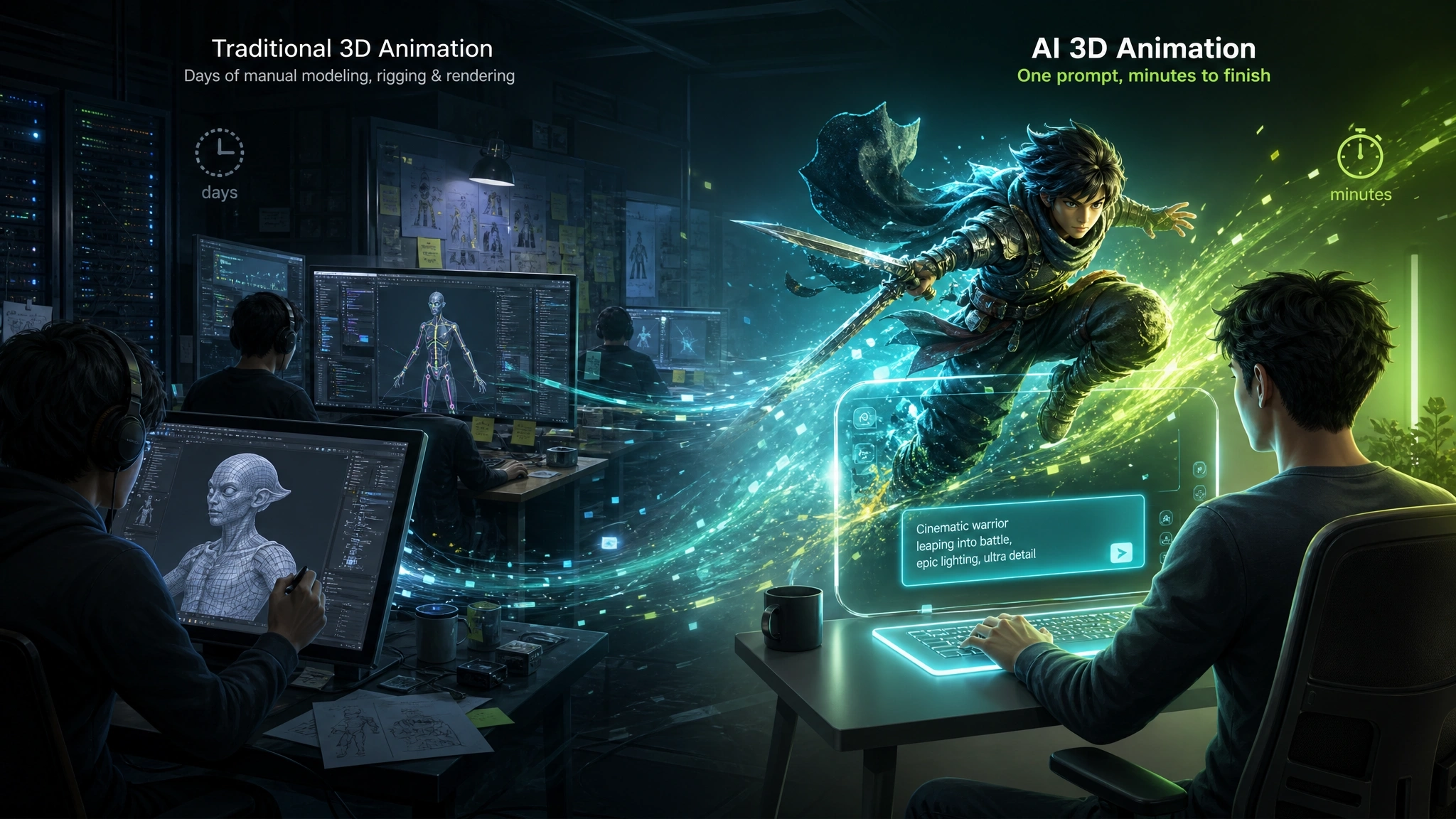
Rendering alone - the step that turns 3D scene data into finished video frames - can take anywhere from a few hours to several days per shot, depending on scene complexity and resolution. Industry estimates put a short 3D animated video at 6 to 10 weeks of production, while a full-length animated feature can take 12 to 24 months from concept to release.
How AI Is Changing 3D Animation Creation
From Manual Production to AI-Assisted Animation
AI hasn’t eliminated the stages of the 3D pipeline - it has automated most of the manual labor inside them. Modern AI 3D animation tools are built on a few core techniques:
- Text-to-3D and text-to-video generation - diffusion-based AI models generate 3D-style scenes and characters directly from a written description, understanding lighting, camera movement, and continuity between frames.
- Auto-rigging - AI can now detect a character’s proportions and automatically place a working skeleton on it, a step that traditionally took hours of manual bone placement and weight painting.
- AI motion and lip sync - text-to-motion models translate a written action (“a character waves and sits down”) directly into animation data, while AI lip-sync engines match mouth movement to any voice track automatically.
Put together, this means a task that once required a modeler, a rigger, an animator, and a render farm can now happen inside a single AI-powered platform in one continuous workflow.
Why More Creators Are Using AI for 3D Animation
- Speed - AI platforms can generate a full 3D-style animated clip in minutes instead of weeks.
- No technical skill required - there’s no need to learn rigging, keyframing, or rendering software; prompts and simple editing tools replace the technical pipeline.
- Lower cost - instead of paying a team of specialists or licensing production software, most AI tools run on affordable subscriptions or credit systems.
- Faster iteration - creators can regenerate or tweak a scene in seconds rather than re-rendering an entire shot.
- Accessibility - solo creators, small businesses, and marketing teams can now produce studio-style 3D content without an in-house animation department.
Traditional 3D Animation vs AI 3D Animation: Which One Should You Choose?
Neither approach is universally better - they solve different problems. Here’s how they compare across the factors that matter most to most creators:
| Factor | Traditional 3D Animation | AI 3D Animation |
|---|---|---|
| Skills needed | Modeling, rigging, animation & rendering software | Plain-language prompts - no technical training required |
| Typical timeline | 6-10 weeks for a short; 12-24 months for a feature film | Minutes per clip, start to finish |
| Team size | Often 5 to 150+ specialists per project | One person can handle the entire workflow |
| Cost | High - artist time, software licenses, render farms | Low - subscription or credit-based pricing |
| Creative control | Full manual control over every frame, rig, and light | Prompt-based direction, with editing tools to fine-tune motion, timing & camera |
| Best for | Feature films, AAA games, and projects needing pixel-perfect, bespoke realism | Social content, marketing videos, prototyping, indie shorts & rapid iteration |
If you’re producing a big-budget film or a AAA game asset that needs frame-by-frame control, traditional software and a trained team are still the right call. But for most everyday content - social videos, marketing clips, short stories, product demos - AI 3D animation gets you a finished, professional-looking result in a fraction of the time and cost.
How to Make 3D Animation with Anijam AI Step by Step
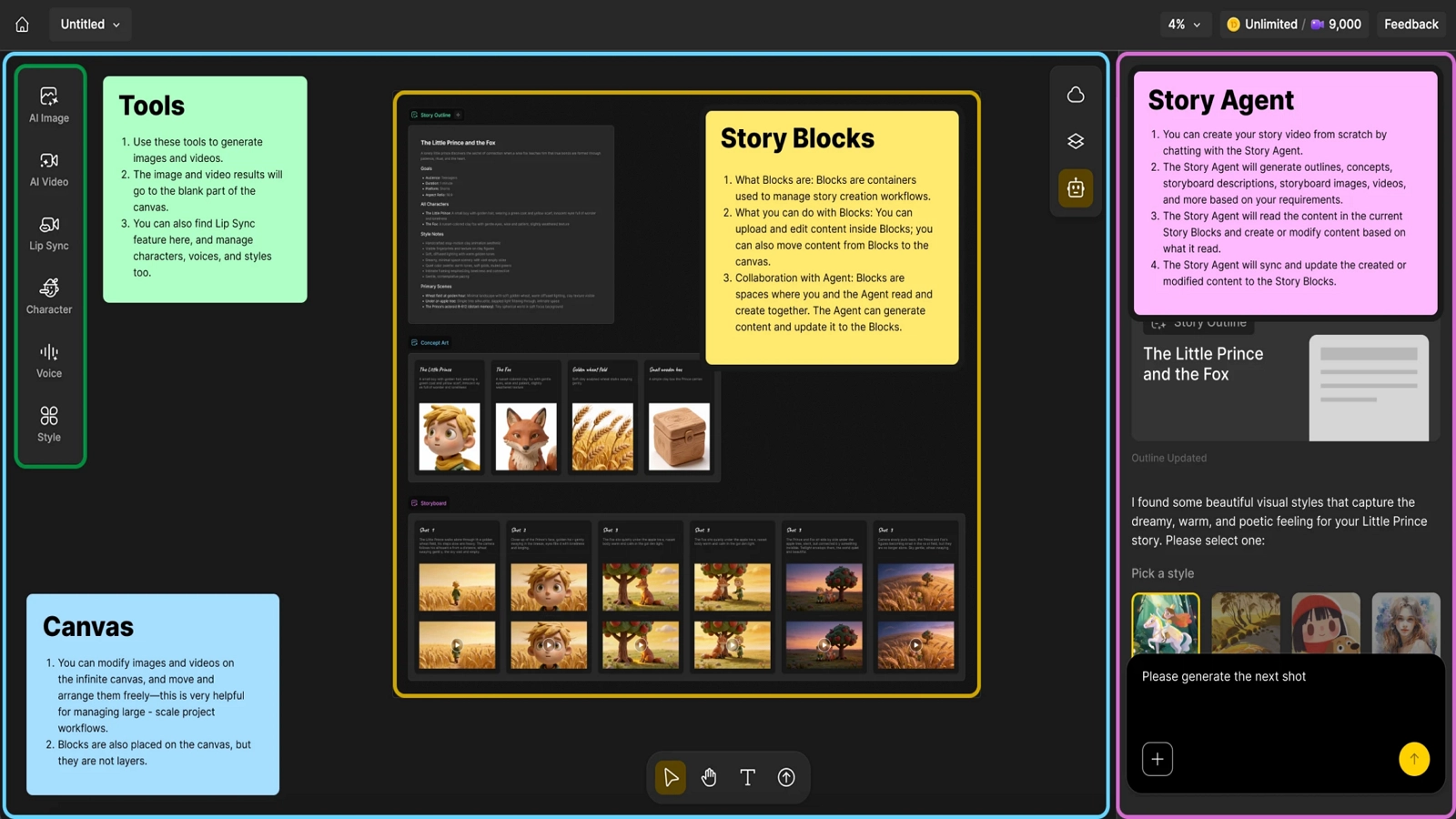
Anijam AI is an all-in-one AI video maker where you build the whole 3D animation - story, characters, motion, voice, and export. Your projects sync automatically between the web platform and the mobile app, so you can start a scene on your laptop and keep creating from your phone, wherever you are. The app also surfaces trending social styles and ready-to-use templates you can apply directly to your project - handy when you want to jump on a trend fast without building a scene from scratch.
Step 1: Describe Your 3D Scene or Story
Type your idea in plain language, or upload a reference image or character design. Anijam’s AI agent turns it into a full story outline: characters, setting, and action, such as “a fantasy mage casting a spell in a stone hall, dramatic rim lighting.”
Step 2: Choose Your 3D Animation Style
Pick a visual style from Anijam’s library or explore game-art, stylized, and hybrid looks depending on the tone you want.
Step 3: Customize Characters, Motion & Voice
Design your character’s appearance and lock it in so it stays consistent across every scene. Add dialogue through an AI-generated voice or your own uploaded audio for lip sync, and fine-tune motion and camera angles directly in the canvas.
Step 4: Generate Your 3D Animation
Anijam’s AI agent renders the full sequence - characters, environment, lighting, and camera movement - based on your description, typically in under five minutes.
Step 5: Fine-Tune, Export & Share
Use the timeline and scene editor to adjust pacing, motion, and dialogue sync. When it looks right, export in HD, watermark-free, ready for YouTube, TikTok, Instagram, or a client deliverable.
Tips for Better AI 3D Animations
- Be specific about action, setting, and camera - “a warrior sprinting through a burning village, low camera angle, embers drifting past” gives the AI far more to work with than “a warrior running.”
- Keep one scene focused on one action - cramming multiple actions into a single generation tends to produce rushed, jumbled transitions.
- Lock in character details early - describing your character’s appearance consistently across prompts (or using a character-consistency feature) keeps them recognizable from scene to scene.
- Use motion and camera controls for fixes - if a walk cycle or camera pan isn’t quite right, adjust it directly instead of regenerating the whole scene from scratch.
- Treat the first generation as a draft - refining the prompt and regenerating a couple of times usually improves the result significantly.
What Can You Create with AI 3D Animation?
3D Animated Short Films
From original character stories to fantasy adventures and emotional narratives, AI makes it possible for a solo creator to produce a multi-scene animated short - complete with consistent characters, voiced dialogue, and cinematic camera work - without a production team.
Social Media Animation Videos
3D-style content performs well on TikTok, Instagram Reels, and YouTube Shorts precisely because it stands out from flat video and static graphics. AI tools built for vertical, fast-turnaround content make it realistic to publish 3D animated clips on a regular posting schedule.
Marketing and Brand Videos
Brands use AI 3D animation for product demos that simulate real-world usage, animated explainer videos, brand mascot content, and ad creative - turning a static product shot into a dynamic, scroll-stopping video without a full commercial video shoot.
Conclusion
3D animation has never been more accessible than it is right now. The pipeline that used to require a modeler, a rigger, an animator, and a render farm can now start from a single sentence.
Traditional software still has its place for feature films and projects that demand frame-by-frame control. But for short films, social content, and marketing videos, AI has made it realistic for one person to go from idea to finished 3D animation without touching a rig or a render queue.
If you want to try it yourself, Anijam AI is built to handle the entire 3D animation pipeline - story, characters, motion, voice, and export - in one place.
Frequently Asked Questions
What is AI 3D animation? AI 3D animation uses artificial intelligence to automatically generate motion, characters, and scenes from inputs like text, images, or reference 3D models. Platforms like Anijam let you create smooth, styled animation without manual modeling, rigging, or keyframing.
Is it free to make 3D animation with Anijam? Yes. You can earn credits through daily check-ins to try out Anijam’s animation generation for free. If you need more advanced features, there are several paid plans to choose from depending on how much you create.
What’s the difference between traditional 3D animation and AI-generated animation? Traditional 3D animation requires manual modeling, rigging, keyframing, and rendering, which can take weeks or months depending on complexity. AI-generated animation automates most of those steps, letting you produce a comparable-looking video from a simple prompt in minutes.
How long does it take to make a 3D animation with AI? Simple clips can generate in a few minutes; more complex scenes with multiple characters or actions may take a little longer. Either way, it’s a fraction of the time a traditional 3D pipeline requires.
Do I need animation experience to make 3D animation with AI? No. That’s the core difference from traditional 3D animation software. AI platforms are built around plain-language prompts instead of manual rigging or keyframing, so no prior animation skill is required to get a usable result.
by Evan
Evan is an AI content creator and video technology writer at Anijam AI, focused on how generative AI is transforming storytelling and video production. He shares social trends, creative workflows, prompt strategies, and practical insights to help creators turn ideas into engaging videos and visual content.