How to Create Faceless YouTube Videos with AI (2026)
For a lot of aspiring creators, the biggest thing standing between them and a YouTube channel isn’t the idea - it’s the camera. Not wanting to show their face, hear their own voice, or be recognized on the street is one of the most common reasons people never hit publish. Faceless YouTube videos solve exactly that - they can build an audience around a topic, a story, or a niche without ever stepping in front of a lens.
What’s changed in 2026 is how fast you can actually make them. AI now handles the script, the voiceover, the visuals, and the captions in a single pass, so a format that used to need a small production team or spend hours bouncing between separate script, voice, and editing tools can now be built by one person with a laptop.
This guide breaks down what faceless YouTube videos actually are, which channel ideas are working right now, how the AI workflow compares to the old manual one, and the mistakes that quietly stall a lot of faceless channels before they ever grow.
What Are Faceless YouTube Videos?
A faceless YouTube video is any video that doesn’t require the creator to appear on camera. Instead of relying on an on-screen personality, it uses elements such as narration, animation, stock footage, screen recordings, AI-generated visuals, or text to deliver the content.
Key Features
- No on-camera presence - the creator’s identity is never the focus of the video.
- Voiceover-driven content - Narration, AI-generated voices, or other audio can carry the story while visuals support the topic.
- Visual storytelling - Stock footage, animations, screen recordings, images, or AI-generated scenes can replace traditional talking-head footage.
- Flexible production formats - Faceless videos can work across educational content, storytelling, documentaries, music, kids’ content, and other YouTube formats.
- AI-assisted creation - AI tools can help with scripting, voiceovers, visuals, editing, and other time-consuming parts of video production.
Why Creators Are Going Faceless
The appeal of faceless videos isn’t just about staying off camera. For many creators, the format offers a more flexible way to produce content while reducing the time, equipment, and personal exposure traditionally associated with YouTube.
- Privacy and personal comfort - Not everyone wants to be recognized in public or deal with camera anxiety. Faceless formats protect personal boundaries and let creators build an audience without giving up their anonymity.
- Faster content production - AI can help with scripting, voiceovers, image generation, and editing, allowing creators to handle more of the production process from a single idea.
- More privacy and creative freedom - Creators can build a recognizable content brand without making their personal identity the center of the channel.
- Easier to scale content - A repeatable production workflow makes it easier to create multiple videos around the same format or niche without having to appear on camera every time.
- Lower startup costs - Faceless content can reduce the need for cameras, studio lighting, and other equipment associated with traditional on-camera production.
- Changing audience preferences - Viewers increasingly consume fast, valuable, and consistently presented content, giving creators more ways to deliver useful information without relying on a personal on-screen presence.
Why Faceless Channels Are Booming in 2026
Several factors are contributing to the growing interest in faceless YouTube channels in 2026:
- Repeatable content formats - A channel can establish a consistent format, such as explainers, storytelling, documentaries, or animated videos, and reuse the workflow across multiple uploads.
- Scalable channel production - AI-assisted workflows can reduce repetitive work, making it easier to maintain a regular publishing schedule as a channel grows.
- More niche opportunities - Creators can build channels around specific interests or topics without needing to become the on-screen personality behind them.
- A broader range of production styles - Faceless channels are no longer limited to stock footage and voiceovers. AI-generated animation, characters, images, and other visual formats allow channels to develop distinctive content styles.
- Long-term content consistency - Because the channel does not depend on the creator’s availability for filming, the same production model can be maintained across many videos and over a longer period.
Popular Faceless YouTube Channel Ideas (and Tips for Each)
Faceless videos can work for almost any topic, but some formats have a proven track record. Here are five that consistently perform well, along with what actually matters for each one.
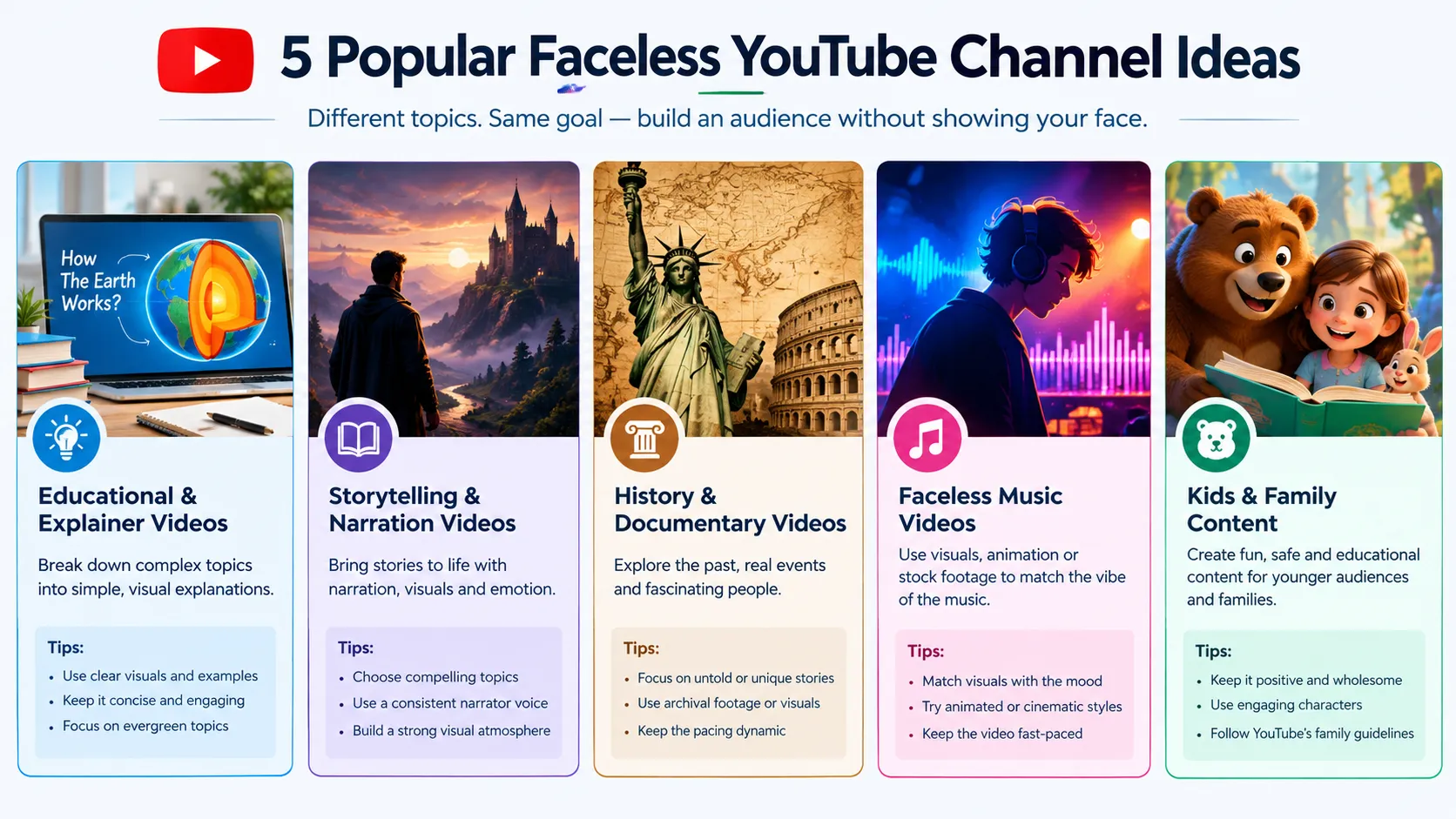
Educational & Explainer Videos
Common formats: tutorials, how-to videos, educational explainers, animated lessons, and visual breakdowns.
These work well faceless because viewers are searching for an answer, not a personality - a screen recording, a diagram, or an animated walkthrough usually explains a process better than a person talking about it ever could.
Tips: Start with a clear topic and structure the script around a strong hook, easy-to-follow explanations, and supporting visuals. AI can also help turn a topic into a structured script before you move into video production.
Storytelling & Narration Videos
Common video types: true crime recaps, urban legends, horror narration, and narrated text-post or confession-style stories.
These channel reads are among the highest-earning faceless niches on YouTube - public channel data on well-known horror narration channels shows some pulling tens of millions of monthly views on narration alone, with no on-camera presenter at all.
Tips: A flat, emotionless AI voice reading a horror story out loud kills the tension instantly - the narration has to match the mood of the story, with pacing that builds rather than rushes. Anijam’s AI Story Video Generator is built around this kind of narrative pacing, breaking a script into scenes and generating matching visuals and voice so the story’s tone carries through from the first line to the last.
History & Documentary Videos
Common formats: history deep dives, documentary-style explainers, and science or mystery breakdowns.
These work well faceless because the subject matter, not the presenter, is the draw. Accuracy is the whole product here - a single wrong date or misattributed quote undermines the credibility the format depends on.
Tips: Organize the information into a clear narrative rather than simply presenting facts. Use visuals to illustrate important events, places, and people while keeping the narration concise and easy to follow.
Faceless Music Videos
Common formats: lyric videos, animated visualizers, and fully animated artist personas.
Lyric videos, animated visualizers, and fully animated artist personas let musicians release without ever putting a real face on the thumbnail. Here, the animated identity effectively becomes the artist’s visual brand, which means it has to look exactly the same in every release.
Tips: Choose visuals that match the mood and rhythm of the music. Consistent visual themes can also help a channel develop a recognizable style across multiple uploads.
Kids & Family Content
Common formats: bedtime stories, nursery-style videos, and gentle animated explainers for children.
Bedtime stories, nursery-style content, and gentle animated explainers for children are a durable faceless category, largely because parents and kids both respond to repetition and familiarity. That makes a recurring host character non-negotiable - it has to look the same in episode 40 as it did in episode 1.
This is where Consistent Character AI earns its keep: designing a character once and locking its face, outfit, and proportions means a kids’ channel can publish for months without the host quietly turning into a slightly different-looking character.
Tips: Keep the tone calm, positive, and age-appropriate, and lean on the repetition parents and kids both respond to. A consistent host character matters more here than in any other niche, so lock in one design early and keep reusing it identically from episode to episode.
Old Workflow vs. AI Workflow: How AI Is Changing Faceless YouTube Videos
The old faceless production stack was really four separate jobs stitched together: a scriptwriter, a stock footage or voice-acting budget, editing software, and someone to design a thumbnail. Each stage lived in its own tool, and each handoff between them cost time.
| Production Stage | Old Workflow | AI Workflow Today |
|---|---|---|
| Scripting | Manual research and writing, often outsourced to a scriptwriter | AI drafts a scene-by-scene outline from a single topic or prompt |
| Voiceover | Book a voice actor or record and re-record it yourself | AI voiceover generated in minutes, in dozens of languages |
| Visuals | Buy or license stock footage, or commission an illustrator | AI generates matching scenes, characters, or animation on demand |
| Editing | Manually assemble the timeline, transitions, and captions in separate software | Timeline, captions, and pacing adjusted inside the same AI workspace |
| Turnaround | Days to weeks per finished video | Often a single sitting, from idea to export |
None of this replaces judgment, though. A faster workflow still needs a real hook, an accurate script, and a consistent identity to actually grow - speed just means a weak video gets made faster, not that it performs any better.
How to Create Faceless YouTube Videos with Anijam AI
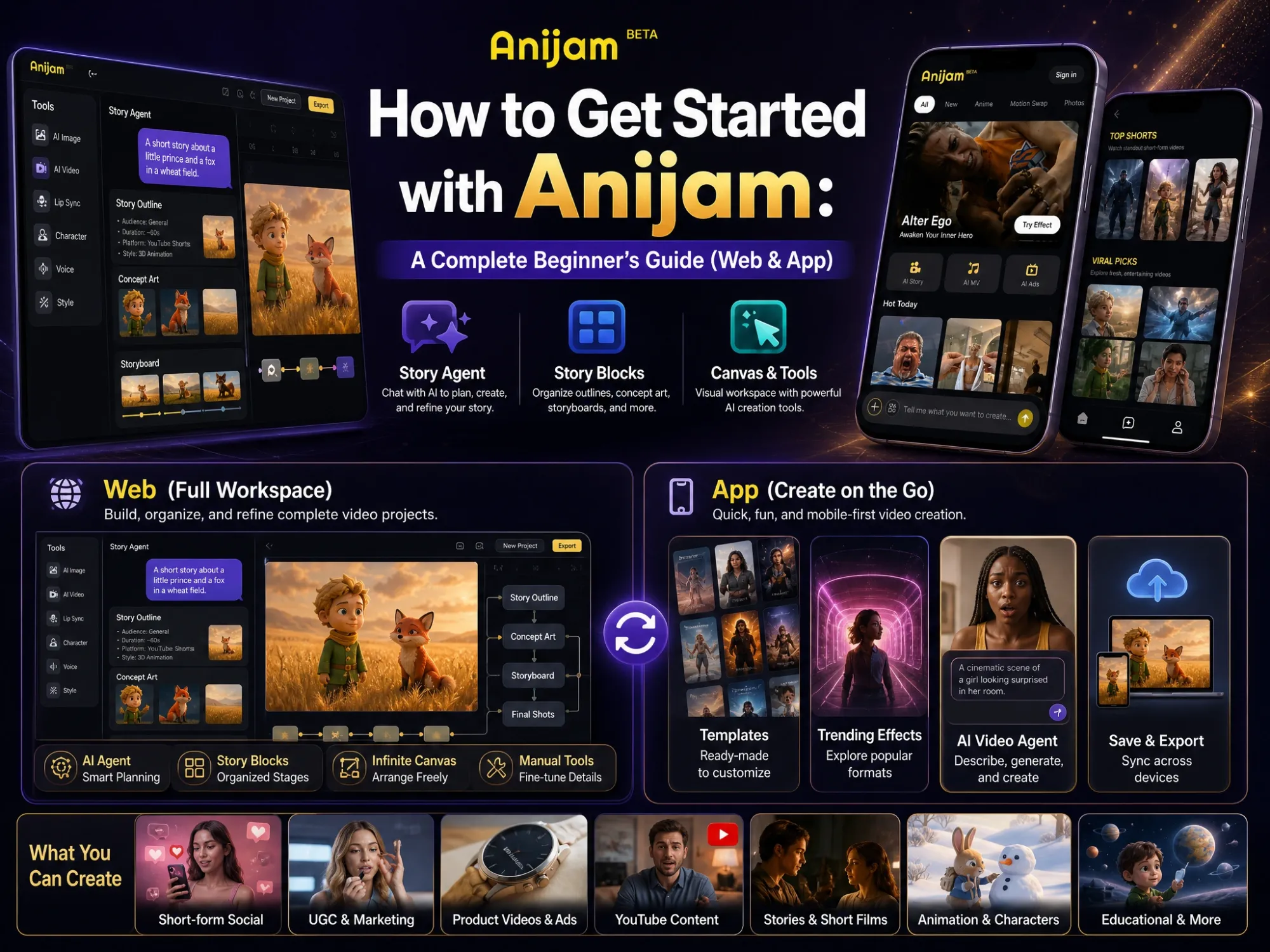
Anijam AI is an AI video agent built to run this entire workflow - script, voice, visuals, and captions - in one place, so a faceless video doesn’t need separate tools to get made. Whether the format is a Reddit story, a history explainer, or a kids’ bedtime series, the AI Faceless Video Generator turns a topic or a full script into a publish-ready video without ever putting a face on screen.
For a quick sense of what’s possible before diving in, the homepage’s Creator Spotlight is worth a browse - a running feed of videos the creator community has actually published with Anijam - alongside a library of ready-made templates if you’d rather start from an existing setup.
Step-by-Step: From Idea to Published Video
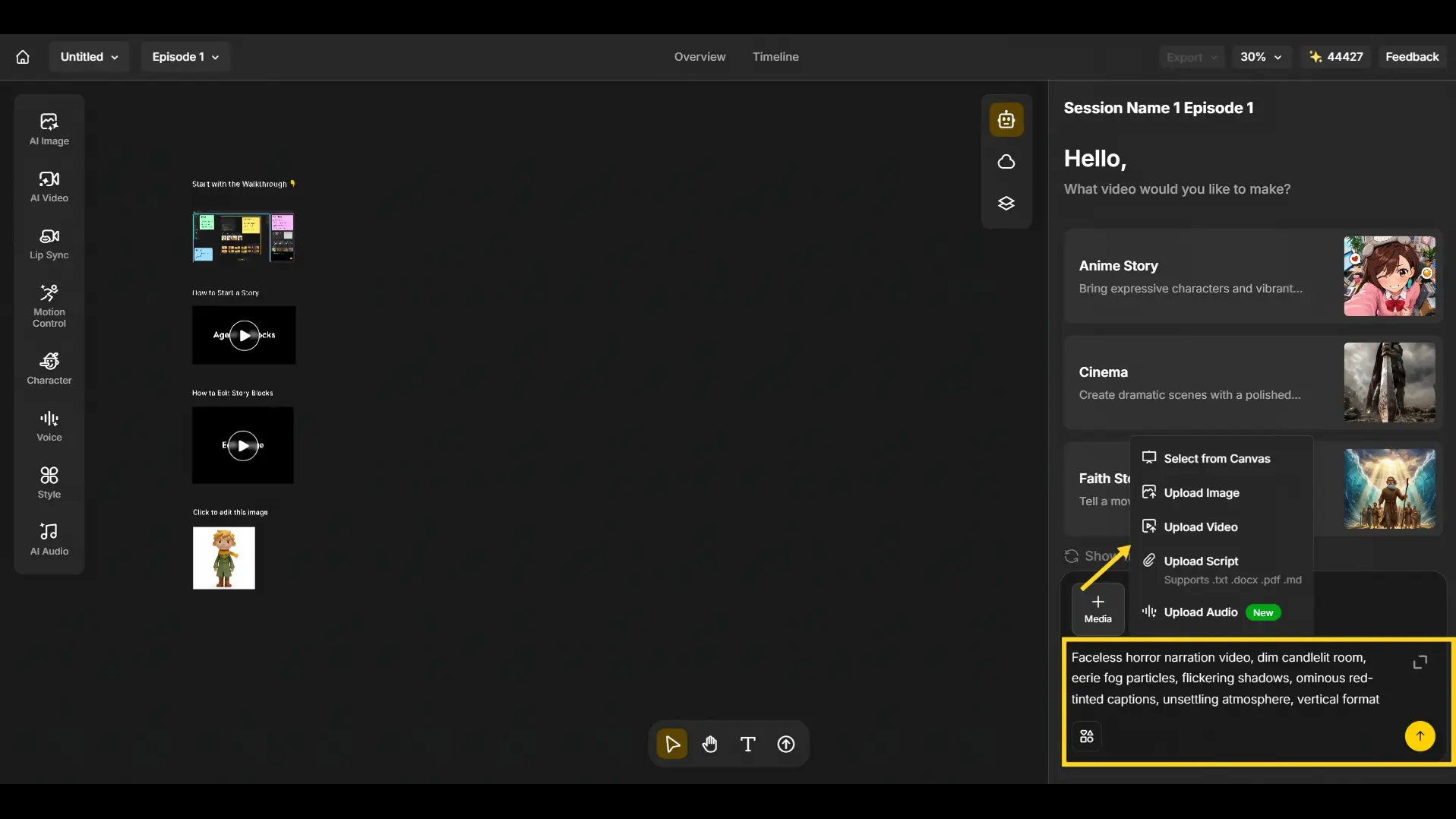
Step 1: Add Your Ideas, Script or Other Media
- Type what you want to make directly into the chat - a topic, a full script, or just an idea - the same way you’d message an assistant.
- Or you can also upload an image, a video, or an audio track as your starting point.
- Select YouTube to tell Anijam’s agent to generate the final video at the right size and format for that platform from the start, rather than needing a resize later.
Step 2: Pick a Voice and Design Your Visual Style
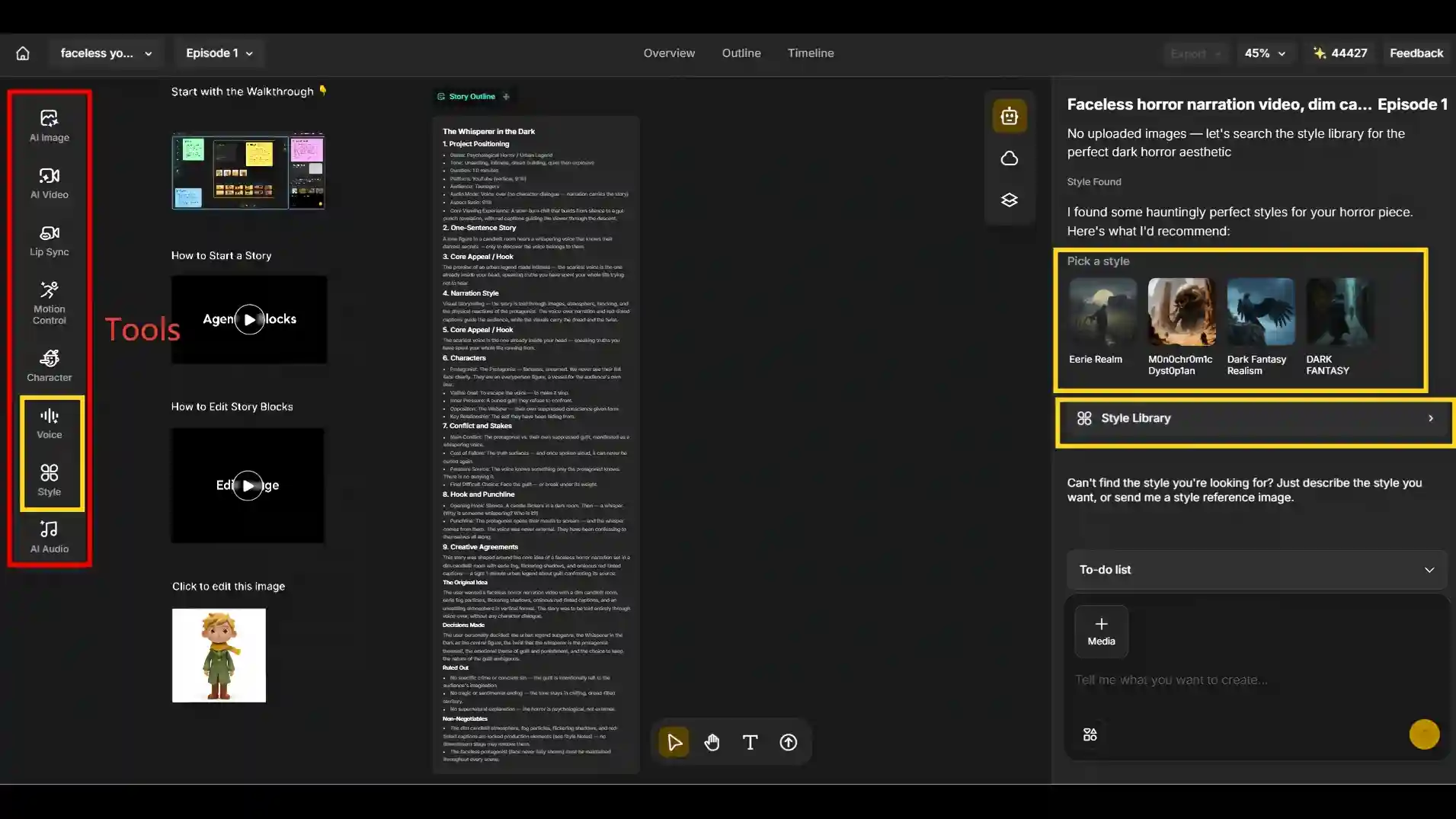
- Choose a multilingual AI voice for your narration and select a matching visual style from AI-recommended options (like Eerie Realm or Dark Fantasy Realism) or browse the full Style Library if you want something more specific.
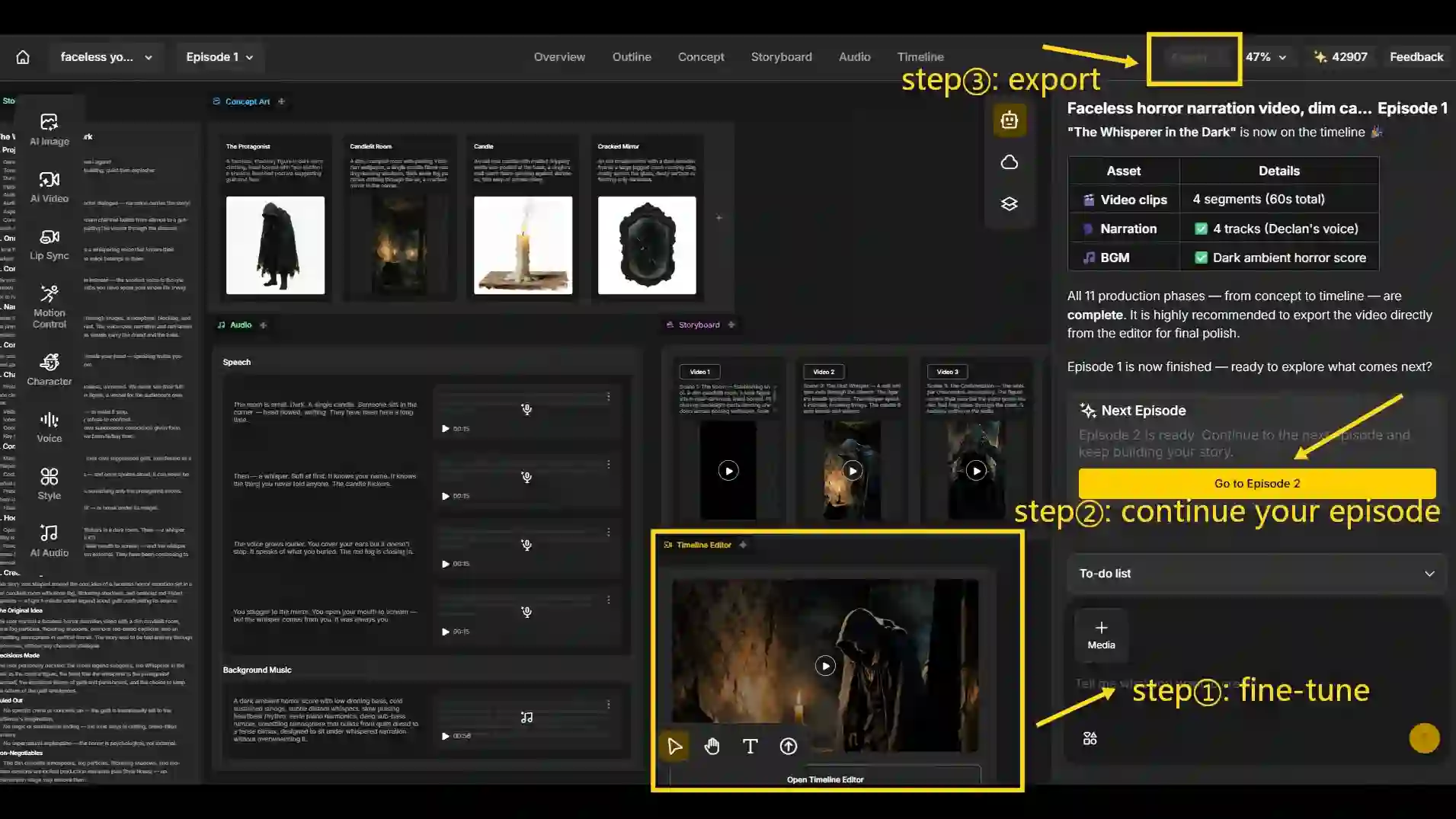
Step 3: Fine-tune, Continue Episode and Export
- Drop into the Timeline to adjust scenes - reposition, set opacity and rotation on any element - and fine-tune captions frame by frame.
- Go to the next episode from the same voice, visual style, and characters instead of rebuilding from scratch - the AI Series Generator is built to carry that identity forward episode after episode, so a channel’s format stays consistent from Episode 1 onward.
- Preview the combined video once everything’s in place, then export at your target resolution (with Advanced Export options available) and publish straight to YouTube, TikTok, or Instagram Reels.
Common Mistakes When Making Faceless YouTube Videos with AI (and How to Fix Them)
AI removes most of the technical barrier to making faceless videos, which also makes it easy to skip steps that used to happen naturally. These are the mistakes that come up most often, and what to do instead.
- Mistake 1: Using a flat, generic AI voice. A monotone narrator that doesn’t match the niche’s tone is one of the fastest ways to lose viewers in the first thirty seconds.
Resolution: Pick an expressive voice and match its energy to the format - calm and measured for a history explainer, tense and controlled for a horror narration.
- Mistake 2: Writing for the eye instead of the ear. AI voices read exactly what’s on the page, so a script that looks fine on screen can sound stiff out loud.
Resolution: Read the script aloud before generating narration, vary sentence length, and build in natural pauses instead of one long unbroken paragraph.
- Mistake 3: Switching voice or visual style between videos. Changing narrators or art styles episode to episode breaks the recognition an audience builds up over time.
Resolution: Lock in one narrator persona and one visual style early, and reuse them deliberately rather than experimenting on every upload.
- Mistake 4: Publishing unedited, mass-produced AI output. A script generated in one click and exported without review is easy to spot, and it’s exactly the kind of low-effort AI content YouTube’s 2026 enforcement targets.
Resolution: Treat the AI draft as a first pass - add real research, commentary, or a personal angle before it goes live.
- Mistake 5: Skipping AI-content disclosure. When AI-generated or altered visuals are realistic enough to be mistaken for a real person, place, or event, skipping disclosure creates unnecessary risk.
Resolution: Use the AI content setting in YouTube Studio to flag it - it’s a quick toggle, and it protects the channel rather than hurting it.
- Mistake 6: Chasing a trending topic instead of a niche with real demand. Copying whatever is trending this week rarely outperforms a niche that’s already showing traction.
Resolution: Study recent, small channels that are already getting more views than their subscriber count would suggest before committing to a format.
Final Thoughts
Faceless YouTube videos aren’t a shortcut around good content - they’re just a different way to make it. Pick a niche, get the format right, and let AI carry the production load. Tools like Anijam AI can take a single idea all the way to a finished, publish-ready video without a camera, a crew, or your face ever needing to be part of the pitch.
Frequently Asked Questions
What are faceless YouTube videos? A faceless YouTube video is any video that never puts the creator’s face on camera. The content is carried by narration, visuals, and pacing instead of a presenter.
Do faceless YouTube channels still work in 2026? Yes, though the bar is higher than it used to be. YouTube’s 2026 policies specifically target repetitive, unedited AI content, but channels that pair AI production with real research and a distinct format haven’t been affected.
Do faceless YouTube channels make money? Yes - faceless channels earn the same way any YouTube channel does, through ad revenue, sponsorships, and affiliate links, and a growing share of the platform’s top earners in niches like true crime, finance, and top-10 lists run entirely faceless. Active channels have reported monthly earnings from a few thousand dollars up to tens of thousands, though results vary widely by niche and consistency.
Do I need to disclose that a video was made with AI? If the content is realistic enough that it could be mistaken for a real person, place, or event, YouTube asks creators to flag it using the AI content setting in YouTube Studio. Clearly stylized animation or an AI-assisted script generally doesn’t need this.
How long should a faceless YouTube video be? For general faceless videos, 7-15 minutes can be a practical range, but the ideal length depends on your topic, audience, and format. YouTube does not require a specific length for faceless videos; unverified accounts can upload videos up to 15 minutes, while verified accounts can upload longer videos, up to about 12 hours.
by Evan
Evan is an AI content creator and video technology writer at Anijam AI, focused on how generative AI is transforming storytelling and video production. He shares social trends, creative workflows, prompt strategies, and practical insights to help creators turn ideas into engaging videos and visual content.