How to Make AI Ads in 2026: A Complete Step-by-Step Guide
Not long ago, making an ad meant a camera, a studio, a crew - and a budget that ruled most people out before they even had an idea.
That’s no longer true. Anyone with a product photo, a script, or even just an idea in their head can now turn it into a finished ad video - no filming, no editing software, no production team required.
AI hasn’t just made ad production faster. It’s made it possible for literally anyone - a solo seller, a first-time marketer, a creator with zero design background - to produce something that used to require a whole team.
This guide walks through exactly how to make an AI ad in 2026: the ideas worth starting from, the step-by-step process, and the mistakes that quietly ruin results.
Why AI Ads Are Different in 2026
For years, “AI in advertising” mostly meant automation behind the scenes - bidding, targeting, audience segmentation. The creative itself, the video or image a viewer actually sees, still came from a human production team.
That has changed. Generative AI tools can now write the script, generate the visuals, add a voiceover, and assemble a finished ad video, often in minutes rather than weeks.
Three shifts explain why 2026 feels different:
- Volume. A traditional workflow might produce a handful of ad executions per campaign. AI-assisted workflows can produce dozens of variations from the same brief, giving platform algorithms more creative to learn from.
- Speed. Many marketers still report it takes three to four weeks to move a campaign from asset creation to launch using traditional production. AI-generated ads can compress that timeline to hours or days.
- Performance data. Brands using AI-generated creative have reported meaningfully higher click-through rates in testing, and AI-generated variations have outperformed manually designed ads in large-scale A/B tests.
| Factor | Traditional Ad Production | AI-Generated Ads |
|---|---|---|
| Timeline | Weeks per campaign (shoot, edit, revisions) | Minutes to hours per ad |
| Cost structure | Recurring shoot, talent, and editing costs | Mostly upfront setup, then fast iteration |
| Creative variations | A handful of hero executions | Dozens of variations from one brief |
| Consistency | Depends on crew, talent, and location availability | Same character, voice, and style every time |
| Skills required | Filming, editing, motion design | Plain-language prompts |
None of this means AI replaces creative judgment. It changes where that judgment goes - into the brief and the testing loop, rather than into a shot list and a studio schedule.
AI Ad Ideas and Examples to Get You Started
Before opening any tool, it helps to know what an AI-generated ad can actually look like. Most effective ads fall into a handful of proven formats.
Product Demo Ads
A product demo ad shows the item in action: rotating on a pedestal, held in someone’s hand, or working the way it’s meant to. This format works especially well for jewelry, gadgets, skincare, and anything visually distinctive up close.
Storytelling / Narrative Ads
Instead of a straight pitch, a narrative ad puts a character - a mascot, an avatar, or an animated persona - into a short scene with a beginning, middle, and payoff. This format tends to hold attention longer than a direct product shot and works well for brand awareness campaigns.
Testimonial-Style Ads
An AI avatar or presenter delivers a review, endorsement, or “here’s why I use this” pitch to camera. This mirrors the UGC-style ads that now dominate TikTok and Instagram feeds, without needing to book a real creator or negotiate usage rights.
Before-and-After / Transformation Ads
Skincare, fitness, home goods, and renovation products all lean on a visual transformation: a clear “before” state and an “after” payoff. AI tools can generate both states from a single product photo or description, without staging two separate shoots.
Here’s how these ideas map onto ad categories teams are already producing with AI:
| Ad Idea | Example Categories |
|---|---|
| Product Demo | Luxury jewelry macro shots, gadget close-ups, skincare product showcases |
| Storytelling | Character or mascot-led brand spots, short narrative ads |
| Testimonial | AI avatar and UGC-style talking ads, presenter-style reviews |
| Before-and-After | Fashion and streetwear transformations, interior and home renders |
How to Make AI Ads with Anijam
Anijam is an all-in-one AI video platform built for marketers, e-commerce sellers, and creators who need finished ad videos without hiring a production team. Describe a product, paste an ad script, or upload a photo, and Anijam’s ai ads tool plans the scenes, generates the visuals, adds a voiceover, and assembles a publish-ready ad video in one workflow.
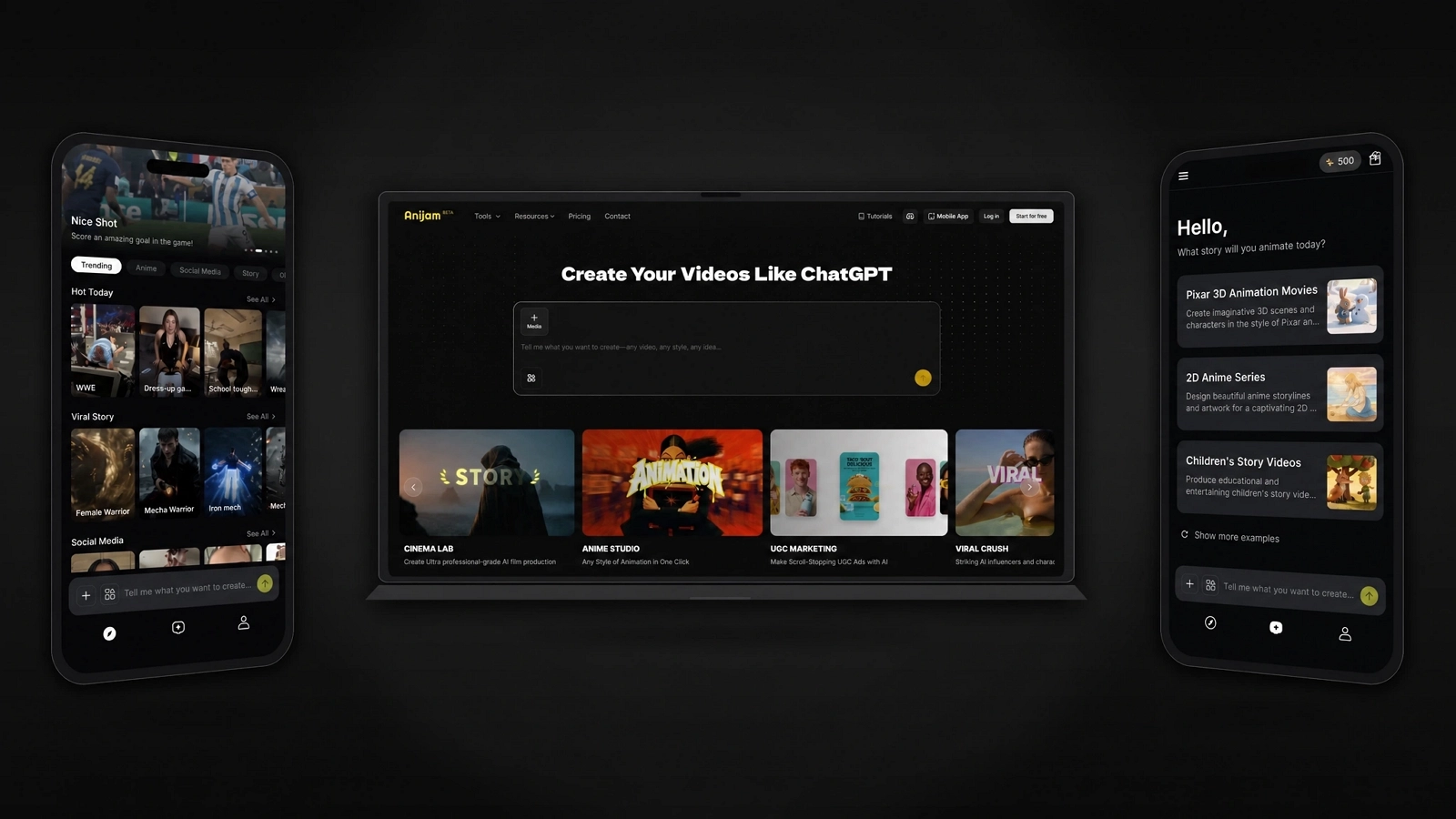
It works the same way on web and on the mobile app, so a project started on your phone stays in sync if you finish it on a laptop, and the other way around.
On Web: Full Creative Control
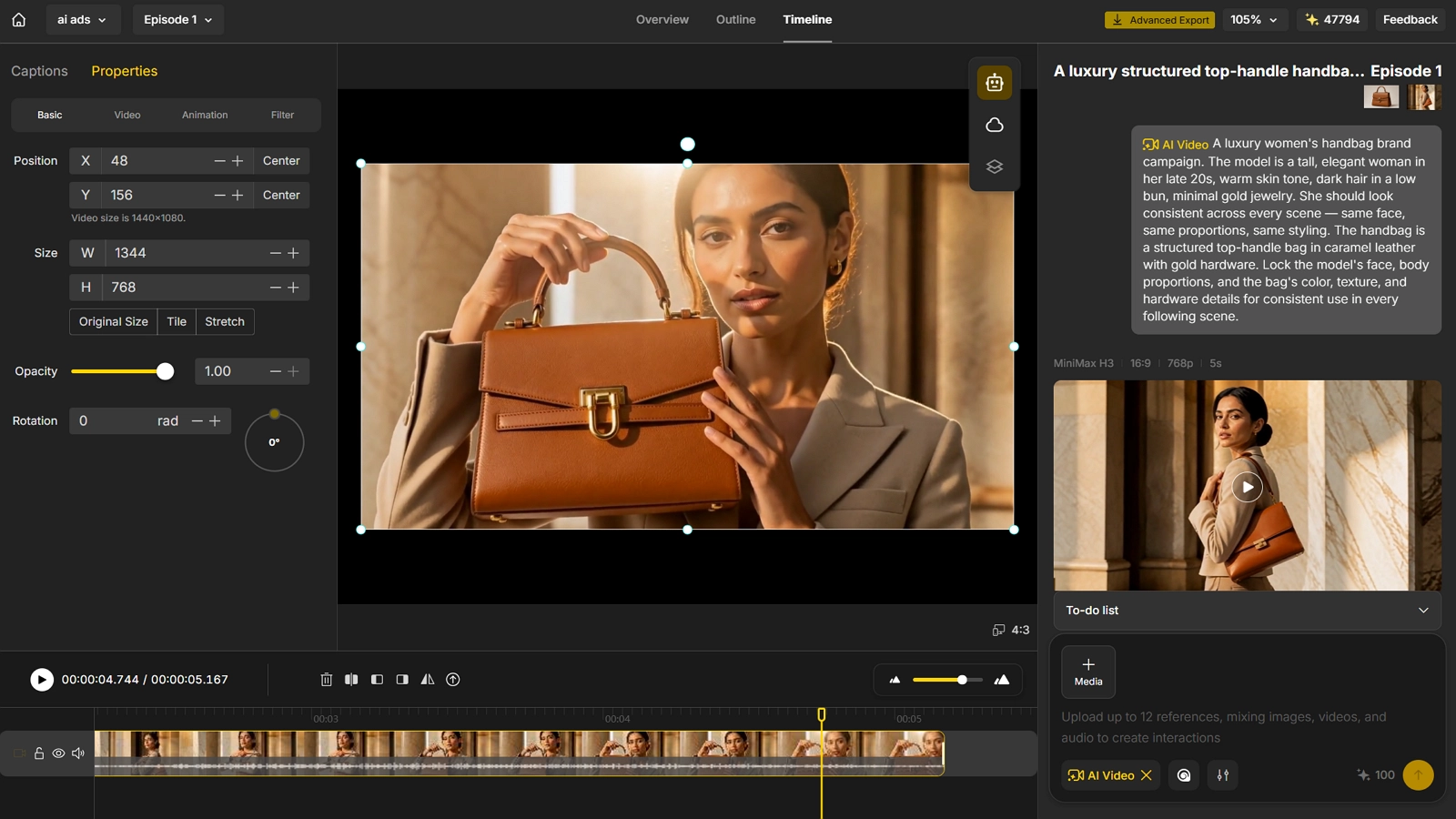
Here’s what that looks like in practice - say you’re advertising a high-end women’s handbag.
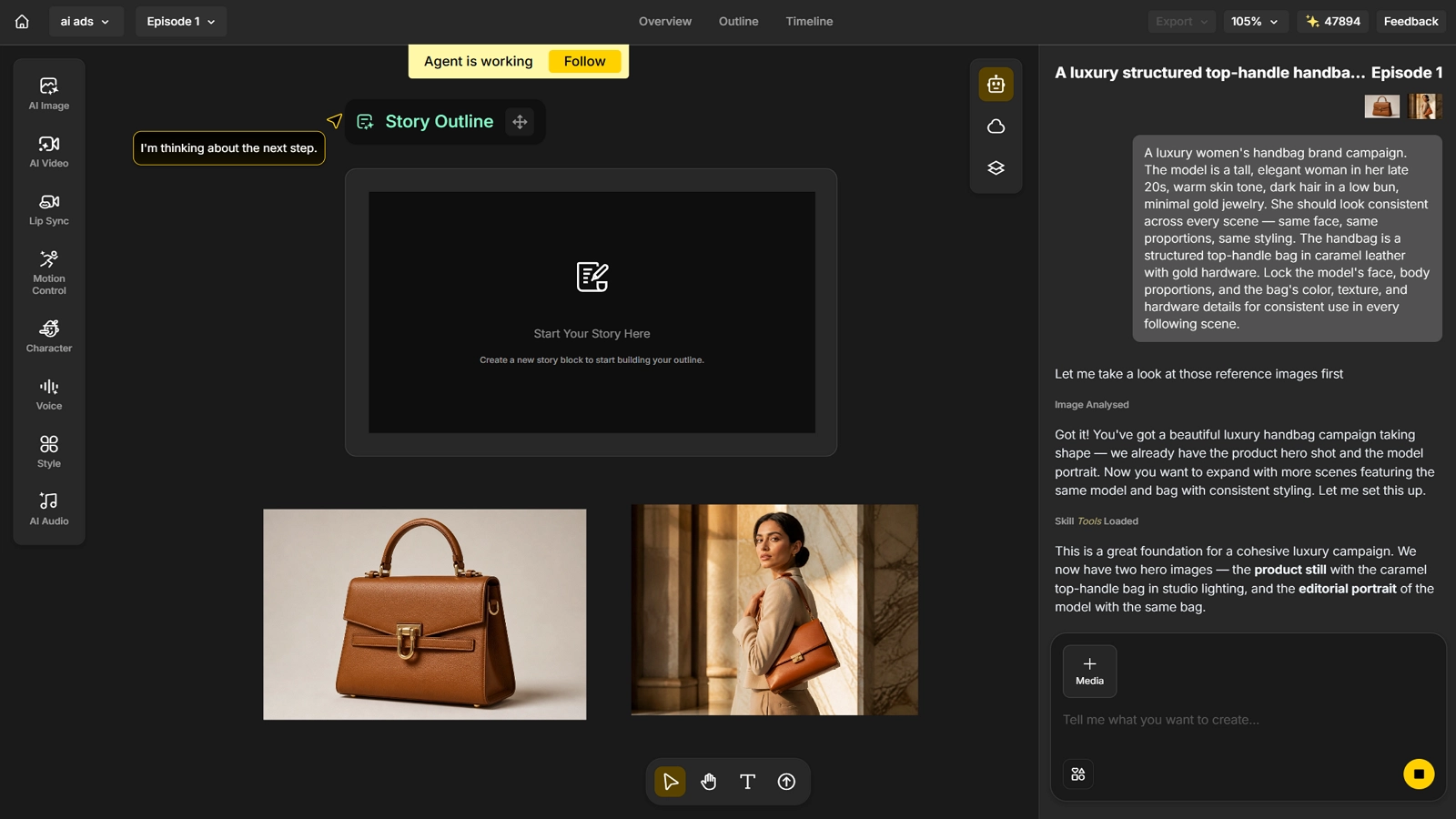
Step 1: Upload Your Product and Model, Then Lock the Character
- Upload a photo of your handbag, along with a brief and a reference photo of the model you want to feature.
- Once confirmed, Anijam’s character consistency locks the model’s face, styling, and the product’s look, so everything generated afterward stays the same person, same bag, same details.
Step 2: Describe the Ad You Want
- Describe the ad concept or script you have in mind - the setting, the mood, the story you want the bag to tell.
- Not sure where to start? Ask Anijam to suggest ad ideas based on your product and let the AI agent pitch a few directions to choose from.
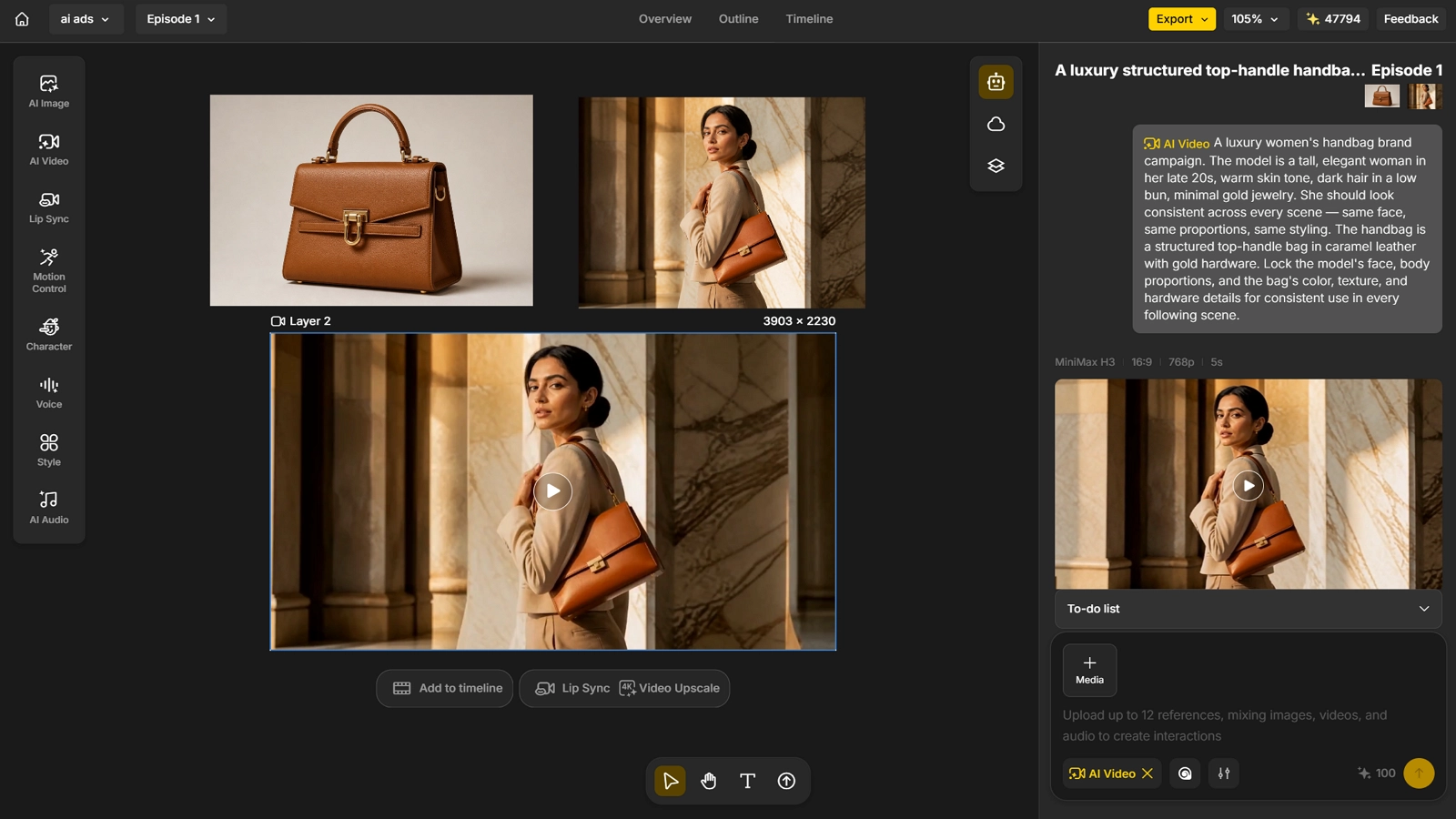
Step 3: Add Lip Sync and Music
- If your ad includes a talking model or voiceover, use lip sync to match mouth movement to the script or audio.
- Add background music to match the mood of the ad, or let Anijam generate a track for you automatically.
Step 4: Edit, Refine, and Export
- Fine-tune pacing, transitions, and details in the editor, then export your finished ad, ready to publish.
On App: Fast Start from a Template
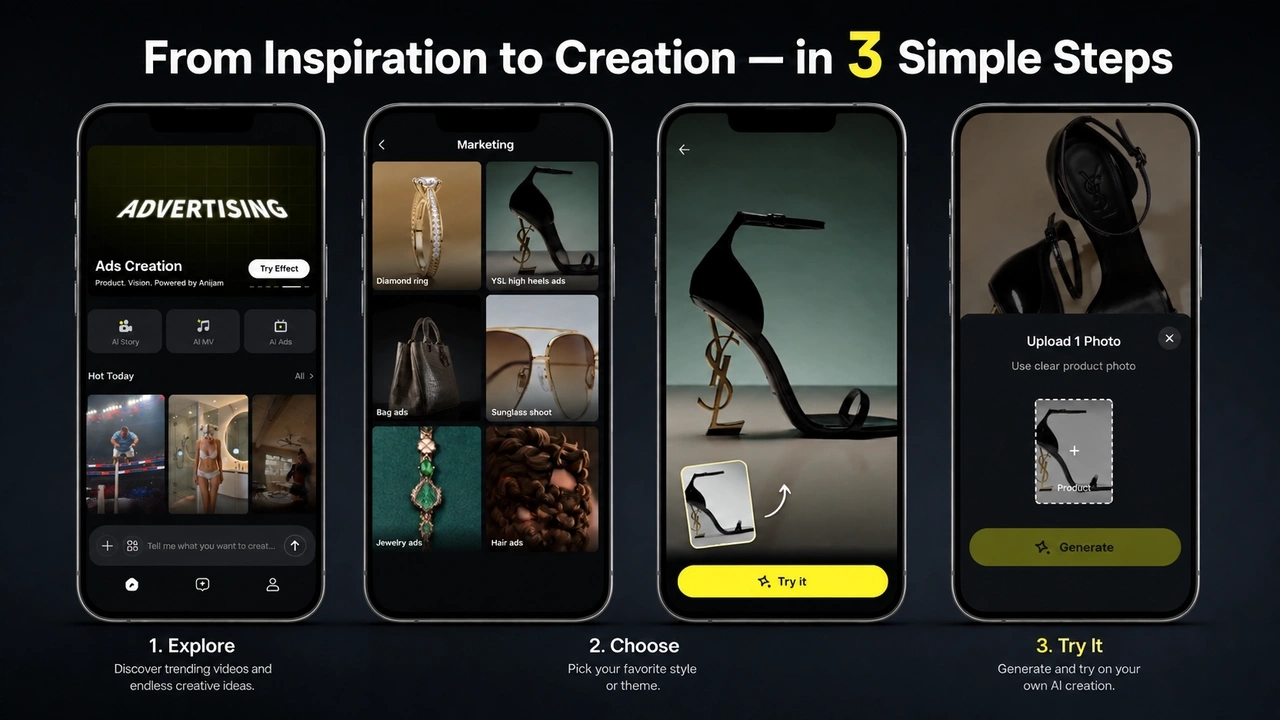
Step 1: Pick a Template You Like
- Browse the app’s constantly updated AI Ads template library - from luxury jewelry spots to mascot-style brand battles - to find a format that already fits your product.
Step 2: Upload Your Product Photo
- Add the product photo the template needs, and Anijam animates it with camera motion, studio lighting, and depth automatically.
Step 3: Adjust, Refine, and Export
- Tweak the script, voice, or styling to match your brand, then export. Projects sync automatically between the app and the web canvas, so you can keep refining on either one.
Common Mistakes to Avoid When Making AI Ads
| Mistake | Why It Hurts | Fix |
|---|---|---|
| Skipping the brief | The ad drifts without a clear audience, goal, or message, so it’s hard to judge what “worked” | Define your audience, platform, and goal before generating anything |
| Chasing volume over distinctiveness | Dozens of near-identical ads give the algorithm more to test but don’t actually stand out | Vary the concept, not just the copy - different hooks, formats, and openings |
| Losing character or brand consistency across versions | Viewers stop recognizing repeat characters or products as the same campaign | Use a locked, reference-based character or product asset across every ad variation |
Skipping the Brief
A brief doesn’t need to be long, but it should answer three questions before you generate anything: who is this ad for, what platform will it run on, and what should the viewer do after watching it. Skipping this step is one of the biggest reasons AI-generated ads underperform - the tool executes fine, but there was nothing specific to execute.
Chasing Volume Over Distinctiveness
More variations help an algorithm find what works, but only if the variations are actually different from each other. Fifty versions of the same shot with different captions rarely outperform five genuinely distinct concepts tested against each other.
Losing Character or Brand Consistency Across Versions
If a mascot, avatar, or product hero looks slightly different in every ad, viewers stop connecting the dots between posts. A consistent, reference-based character, or a locked product asset, makes a campaign feel like one recognizable brand voice instead of a pile of unrelated clips.
Conclusion
Making an AI ad in 2026 is no longer the hard part. Writing a clear brief, picking the right format, and staying consistent across variations is what actually separates a scroll-stopping ad from generic AI output.
Anijam brings the entire production process together in one workflow, on both web and mobile, so a product photo, a script, or a single idea can become a finished, publish-ready ad video in minutes. If you’re ready to make your first AI ad, head to Anijam AI and get started.
Frequently Asked Questions
Is Anijam’s AI ads generator free to use? Yes. Signing up gives you free video credits to start generating AI ad videos right away, no credit card required, and you can earn more each day just by checking in.
Do I need filming, design, or editing experience to make an AI ad? No. The entire workflow runs on plain-language prompts, scripts, or a single product photo. Anijam’s AI agent handles scene planning, visuals, voiceover, and assembly automatically.
Can I turn a single product photo into a finished ad video? Yes. Upload one product photo and Anijam animates it into a cinematic ad, adding camera motion, lighting, and depth automatically. This works for jewelry, skincare, gadgets, apparel, and interior renders.
What formats can I export for paid ad campaigns? Anijam exports in 9:16, 16:9, or 1:1, matching the requirements for TikTok, Instagram Reels, YouTube Shorts, Meta feed placements, and Google Display, so the same ad can be adapted to whichever platform you’re running it on.
Does Anijam support different ad styles? Yes. Anijam supports a range of styles - from cinematic product videos to stylized animated ads to realistic AI avatar and UGC-style talking ads - so the same platform can produce whatever look a campaign calls for.
by Evan
Evan is an AI content creator and video technology writer at Anijam AI, focused on how generative AI is transforming storytelling and video production. He shares social trends, creative workflows, prompt strategies, and practical insights to help creators turn ideas into engaging videos and visual content.