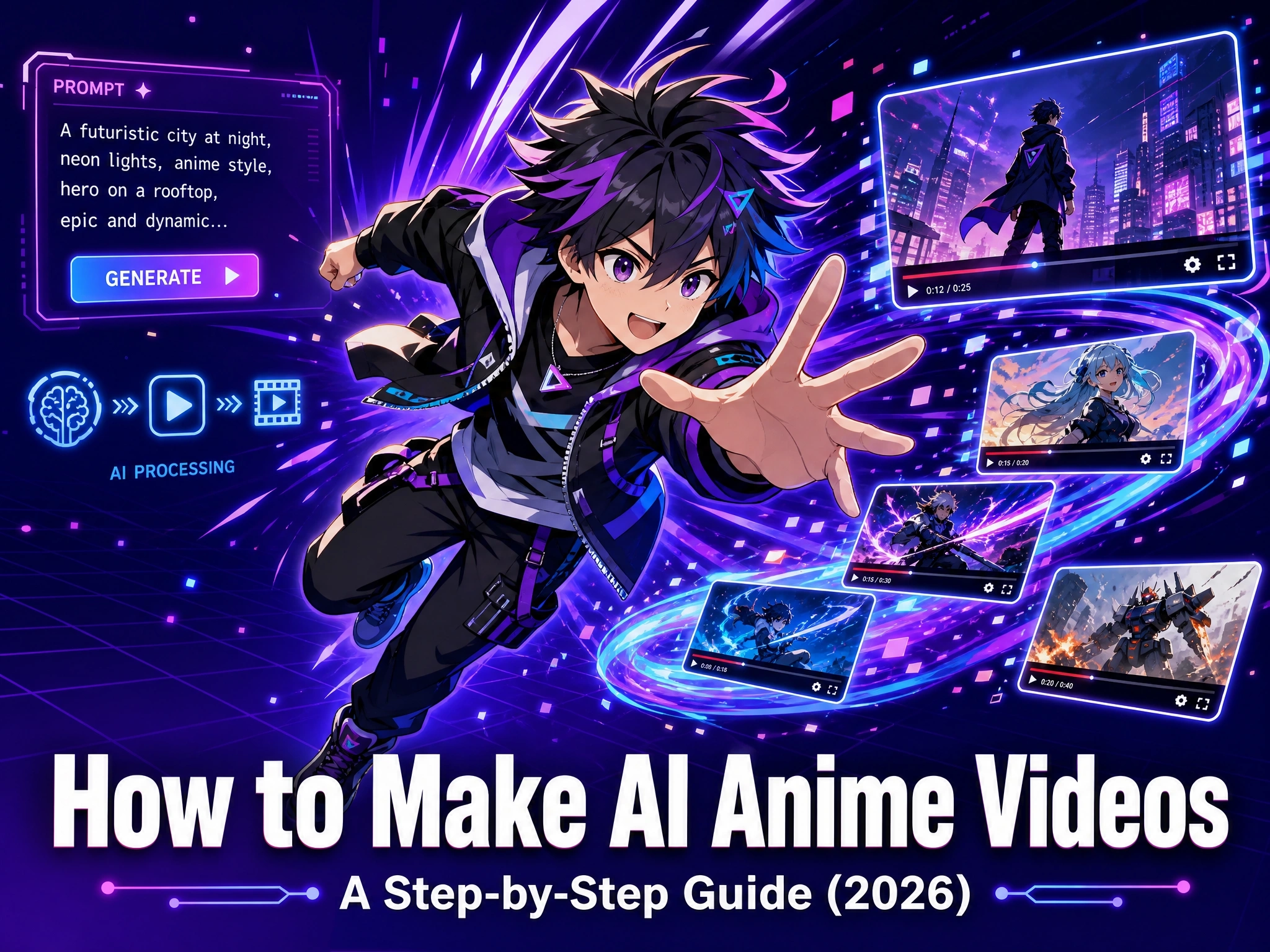
How to Make AI Anime Videos: A Step-by-Step Guide (2026)
Open TikTok or YouTube Shorts right now and anime style is everywhere - cel-shaded characters, dramatic camera pans, glowing energy effects, cherry blossom backdrops. A lot of it isn’t hand-drawn anymore.
It’s generated. A single text prompt, a photo, or a short script goes in, and an AI model turns it into a moving anime-style scene, no storyboard, no frame-by-frame drawing, and no animation software required.
This guide covers what an AI anime video actually is, why the style is having such a big moment on social platforms, and exactly how to make your own anime video with Anijam AI, on both web and the mobile app, along with a few trending template styles worth trying first.
What Are AI Anime Videos?
An AI anime video is a short clip generated by artificial intelligence in an anime visual style: cel-shaded lighting, expressive eyes, clean line art, and the dynamic camera work associated with Japanese animation. Instead of a human animator drawing each frame, an AI model generates the motion, characters, and background based on what you describe or upload.
It can start from a text prompt, a reference image or character design, a full scrip , an audio clip, or even an existing photo that gets restyled into an anime aesthetic. The output ranges from a single stylized scene to a multi-scene story with a recurring character, dialogue, and lip sync.
How AI Anime Video Generators Work
AI anime video generators work by turning a prompt, image, or script into a moving anime-style scene. You describe what you want - or upload a reference - and the AI fills in the motion, characters, and background to match.
There are three common ways to start:
- Text-to-video - describe a scene in plain language and the AI builds it from scratch.
- Image-to-video - upload a character design or photo and the AI adds motion, expression, and camera movement around it.
- Script-to-video - paste a full script or story and the AI breaks it into scenes automatically.
- Audio-to-video - upload an audio clip or voice recording and the AI builds a scene and lip-synced character around it.
The tricky part is keeping things looking like anime - and keeping the same character from scene to scene. That’s why tools built for animated storytelling, like Anijam AI, lock in a character’s design and style so it stays consistent throughout the whole video.
Why Anime Style Is Booming on TikTok & YouTube in 2026
Anime’s reach online has grown well beyond fan communities. Market research on the global anime industry has tracked it moving from roughly $26.8 billion in 2023 toward a projected $78.9 billion by 2036, and that growth shows up directly in how much anime-adjacent content circulates on short-form video platforms.
On TikTok specifically, anime content spans far more than clips from official shows. Fan edits built around currently popular series, original character videos, anime-style dance and transition trends, and short story-driven clips all perform well, and creators frequently reuse a trending audio or visual format with their own characters or scenes to ride an existing wave rather than starting from zero.
That reuse pattern is exactly where AI anime video tools fit in. A creator doesn’t need to storyboard, draw, or animate a character from scratch to participate - they need a clear idea, a reference image or prompt, and a tool that can generate the scene in a matching anime style within minutes.
How to Make AI Anime Videos with Anijam: Step-by-Step
However you start - a prompt, an image, an audio clip, or a full script - Anijam AI anime generator turns it into a fully animated anime scene, ready to edit, adjust, and export in one place. It includes a dedicated anime style library and template gallery, so you can pick the anime look you want.
On the web platform, you can create, add, and manage individual episodes to build out a full anime series, while on the app you can jump straight into a ready-made anime template and start creating right away. Projects sync automatically between the web platform and the mobile app, so you can start on one and finish on the other.
On Web
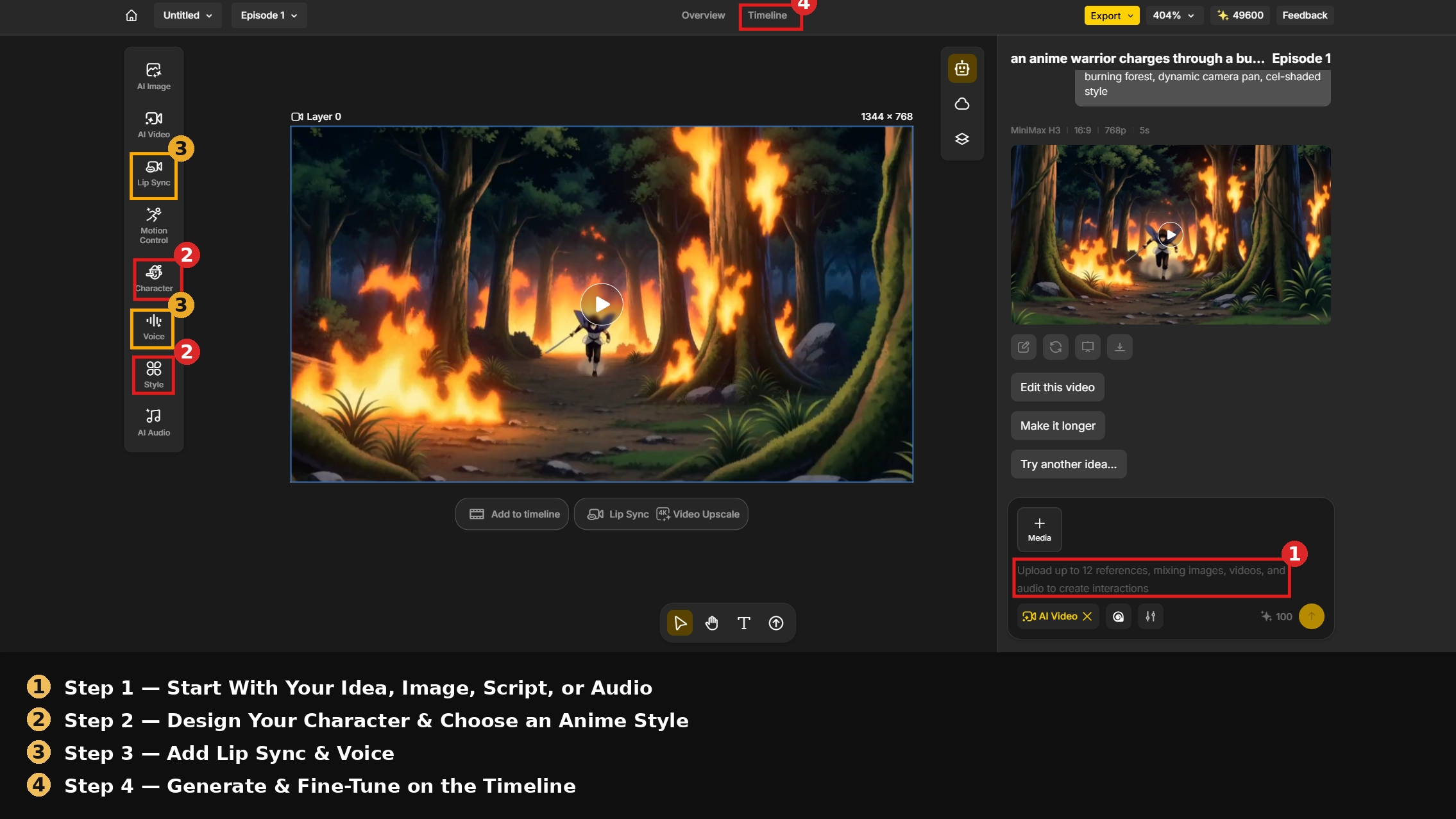
Step 1: Start With Your Idea, Image, or Script , or Audio
Open Anijam and enter your concept into the canvas. This can be a single sentence (“an anime warrior charges through a burning forest, dynamic camera pan, cel-shaded style”), a full scene description, a script with dialogue, an audio clip you want the scene built around, or a reference image of a character or setting you want animated.
Step 2: Design Your Character & Choose an Anime Style
Describe your character’s appearance in text, or upload a reference image, then pick an anime style from the style library - classic 2D anime, cinematic anime, Ghibli-inspired painted backgrounds, cyberpunk, dark fantasy, or chibi. The character consistency engine locks that design in so the same face, proportions, and outfit carry through every scene you generate afterward.
Step 3: Add Lip Sync & Voice
For a talking or narrated anime video, add your script or upload an audio clip and use the Lip Sync feature to match mouth movement to the dialogue. Anijam’s voice library includes 200+ AI voices across 30+ languages if you don’t want to record your own audio.
Step 4: Generate & Fine-Tune on the Timeline
Hit Generate and let the AI render your scene with motion, camera work, and lighting applied automatically. Use the built-in timeline editor to reorder scenes, trim awkward openings or endings, and adjust pacing. When you’re happy with the result, export - Anijam exports up to 1080p on standard plans and 4K on premium plans, ready to post to YouTube, TikTok, or Instagram.
On App
Step 1: Browse Trending Templates & Pick One You Like
Launch the Anijam app and check the trending templates section on the home screen, a curated feed of anime video styles and formats based on what other creators are currently making. Tap a trending template that matches the mood you’re going for, or start a fresh project and type your own prompt if you already know what you want to make.
Step 2: Upload Your Character Design
Upload a reference image of your character if you already have one. If not, no problem - just describe your character in text and let Anijam generate one for you.
Step 3: Edit, Adjust & Export
Generate the clip and preview it right on your phone. Fine-tune motion, timing, or dialogue sync if needed, then export it and share directly to TikTok, Instagram, or YouTube Shorts from within the app.
🔥 Trending AI Anime Video Templates in 2026
Not sure what style to start with? These four formats blend what’s currently trending in AI anime content with styles you can build directly on Anijam.
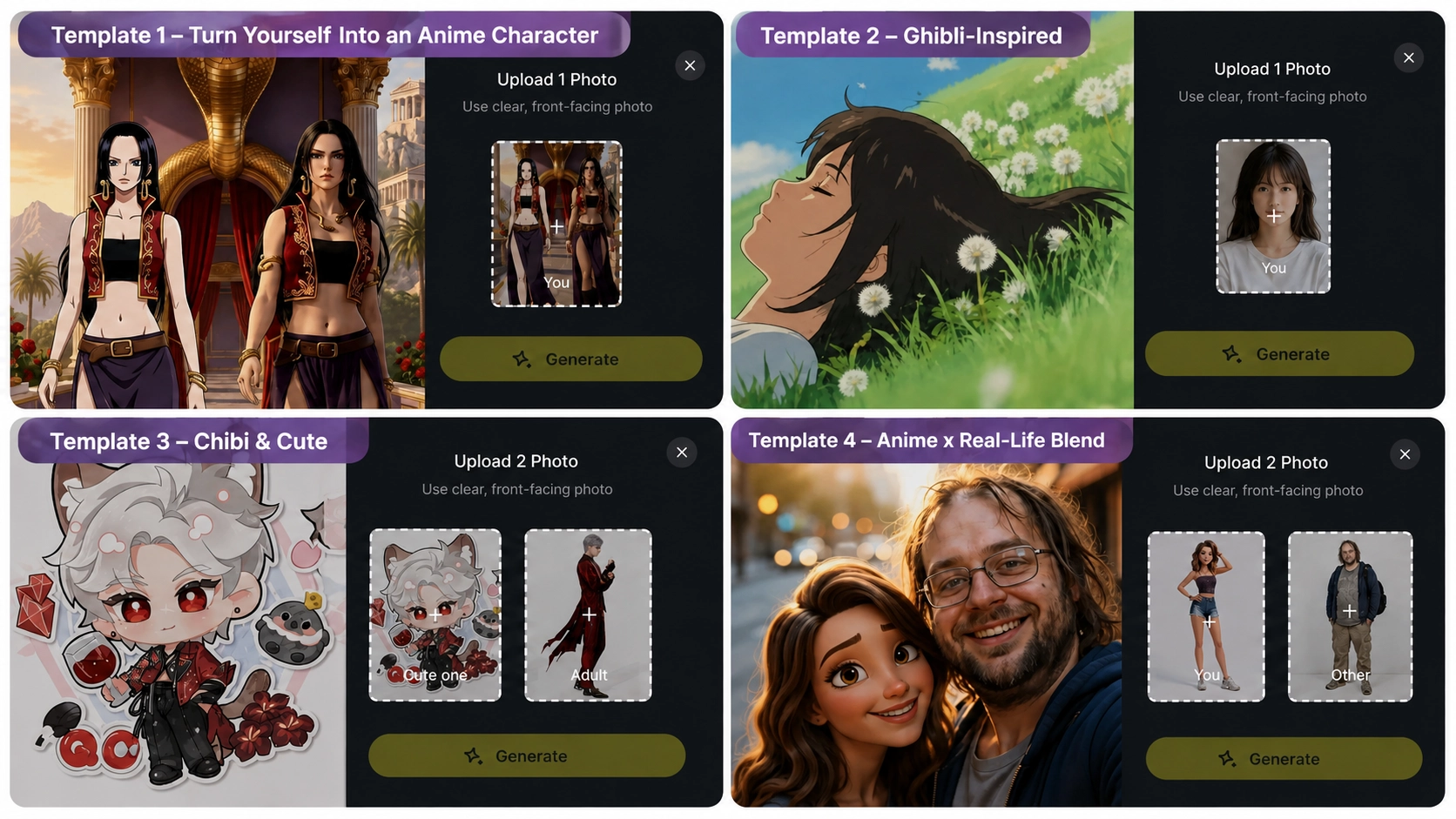
Template 1 - Turn Yourself Into an Anime Character
One of the most viral AI anime formats right now, with related hashtags racking up tens of millions of views. Upload a selfie or photo to the template, and the AI keeps your face shape, hairstyle, and outfit while converting the whole scene into anime style - ready to animate with motion, camera work, or a full scene around it.
Template 2 - Ghibli-Inspired
Soft, hand-painted backgrounds, warm natural light, and a slower, more atmospheric pace. This style tends to perform well for storytelling content, aesthetic mood clips, and longer-form YouTube videos where viewers are settling in rather than scrolling past.
Template 3 - Chibi & Cute
Rounded proportions, bright colors, and exaggerated expressions built for comedy and reaction content. This style is popular for short, punchy clips, mascot-style characters, and lighter content that’s meant to be shared quickly - easy to generate on Anijam by describing your character with a chibi style lock.
Template 4 - Anime x Real-Life Blend
Placing yourself in the same frame as an anime character - a “selfie together” effect, essentially. The contrast between a real photo and an anime character, along with the built-in fan appeal of a specific character type, is driving strong engagement on this format. On Anijam, this works by combining an uploaded photo with a separately designed anime character in the same scene, using the character consistency engine to keep both looking right across every frame.
| Template | Best For | Style Notes |
|---|---|---|
| Turn Yourself Into an Anime Character | Profile pictures, transformation posts, everyday updates | Keeps face shape, hairstyle & outfit; full anime restyle |
| Ghibli-Inspired | Storytelling, mood pieces, longer videos | Painted backgrounds, warm soft light |
| Chibi & Cute | Comedy, reactions, mascots | Rounded shapes, bright colors, exaggerated expression |
| Anime x Real-Life Blend | Fan content, character crossovers, novelty posts | Real photo + anime character in one consistent scene |
Tips for Better AI Anime Videos
How to Keep Characters Consistent Across Scenes
The most common problem in AI anime videos is a character that looks slightly different in every scene, different hair, a different face shape, a different outfit. Avoid this by designing your character once in detail and locking that design in with a character consistency engine rather than re-describing the character from scratch in every new prompt.
Best Practices for Prompt Writing
Anime has a distinct visual vocabulary, and getting an AI model to speak it consistently comes down to prompt structure. A dependable pattern is:
- Subject and setting - who or what, and where the scene takes place
- Style lock - a specific anchor like “cel shading,” “soft line art,” or “2D anime style” so the model doesn’t default to a photorealistic look
- Lighting and mood - soft rim lighting, golden hour glow, neon-lit scene, and so on
- Camera direction - wide establishing shot, close-up, low-angle, slow dolly-in
Keep prompts to roughly 8-14 meaningful keywords, and stick to one anime sub-style per generation. Mixing several distinct styles in a single prompt, like Ghibli and cyberpunk together, tends to confuse the model and produce inconsistent results.
How Long Should Your First Project Be
A 20-45 second clip is a realistic first attempt - the number of scenes, character checks, and edits adds up fast, and a short finished video beats an abandoned long one.
Why Sound Makes or Breaks an AI Anime Video
Music or voice makes a big difference in how finished a clip feels - even one background track goes a long way toward making an AI anime video feel complete.
Conclusion
Making an anime video used to require either years of drawing practice or a studio budget. Now it comes down to a clear idea, a well-built prompt, and a tool that understands anime’s visual language.
Anijam handles that entire workflow in one place, from character design and style selection to lip sync, motion, and export, on web or on the app. If you want to try it yourself, head to Anijam and start with your first anime video today.
Frequently Asked Questions
Is Anijam AI free to use?
Yes. Anijam offers a free plan with no credit card required, and you can check in daily to earn extra credits to use toward your videos. Premium plans unlock 4K export, longer videos, and full commercial usage rights.
Do I need drawing or animation skills to make an AI anime video?
No. Anijam is built around plain-language prompts, reference images, and style presets instead of manual drawing or frame-by-frame animation, so no prior art or animation experience is needed to get a finished result.
How long does it take to generate an AI anime video?
Most short scenes generate within a few minutes. Longer videos with multiple scenes, dialogue, and lip sync take a bit more time, but the entire process is still dramatically faster than traditional frame-by-frame animation.
Can I make an anime video without drawing my own character?
Yes. You can describe a character in text and let the AI design them from scratch, or upload a reference photo or existing character art and have Anijam animate it in your chosen anime style.
What anime styles can I create with Anijam?
Anijam’s style library covers classic 2D anime, cinematic anime, Ghibli-inspired painted backgrounds, cyberpunk, dark fantasy, chibi, pixel art, and more, with the option to train a custom style for a signature look.
by Evan
Evan is an AI content creator and video technology writer at Anijam AI, focused on how generative AI is transforming storytelling and video production. He shares social trends, creative workflows, prompt strategies, and practical insights to help creators turn ideas into engaging videos and visual content.