How to Make Collage Animation with AI: A Step-by-Step Guide
Scroll through TikTok, Instagram, or Youtube right now and you’ve probably run into it: a single portrait torn into a handful of photo “stickers,” scattered across a cream paper background, then snapped into place one by one as if an invisible pair of hands assembled it off-camera. It moves in short, punchy bursts - a beat, a bounce, done in under two seconds.
That’s the current wave of collage animation, and it’s a different animal from the “photo slideshow with transitions” people used to call by the same name. This version is AI-generated: a text prompt turns one photo into a full scrapbook-style composition - cutout stickers, torn paper edges, retro typography - and another prompt brings the whole thing to life with a tactile, stop-motion feel.
This guide breaks down what this new-style collage animation trend actually is, why AI tools are behind almost all of it, and a step-by-step walkthrough for making your own with Anijam.
What Is Collage Animation?
Collage animation combines multiple images, or fragments of images, into one moving visual - rather than a single static picture, you get a sequence or composition where elements shift, transition into each other, or perform actions over time.
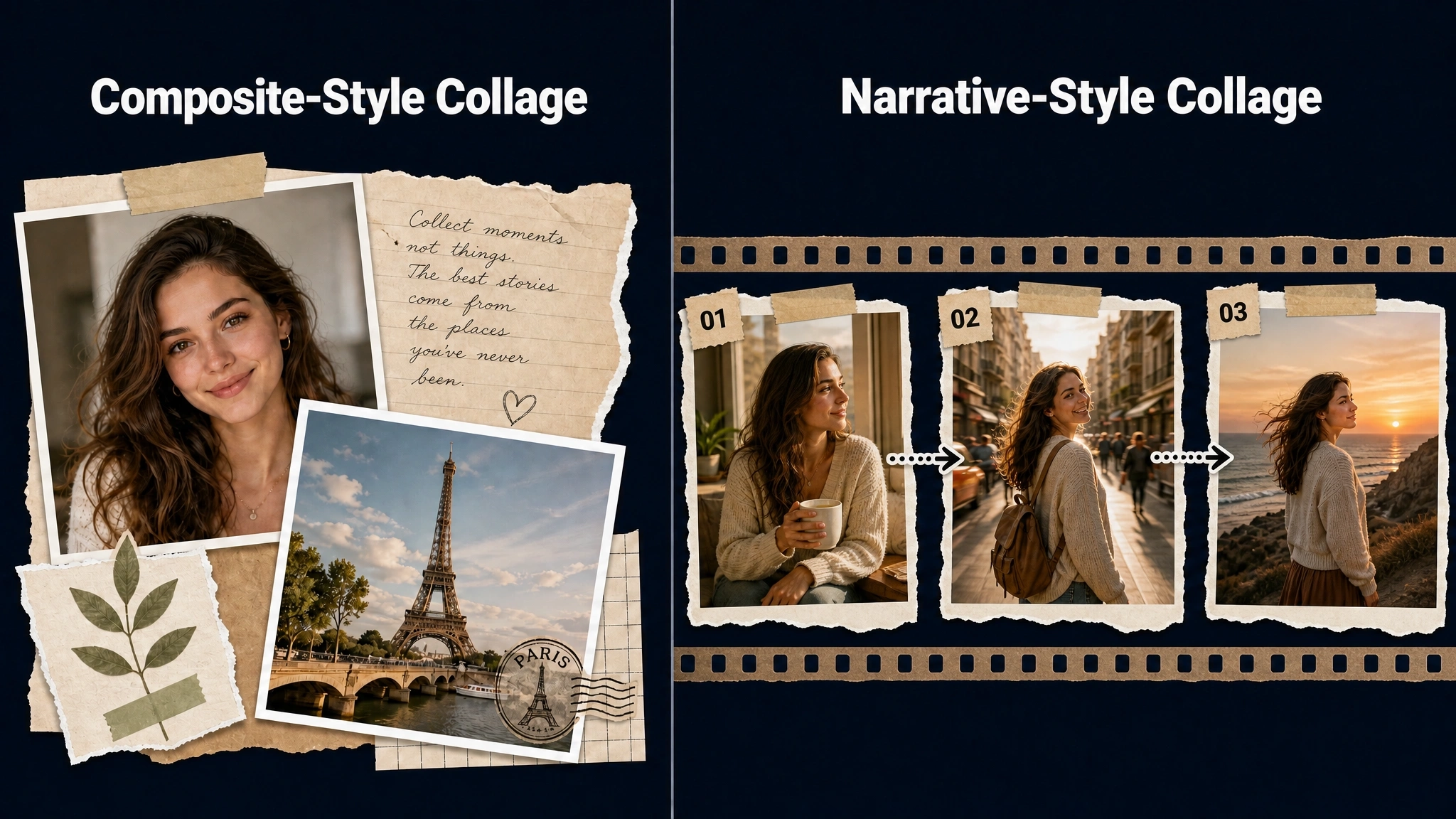
There are two broad approaches creators tend to use:
Composite-Style Collage
Several images share the same frame at once, arranged like a moving scrapbook page - photos slide in, layer over one another, or pulse with the music, closer to a dynamic poster than a scene.
Narrative-Style Collage
Images are stitched into a sequence that plays out like a short story, with each photo getting its own moment of motion before transitioning into the next - closer to a short video built from stills than a single animated frame.
Both approaches show up constantly across social platforms: travel and birthday recaps, wedding highlight videos, product showcases, brand storytelling, and personal memory videos are some of the most common uses.
Why Use AI for Collage Animation?
Making a collage animation by hand means making every decision yourself - layout, pacing, transition style, and camera movement - inside a video editor. AI takes over most of that manual work, which is why collage animation has become accessible to people with no editing background at all.
Here is what AI actually handles for you:
- Automatic layout and pacing - arranging images and deciding how long each one stays on screen
- Generated motion and transitions - smooth movement between images instead of a static cut
- Image-to-video conversion - turning a still photo into a clip with real camera motion or animated elements
- One-click background removal - instantly isolating a subject from its original photo, so it’s ready to use as a clean cutout element in a collage, without manually tracing edges
- Consistency across scenes - keeping the same face, outfit, or product looking identical from one photo to the next
- Voice and sync - adding narration or matching lip movement to dialogue automatically, when a photo includes a person
Step-by-Step: How to Make a Collage Animation with Anijam
Anijam AI is an all-in-one AI video and animation platform, where a batch of photos can become one animated collage in a single continuous workflow. It’s built to handle multiple images at once while keeping every subject consistent across scenes, and projects sync automatically between the web platform and the mobile app.
An example made by Anijam:
Step 1: Upload Your Photos
Start by uploading the photos you want to include in your collage animation - portraits, travel snapshots, or any images with the elements you want to feature.
Step 2: Edit on the Canvas
Use the canvas editor to clean up each image before composing your collage - remove the background, isolate the subject, or keep only the specific element you want (a person, an object, a landmark). This gives you clean, cutout-style assets to work with in the next step.
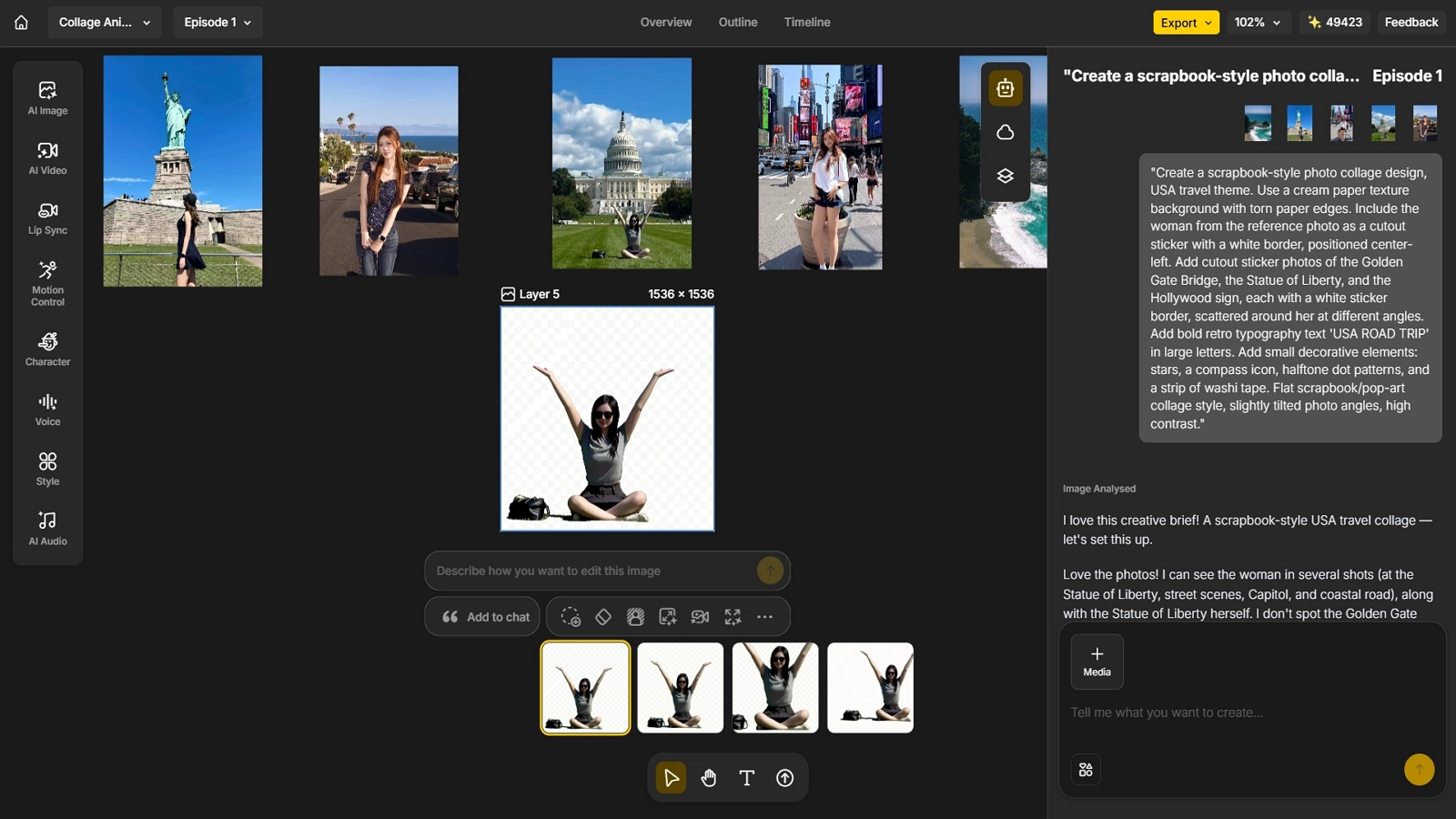
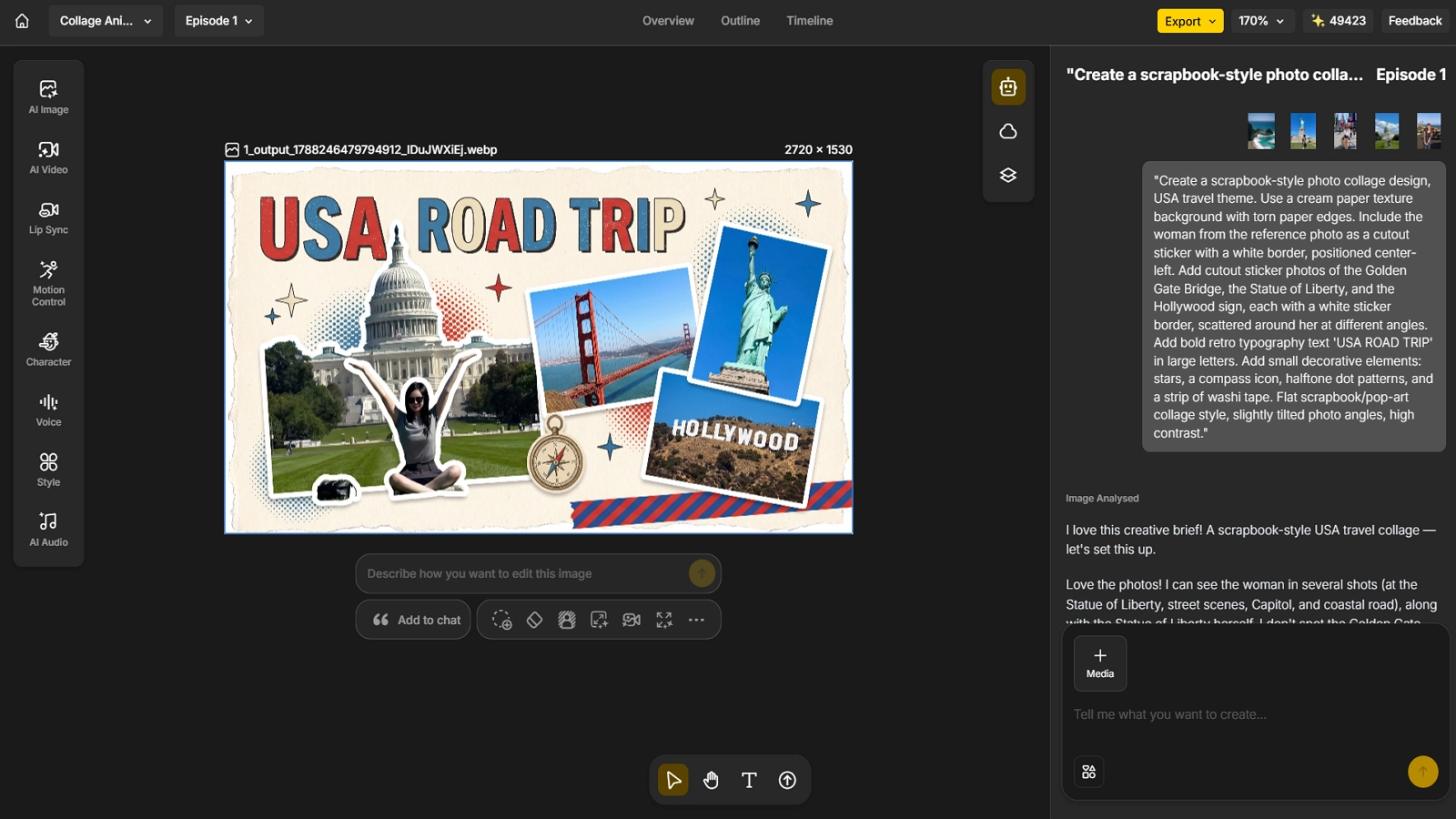
Step 3: Generate the Static Collage Layout
Describe the collage you want in plain language, and let the AI compose the layout - arranging your cutout elements, adding decorative details, and applying a cohesive visual style. For example:
“Create a scrapbook-style photo collage design, USA travel theme. Use a cream paper texture background with torn paper edges. Include the woman from the reference photo as a cutout sticker with a white border, positioned center-left. Add cutout sticker photos of the Golden Gate Bridge, the Statue of Liberty, and the Hollywood sign, each with a white sticker border, scattered around her at different angles. Add bold retro typography text ‘USA ROAD TRIP’ in large letters. Add small decorative elements: stars, a compass icon, halftone dot patterns, and a strip of washi tape. Flat scrapbook/pop-art collage style, slightly tilted photo angles, high contrast.”
Review the layout and regenerate if any element needs adjusting before moving to animation.
Step 4: Animate the Collage
Once the static layout looks right, bring it to life with a motion prompt describing how each element should move into place:
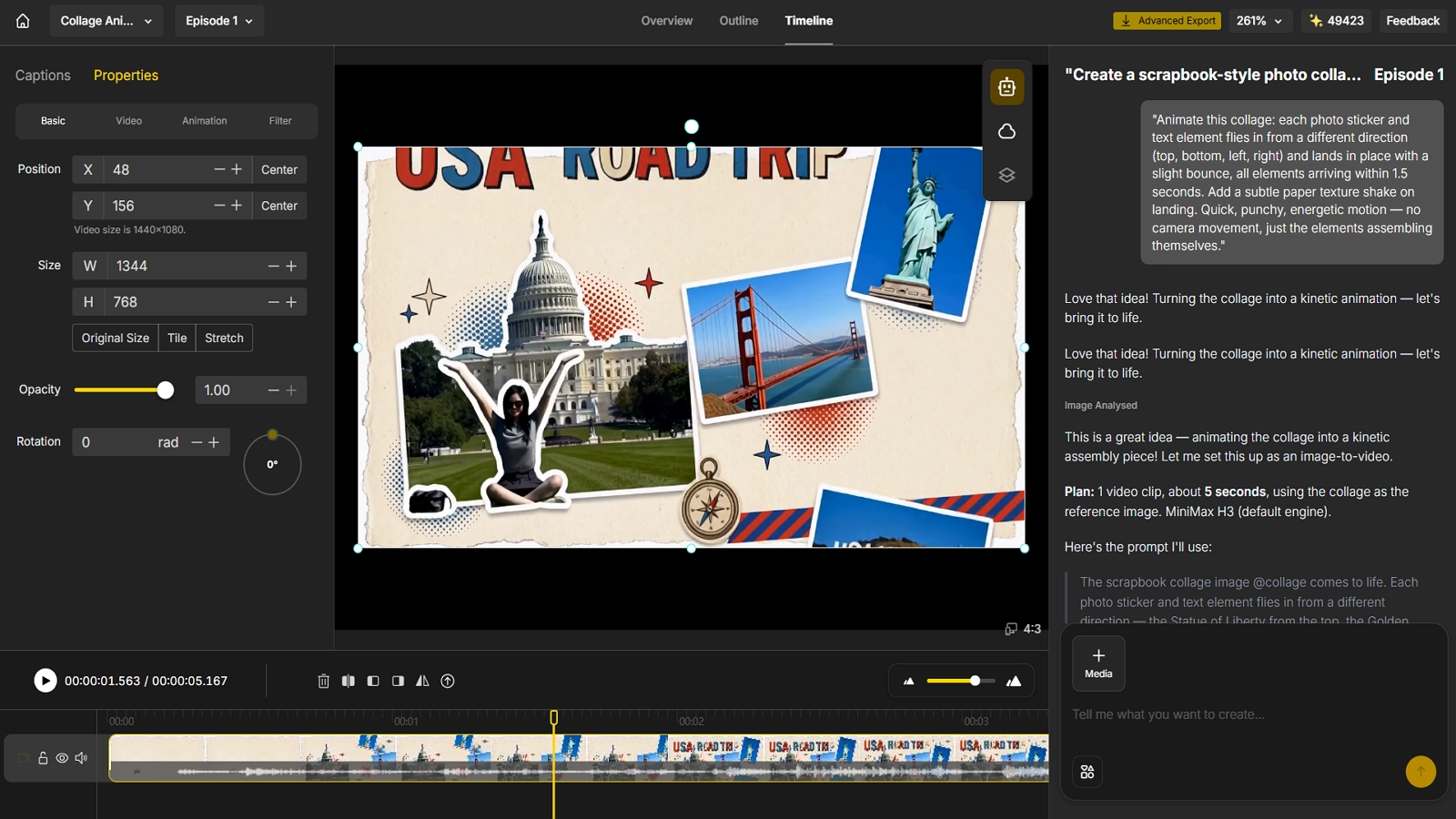
“Animate this collage: each photo sticker and text element flies in from a different direction (top, bottom, left, right) and lands in place with a slight bounce, all elements arriving within 1.5 seconds. Add a subtle paper texture shake on landing. Quick, punchy, energetic motion - no camera movement, just the elements assembling themselves.”
From here, fine-tune the timing of individual elements, trim the clip, and add background music, then export your finished collage animation.
The result is a short, 1-2 second burst of motion where every sticker, photo, and text element snaps into place - perfect for a fast-paced intro, transition, or standalone social clip.
Collage Animation Ideas for Social Media
Collage-style content is not a niche format - it is one of the most consistently high-performing content types on social platforms right now. A few real, currently trending directions are worth knowing before you start.
Photo Dump and Memory Recap
The photo dump - a casual mix of photos and videos from a trip, week, or event - is one of the highest-engagement formats on Instagram. Carousel-style posts average a 0.72% engagement rate across industries, noticeably higher than the 0.68% average for Reels, and the #photodump hashtag has grown to millions of posts. Instagram supports up to 20 images or videos in a single carousel, which is exactly the kind of batch that works well when animated into one collage video instead of a static swipe.
Mixed-Media Collage Animation
Industry trend reports for 2026 point to collage animation as a genuine growth area in motion design, precisely because it brings a more artistic, handmade feel to digital content - blending photos, paper textures, cutouts, illustration, scanned objects, and animated typography into a single piece, rather than relying on one clean, uniform look.
Animation Combo Edits
Inside the CapCut ecosystem, “animation combo” is an established, actively used tag for edits that stitch several photos and clips together with animated transitions, often layered on top of a trending collage template. It sits alongside a broader cluster of scrapbook, recap, and throwback collage trends that consistently resurface around holidays and milestones.
Here is how the three directions compare at a glance:
| Trend | Format | Best For |
|---|---|---|
| Photo Dump & Memory Recap | 5-20 photos and clips animated into one sequence | Travel, weekly recaps, friendship and holiday content |
| Mixed-Media Collage Animation | Photos blended with textures, cutouts, and illustration | Artistic, brand, or portfolio-style content |
| Animation Combo Edits | Photos and clips joined with animated transitions and templates | Trend-driven TikTok and Reels edits |
Tips for Better Results
- Be specific in your prompts - describe the mood, camera movement, and pacing you want instead of a generic instruction.
- Use clear reference photos - well-lit, front-facing images with the subject unobstructed produce the most consistent results across scenes.
- Start with a small batch - test your style and prompt on 4-5 images before committing to a full set.
- Regenerate, do not restart - if one scene looks off, redo that single clip instead of the entire project.
- Match the platform - export vertical for TikTok and Reels, widescreen for YouTube, and square for feed posts.
Common Use Cases
- Personal memories - turning wedding, travel, or family photos into a single animated recap
- Social content - quick, eye-catching edits for TikTok, Instagram, or YouTube Shorts
- Product showcases - bringing multiple product shots to life in one cohesive video
- Brand and marketing storytelling - combining campaign photos into one consistent, on-brand video
Conclusion
AI has turned collage animation from a slow, skill-dependent editing task into something almost anyone can finish in one sitting. Upload your photos, describe what you want to happen, and let the AI handle the layout, motion, and consistency - the same workflow whether you are making a sentimental family recap or a trend-ready social clip.
Anijam is built to handle that entire process in one place, on web or on the app, as an all-in-one AI video and animation platform. If you want to turn your own photos into a finished collage animation, head to Anijam AI and start your first project today.
Frequently Asked Questions
Is Anijam free to use? Yes. You can check in daily to earn credits and use them to generate videos. If you want more advanced features, higher resolution exports, or commercial usage rights, paid plans are also available.
How long does it take to generate a collage animation? Most short clips generate in a few minutes each. A full collage made from several photos takes a little longer since each image is animated individually, but the entire process is still far faster than editing real footage by hand.
Do I need video editing or animation skills to make a collage animation? No. Anijam is built around plain-language prompts and templates instead of manual editing, keyframing, or rigging, so no prior video or animation experience is required to get a shareable result.
Can I combine multiple photos into one animated video? Yes. Anijam accepts multiple reference images in a single project - a main subject, a supporting character, a product, or a location - and keeps every element visually consistent with its own reference throughout the finished video.
by Evan
Evan is an AI content creator and video technology writer at Anijam AI, focused on how generative AI is transforming storytelling and video production. He shares social trends, creative workflows, prompt strategies, and practical insights to help creators turn ideas into engaging videos and visual content.