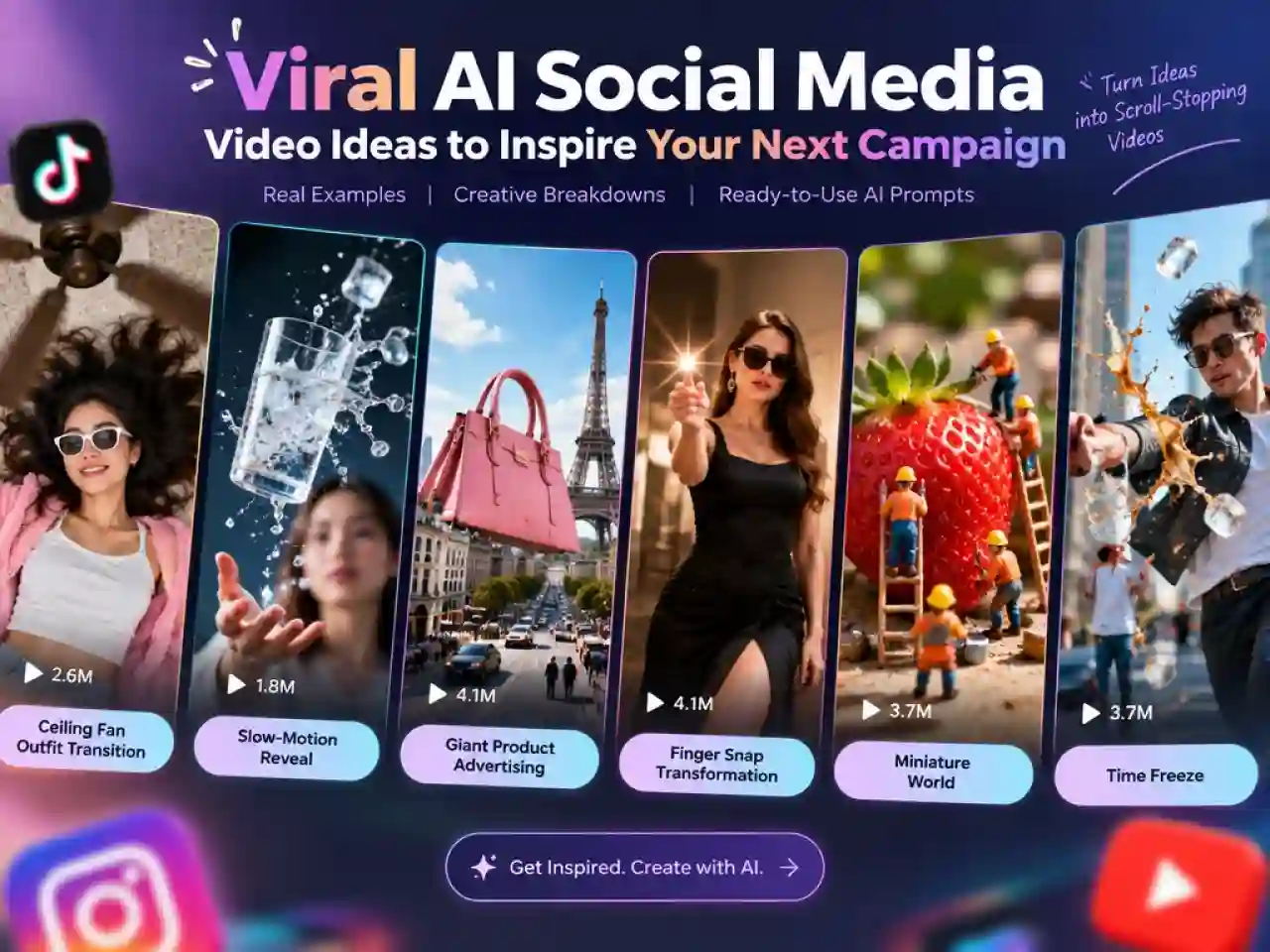
6+ Viral AI Social Media Ad Examples to Inspire Your Next Campaign
Creating social media videos that catch people’s attention doesn’t always require expensive equipment, a production team, or advanced editing skills. Sometimes, one unexpected visual, a clever transition, or a surprising product reveal is enough to make people stop scrolling.
From ceiling fan outfit transitions and giant product advertisements to miniature worlds and impossible visual effects, creative video formats are constantly evolving across TikTok, Instagram Reels, and YouTube Shorts.
AI video tools make it easier to explore these ideas, recreate interesting visual effects, and turn your own concepts into short-form content. You can start with a reference image, a simple idea, or a text prompt and experiment with different creative directions.
In this guide, we’ve collected 6+ AI social media video ideas inspired by real social media content and recognizable creative formats. Each example includes a reference, an explanation of why it works, and an AI video prompt you can adapt for your own content.
We’ll keep updating this article with new social media trends, viral video formats, and AI creative ideas as they emerge. Bookmark this page to find fresh inspiration for your next video.
6+ Creative AI Social Media Video Ads Examples
1. Ceiling Fan Outfit Transition
Creative Idea
Imagine lying beneath a spinning ceiling fan. Every time a fan blade sweeps across the camera, your outfit changes. One moment you’re wearing casual clothes; the next, you’re in a completely different look.
This transition turns an ordinary household object into a creative editing tool. It’s especially suitable for fashion creators, clothing brands, outfit inspiration, and seasonal collections.
Real Social Media Example:
Why It Works
- Unexpected transition: A ceiling fan is an unusual visual device for an outfit change.
- Consistent framing: The fixed overhead camera makes every outfit easy to compare.
- Repeatable payoff: Viewers have a reason to keep watching for the next look.
How to Recreate It with AI
Start with a clear photo of yourself and describe the overhead composition, rotating fan, and outfit changes. Ask the AI video generator to keep your face, body position, and camera framing consistent while changing the outfit with each fan-blade pass.
AI Video Prompt
Create a realistic vertical 9:16 outfit transition video. Show a stylish young woman lying on a soft living room rug beneath a slowly spinning ceiling fan. Use a fixed overhead camera angle. Every time a fan blade sweeps across the frame, seamlessly change her outfit into a new fashionable look. Include five distinct outfits: casual streetwear, sporty athleisure, a summer dress, an elegant evening outfit, and a cozy autumn look. Keep her face, pose, and position consistent. Natural lighting, realistic fabric movement, smooth transitions, high-quality fashion video.
More Ideas to Try
- Show five outfits for different seasons.
- Create a before-and-after styling transformation.
- Feature a clothing collection with one outfit revealed per fan rotation.
2. Unexpected Slow-Motion Reveal
Creative Idea
Take an ordinary action and turn it into a dramatic cinematic moment. A person tosses a drink into the air, flips their hair, jumps into a pool, or throws a jacket over their shoulder. The action suddenly slows down, revealing every detail in the movement.
This is a flexible creative format for lifestyle videos, sports content, beauty campaigns, and product advertisements.
Real Social Media Example:
Why It Works
- Visual contrast: The sudden change from normal speed to slow motion creates an immediate hook.
- Detail and texture: Small movements, splashes, and flying objects become more noticeable.
- Cinematic feeling: Slow motion gives simple actions a more dramatic, polished look.
How to Recreate It with AI
Choose one clear action and describe exactly when the slow-motion effect should begin. Keep the subject’s movement natural and use a stable camera or a controlled camera movement.
AI Video Prompt
Create a cinematic vertical slow-motion video of a young woman tossing a glass of sparkling water into the air. Start with normal speed as she gently throws the glass upward. Suddenly transition into ultra-smooth slow motion, capturing water droplets and ice cubes suspended in mid-air. Use detailed liquid physics, realistic reflections, dramatic side lighting, and a subtle camera push-in. Keep the background clean and the subject sharply focused. High-end commercial cinematography, realistic motion, 4K quality.
More Ideas to Try
- Freeze a basketball just before it enters the hoop.
- Capture a perfume spray in extreme slow motion.
- Show a splash of colorful liquid spreading across a surface.
3. Giant Product Advertising (FOOH)
Creative Idea
What if a giant handbag drove through the streets of Paris? Or a huge mascara wand brushed the eyelashes of a passing subway train?
Fake Out-of-Home (FOOH) advertising combines real-world footage with CGI to create surreal scenes that look like large-scale public installations. The product becomes part of a familiar city environment, creating an unexpected visual spectacle.
Why It Works
- Scale contrast: An oversized product immediately disrupts an ordinary city scene.
- Surprise factor: The unexpected interaction makes people want to watch again.
- Product integration: The product is the main visual attraction rather than an unrelated advertisement.
How to Recreate It with AI
Start with a product photo and choose a recognizable real-world setting. Describe how the product should interact with the environment, including its scale, movement, shadows, and camera perspective.
AI Video Prompt
Create a hyper-realistic Fake Out-of-Home advertising video in a recognizable modern city. A gigantic luxury sneaker appears beside a busy urban street, several times larger than nearby vehicles and buildings. The sneaker slowly moves forward as if it were walking through the city. Keep the original product design, colors, logo placement, and material details accurate. Match the lighting, shadows, reflections, and camera perspective to the real environment. Cinematic wide-angle shot, realistic CGI integration, premium commercial aesthetic, vertical 9:16.
More Ideas to Try
- A giant perfume bottle spraying fragrance over a city square.
- An oversized lipstick appearing on a building facade.
- A massive sneaker stepping onto a basketball court.
- A giant Christmas gift box appearing in a shopping district.
4. Finger Snap Freeze-Frame
Creative Idea
A person snaps their fingers, and everything changes instantly. Their outfit, location, hairstyle, background, or even the entire scene transforms with the sound.
The finger snap acts as a simple visual trigger, making this format easy to adapt to fashion transitions, product showcases, lifestyle content, and before-and-after videos.
Why It Works
- Clear visual trigger: Viewers immediately understand what causes the transformation.
- Fast payoff: The change happens in a single beat.
- Easy to customize: The same structure works for many products and themes.
How to Recreate It with AI
Describe the starting scene, the snapping action, and the exact transformation that follows. Keep the subject’s position and hand movement consistent so the transition feels intentional.
AI Video Prompt
Create a vertical 9:16 transformation video. A fashionable young woman stands in the center of a clean studio wearing a simple white outfit. She raises one hand and snaps her fingers. At the exact moment of the snap, the entire scene transforms into a luxurious fashion setting, and her outfit changes into an elegant black evening dress. Add a subtle flash effect and a smooth transition. Keep her face and body proportions consistent. Polished lighting, stylish composition, seamless transformation, high-end fashion campaign.
More Ideas to Try
- Snap to change between three makeup looks.
- Snap to transform a plain room into a festive holiday setting.
- Snap to reveal different product colors or styles.
5. Miniature World
Creative Idea
Turn everyday objects into enormous landscapes and ordinary people into tiny characters. Imagine miniature workers cleaning a giant strawberry, tiny construction teams building a chocolate cake, or small people living inside a coffee cup.
The contrast between giant objects and miniature characters creates a playful world that viewers can explore.
Real Social Media Example:
Why It Works
- Scale contrast: Familiar objects look completely different when viewed from a miniature perspective.
- Storytelling potential: Tiny characters can interact with everyday objects in unexpected ways.
- Satisfying visuals: Detailed miniature environments encourage viewers to pause and explore.
How to Recreate It with AI
Choose one everyday object and imagine what a miniature world built around it would look like. Add tiny characters, small tools, and a simple action or problem to solve.
AI Video Prompt
Create a hyper-realistic miniature world inside a giant strawberry. Tiny workers in colorful uniforms are carefully cleaning the strawberry’s seeds and surface using miniature ladders, brushes, and tools. Show detailed textures, tiny characters interacting with the oversized fruit, and a macro photography perspective with shallow depth of field. Warm natural lighting, whimsical storytelling, realistic miniature details, satisfying movement, vertical 9:16.
More Ideas to Try
- Tiny workers building a house inside a giant coffee cup.
- Miniature chefs preparing food on an oversized plate.
- A tiny city built inside a transparent perfume bottle.
6. Time Freeze
Creative Idea
Everything suddenly stops moving, but the camera keeps moving. A person is frozen mid-jump, water droplets hang in the air, and objects remain suspended as the camera circles around the scene.
This is commonly known as a bullet-time effect. It turns a split second into a dramatic visual moment.
Real Social Media Example:
Why It Works
- Unexpected motion: The contrast between a frozen subject and a moving camera creates visual interest.
- Cinematic effect: The orbiting camera makes the moment feel like a movie scene.
- Replay value: Viewers may watch again to inspect the suspended objects and details.
How to Recreate It with AI
Choose a clear action that can be frozen at its most interesting moment. Describe which objects should remain suspended and how the camera should move around the scene.
AI Video Prompt
Create a cinematic bullet-time video in vertical 9:16. A young man is walking down a sunny city street when he accidentally drops an iced coffee. At the exact moment the cup falls, time freezes. The coffee, ice cubes, and water droplets remain suspended in mid-air while the camera smoothly circles around him. Keep the subject completely frozen while only the camera moves. After the orbit, time resumes and the coffee continues falling. Realistic physics, detailed liquid particles, cinematic lighting, high-quality visual effects.
More Ideas to Try
- Freeze a basketball player in mid-air before a dunk.
- Suspend colorful makeup products during a beauty reveal.
- Freeze a person jumping through a burst of confetti.
What Makes a Social Media Video Idea Go Viral?
Although these video formats look very different, many share a few creative elements that make them engaging on social media.
1. An Unexpected Visual Hook
A surprising scene, unusual object, or unexpected transformation gives viewers a reason to stop scrolling. Whether it’s an outfit change hidden by a ceiling fan or a giant product appearing in a city, the opening visual should create immediate curiosity.
2. A Simple Concept with a Clear Payoff
The best video ideas are easy to understand without a long explanation. A finger snap triggers a transformation, a slow-motion reveal highlights a dramatic moment, and a miniature world turns familiar objects into something unexpected. Viewers quickly understand the concept and want to see the result.
3. Strong Visual Contrast
Differences in scale, speed, movement, or appearance make videos more visually interesting. Giant products, tiny characters, frozen moments, and sudden transitions all use contrast to make ordinary scenes feel extraordinary.
4. Room for Creative Variations
A strong video format is easy to adapt. Creators can change the subject, product, setting, or visual style while keeping the original creative concept. This makes one idea useful for multiple posts, seasonal content, product showcases, and different social media platforms.
These elements don’t guarantee viral success, but they provide a useful starting point for creating short-form videos that capture attention and encourage viewers to keep watching.
How to Create Creative Social Media Videos with Anijam AI
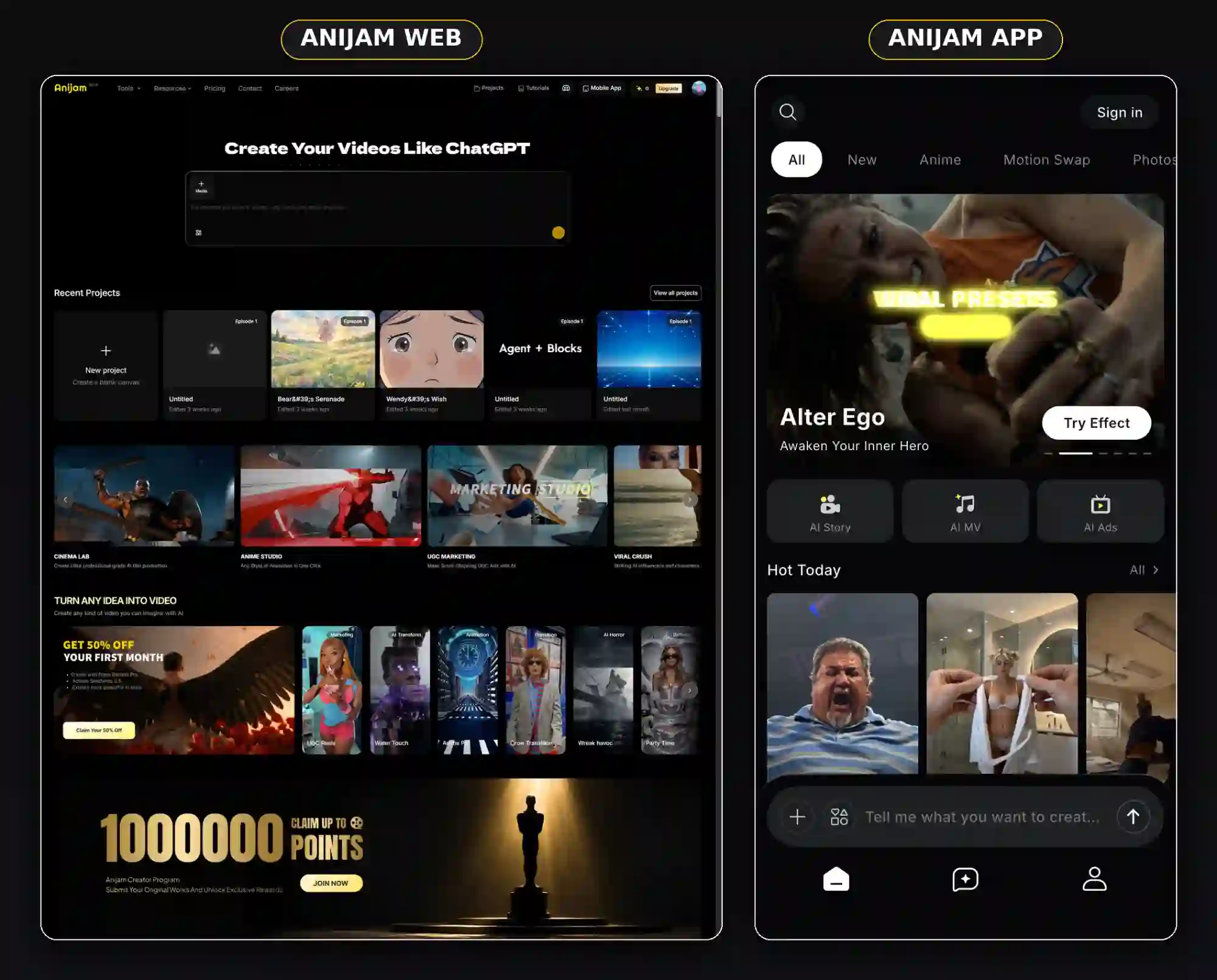
You don’t need to build every video from scratch or switch between multiple tools to experiment with these creative ideas. Anijam AI brings inspiration, video generation, and editing together in one creative workspace.
Whether you want to recreate a trending transition, develop a product video concept, or turn an original idea into a short-form video, you can use Anijam’s AI Video Agent and Trending Templates to get started.
Explore Trending Templates for Instant Inspiration
Not sure which idea to try first? Start with Anijam’s Trending Templates.
Explore ready-to-use video templates inspired by popular social media formats, creative effects, and visual styles. Many templates include prompts you can use directly, making it easier to experiment without writing everything from scratch.
New templates are added regularly, so you can discover fresh ideas and explore different creative directions as social media trends evolve.
Let the AI Video Agent Turn Ideas into Videos
Have a video concept but don’t know how to develop it?
Anijam’s AI Video Agent helps turn an initial idea into a more complete video concept. Describe what you want to create, and it can help develop the storyline, scenes, visual direction, and other creative elements.
You can start with a simple idea, a script, or a visual reference, then refine the result through conversation.
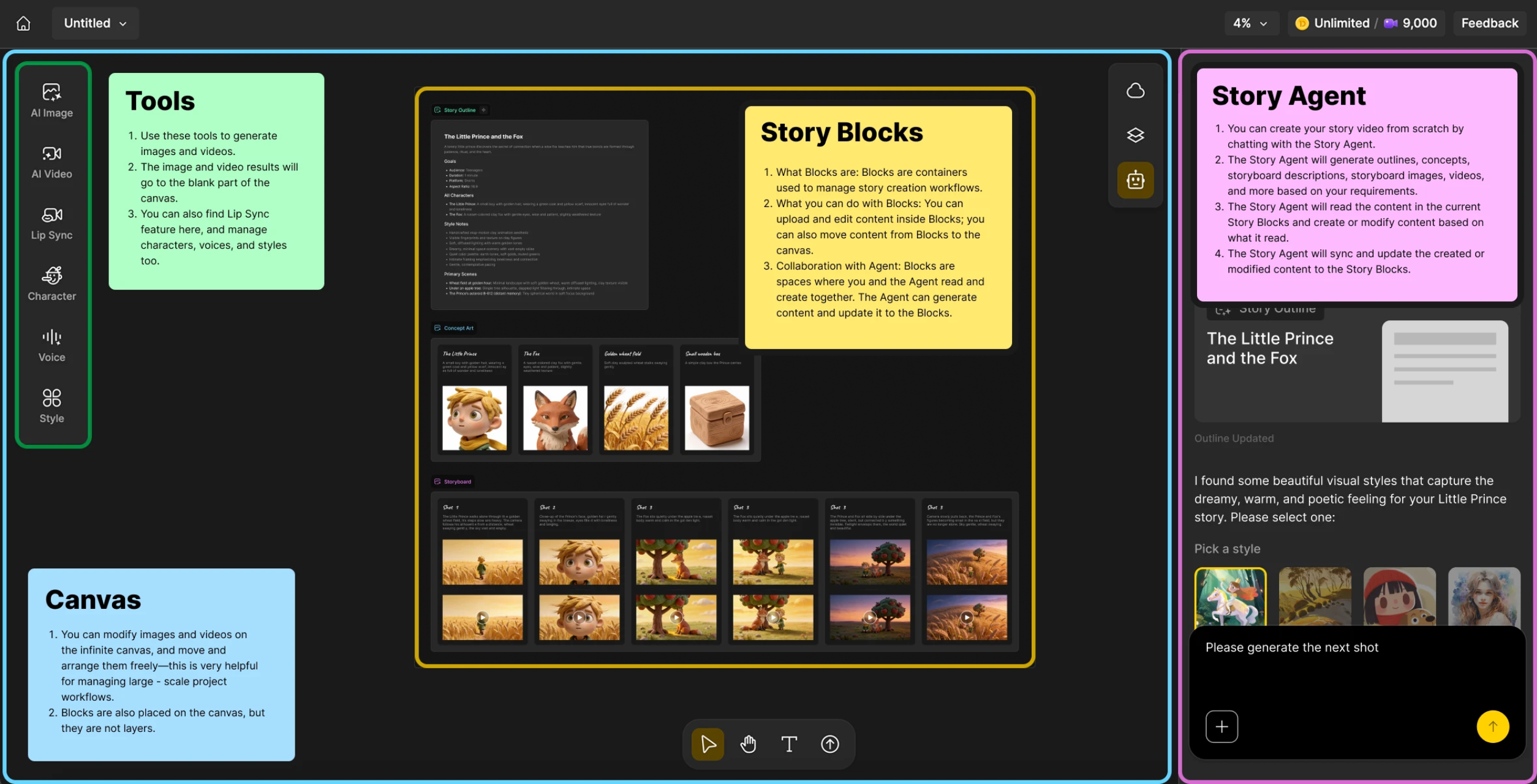
Create and Refine Everything in One Workspace
Anijam brings key parts of the video creation process together in one workspace.
Develop your storyline, build scenes, customize characters and voices, explore visual styles, generate video clips, and refine your content. Instead of treating every step as a separate task, you can move from an initial idea toward a finished video in one connected workflow.
Found a social media video you want to recreate? Use Anijam’s Video to Prompt tool to break down its visual style and creative elements, then turn the reference into a prompt for your own video.
Frequently Asked Questions
1.How can I recreate viral TikTok videos with AI?
Start by identifying the main visual element that makes a video interesting, such as a transition, camera movement, character interaction, or unexpected reveal. Then use a reference image or a detailed AI video prompt to recreate the concept with your own subject, product, or setting.
2. Can AI turn images into social media videos?
Yes. Image-to-video AI tools can animate still images by adding movement, camera effects, environmental changes, and character actions. You can use a product photo, portrait, illustration, or other visual reference as the starting point for a short video.
3. What makes a social media video engaging?
Engaging social media videos often combine a clear opening hook, visual contrast, a simple story, and a satisfying payoff. Unexpected transitions, recognizable situations, strong product visuals, and well-timed reveals can all encourage viewers to keep watching.
4. Can I use AI to create product advertising videos?
Yes. AI video generation can help create product showcases, 3D-style reveals, giant product advertisements, floating product animations, and lifestyle scenes. For more accurate results, provide clear product references and describe the product’s appearance, movement, and role in the scene.
5. What aspect ratio should I use for social media videos?
For TikTok, Instagram Reels, and YouTube Shorts, a vertical 9:16 aspect ratio is generally the best starting point. It fills the mobile screen and is suitable for most short-form social media content. Always check the latest platform specifications before publishing.
by Wendy
Wendy is a passionate writer and AI video enthusiast at Anijam, exploring creative ways to bring stories to life with AI-powered image and video tools. She shares practical tips, prompt ideas, and insights to help creators turn their imagination into engaging visual content.