How to Make an AI Series: A Step-by-Step Guide (2026)
A few years ago, making a TV-style show meant a writers’ room, a cast, a set, and months in post-production. Today, more creators are figuring out how to make an AI series with nothing more than a laptop, a story idea, and the right software.
Here’s the part nobody mentions upfront: making one AI-generated clip is easy. Making a believable, bingeable AI series - where the same character looks and sounds right from Episode 1 to Episode 10 - is a different problem entirely.
This guide walks through the whole process: why AI series are suddenly everywhere, what actually makes one worth watching, what to prepare before you start, how to produce an episode step by step, and how to publish your AI series on social media in a way that keeps people coming back for the next one.
Why AI Series Are Taking Off Right Now
Search “AI series” on social media like Tiktok and YouTube today and you’ll find anime-style dramas, cinematic 3D shorts, and faceless channels racking up millions of views. A few things had to line up at once to make that possible.
AI Has Made Series Production More Accessible
Running a season used to mean actors, sets, a shoot schedule, and a post-production team standing by. AI video tools strip out most of that overhead: industry reporting on AI-produced drama puts production costs at roughly a tenth of an equivalent live-action shoot, and some studios have completed entire seasons in weeks instead of months. That drop in cost and time is really the headline here - it’s what turned “making a series” from a studio-only project into something one person can realistically attempt on a weekend.
From One-Off AI Videos to Multi-Episode Stories
If you tried AI video tools even a year or two ago, you probably remember the frustration: a character’s face would shift slightly in every new clip, like a stranger wearing a familiar mask. That wasn’t a minor annoyance - it made anything beyond a single ten-second clip nearly unusable for actual storytelling.
What changed is a mix of sharper video models and tools that can lock a character’s face, voice, and wardrobe across renders, so the same character can walk into scene after scene without quietly turning into someone else. That one fix - consistency - is arguably the single advance that made multi-episode AI storytelling possible in the first place.
AI Series Fit for Social Media Like TikTok and YouTube
Faceless AI channels have grown from a side hustle into a real content category, and both platforms’ algorithms reward it: YouTube favors series and playlists that extend watch time, while TikTok launched a dedicated Mini Dramas program in June 2026 for serialized 60-to-90-second episodes with built-in cliffhangers - with short-drama downloads already up 140% year-over-year. An AI series isn’t fighting either platform’s incentives; it’s built around them from the start.
What Makes a Good AI Storytelling Series?
All of that explains why AI series exist. It doesn’t explain why some of them are genuinely good and others get scrolled past in three seconds. That part still comes down to old-fashioned storytelling instinct - the AI just removes the production bottleneck that used to stand between you and testing that instinct.
Choose the Right Type of AI Series
Before you write a single line, it helps to know what kind of series you’re actually building, because “AI series” covers a much wider range of formats than most beginners expect walking in. Most successful projects fall into a handful of recognizable buckets below, and picking one early makes every other decision - art style, pacing, episode length - dramatically easier to make later.
| AI Series Type | Typical Vibe | Good For | Typical Episode Length | Production Difficulty |
|---|---|---|---|---|
| Comedy Series | Funny, absurd, relatable | Recurring characters, everyday situations, and short-form entertainment | 30 sec-3 min | Medium |
| Drama Series | Emotional, dramatic, addictive | Romance, family conflict, revenge, and cliffhanger-driven stories | 30 sec-3 min | Medium-High |
| Horror/Mystery Series | Dark, suspenseful, eerie | Horror stories, mysteries, twists, and urban legends | 30 sec-3 min | Medium |
| Romance Series | Emotional, intimate, character-driven | Love stories, relationship conflicts, and emotional storytelling | 30 sec-5 min | Medium-High |
| Fantasy Series | Imaginative, magical, cinematic | Mythical worlds, supernatural stories, and adventures | 1-5+ min | High |
| Sci-Fi Series | Futuristic, cinematic, imaginative | AI, robots, space, dystopian worlds, and futuristic adventures | 1-5+ min | High |
None of these categories are hard rules - plenty of successful series blend two of them - but choosing a lane before you start saves you from second-guessing your art style three episodes in, which is a far more common problem than it sounds like on paper.
Start With a Strong Series Premise
Here’s a quick gut check borrowed from screenwriting rooms: can you sum up your show in one sentence a stranger could repeat back to you? Something like “secretly wealthy heir, arranged marriage, hidden identity” tells a new viewer everything they need to decide whether to keep watching.
If your premise takes three sentences and a diagram to explain, that’s not necessarily a dealbreaker - it usually means the idea deserves one more pass before you start producing episodes around it.
Build an Episodic Story Arc
Resist the urge to write Episode 1 and figure out the rest later - plan 5 to 10 episodes ahead at minimum. This isn’t just good writing hygiene; it’s protection against a very specific AI-series failure mode where Episode 6 quietly contradicts something you set up in Episode 1 because, honestly, you’d forgotten it existed. Knowing where the story is headed also lets you plant small foreshadowing details early, the kind that make attentive viewers feel rewarded for paying attention.
Keep Characters and Visuals Consistent
This is the single biggest thing separating a real series from a pile of unrelated AI clips, and it’s worth repeating because it comes up in almost every conversation about why AI series fail to click.
Viewers need to instantly recognize a character’s face, voice, and wardrobe every time they reappear - whether that’s Episode 5 or Episode 50. It’s less a technical checkbox and more the actual thing that makes a series feel like a series instead of a random assortment of pretty clips.
Make Dialogue Feel Natural With AI Lip Sync
AI lip sync technology has gotten remarkably good, but it’s still not flawless across long stretches of dense dialogue - mouths can drift slightly out of sync, or delivery can feel a touch too even. Series that lean on short, purposeful lines, paired with visual storytelling instead of constant talking, tend to hold up noticeably better episode after episode than scripts written like a stage play. Think less “two characters explaining the plot to each other” and more “a trembling hand, a slammed door, one perfectly timed line.”
What Do You Need to Start an AI Series?
Story figured out? Good - now for the less glamorous but equally important part: the handful of things you genuinely need in place before you generate a single frame. Skip this step and you’ll likely find yourself redoing work three episodes in, which is a frustrating way to learn these lessons the hard way.
A Series Bible You Can Reuse Every Episode
A series bible doesn’t need to be fancy - a simple document with each character’s name, appearance, voice, and personality, plus your show’s tone and visual style, is enough. The point is having one reference you return to every episode instead of re-describing everything from memory.
Consistent Characters Designed Upfront
Design your main cast once, early, and save that reference - face, wardrobe, and style - so it can be reused in every future render instead of re-created from scratch each time. This upfront work is what saves you from having a character subtly change appearance halfway through a season.
A Visual Style Locked in Before Episode 1
Pick a level of stylization and commit to it for the whole run. A clearly stylized look - illustrated, painterly, or a stylized 3D finish - tends to be more forgiving of small AI generation quirks than a fully photorealistic style, which matters far more when you’re producing dozens of episodes instead of one showcase clip.
A Voice, Dialogue, or Narration Plan
Decide early whether your series runs on a single narrator or multiple characters trading dialogue - it changes how you write every single scene. Either way, write for the camera rather than the page: a line like “close-up on her hand trembling as she reads the letter” gives an AI video tool far more to work with than “she reads the letter nervously,” simply because it’s describing a shot instead of just an emotion.
A Repeatable AI Video Workflow
Story, characters, style, and voice are the creative decisions. The last piece is a production workflow you can repeat episode after episode without starting from zero each time, and this is exactly where most first-time AI series creators quietly hit a wall. It’s also exactly where the right tool ends up making or breaking whether you actually finish a season.
How to Make an AI Series with Anijam AI
Anijam AI, an all-in-one AI video maker can enable script, characters, scenes, voice, and editing to stay inside one connected workflow instead of bouncing between apps.
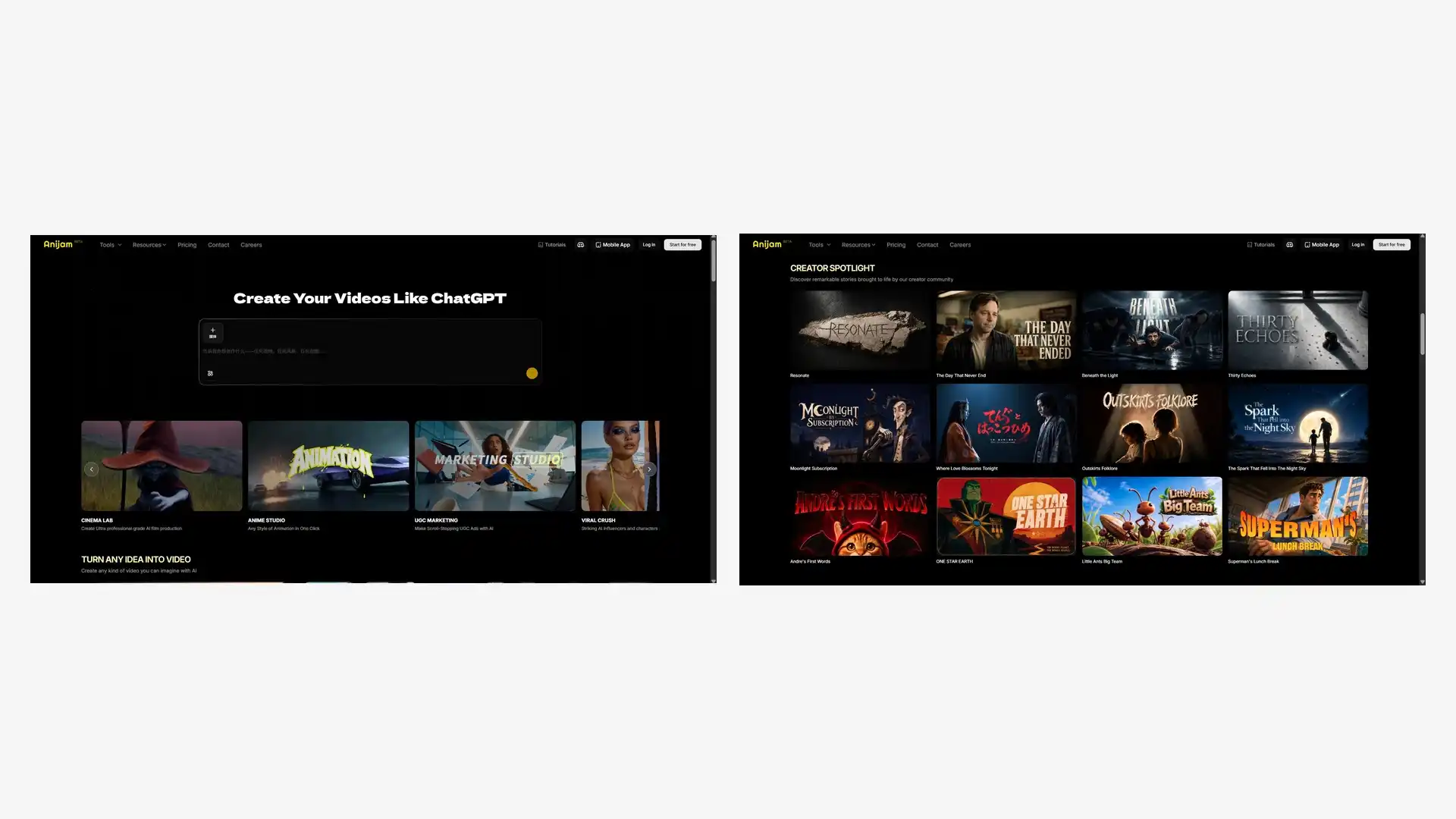
That’s exactly the job the AI series generator is built for - turning a concept or script into a structured, multi-episode show while keeping your cast consistent from the first scene to the last, which is precisely where the stitched-together approach tends to fall apart.
Here’s what the workflow looks like in practice:
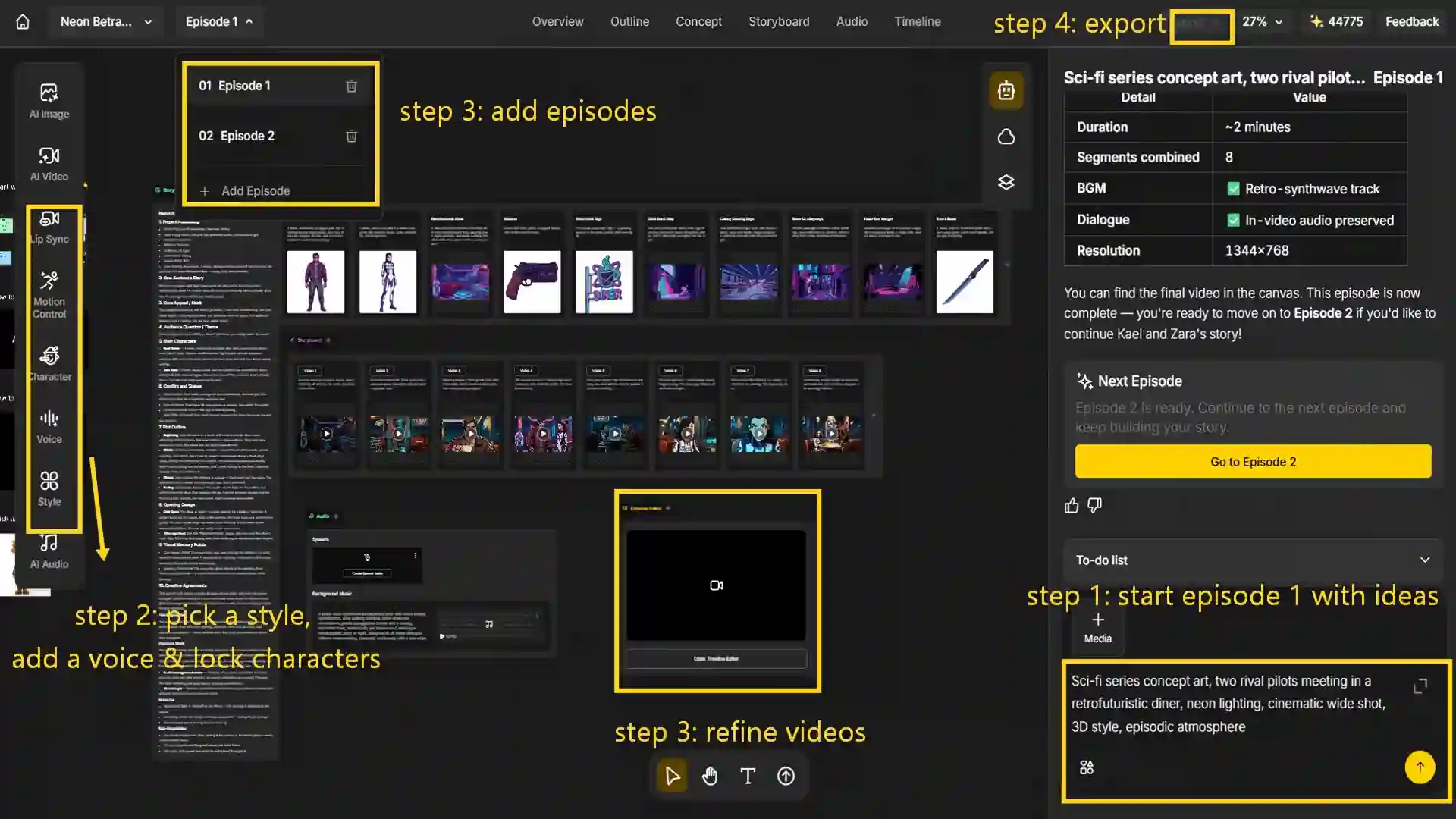
Step 1: Start Episode 1 with Your Story Ideas
Create a new episode on the canvas, describe your concept or upload your script, choose a video model such as MiniMax H3 to generate scenes with native audio and multimodal reference support and then let Anijam AI agent craft the story direction and generate the full story outline.
Step 2: Pick a Style, Add a Voice & Lock your characters
- Choose a recommended visual style or browse the style gallery, from cartoon and 3D to realistic and Ghibli-inspired looks, and let the agent keep your characters looking consistent across episodes.
- Generate or upload voice tracks and let Anijam AI keep your characters, style, and lip sync consistent across episodes.
Step 3: Refine Episode 1 & Continue Your Series
- Fine-tune pacing and scene duration on the timeline, and then create episode 2 to continue your series.
- Continue the previous storyline or add a new twist - the AI agent carries over your established characters, visual style, and story settings to keep the series consistent.
Step 4: Edit, Export & Share Each Episode
Edit episodes on the timeline, fine-tune scene timing and pacing, then export your finished series and share it on social media.
That’s the full workflow on the web. Anijam AI connects your desktop and mobile experience, so you can also create series on your phone with ready-to-use templates whenever inspiration strikes.
Tips to Make Your AI Series Go Viral
Getting an episode made is genuinely half the job now. The other half - getting anyone to actually watch the next one - hasn’t changed at all, AI or not. These are the habits that consistently separate AI series that build a real audience from ones that quietly disappear somewhere around episode two.
- Hook Viewers from the First Episode - Open on conflict, not setup. The first few seconds need to promise something - a betrayal, a reveal, a confrontation - before a viewer has any reason to keep watching. Save the backstory for later; nobody clicks away from a mystery to go read the lore first.
- Keep Each Episode Focused - One episode, one idea. It’s tempting to cram a whole arc’s worth of plot into a single episode, especially when you’re excited about where the story is heading - but it usually just confuses new viewers and dilutes the one moment that was supposed to hook them in the first place.
- End Episodes With a Hook or Cliffhanger - A cliffhanger only works if the conflict is genuinely unresolved when the episode cuts - not wrapped up with a bow. Cutting away mid-beat, right as something’s about to happen, is what turns a single view into someone immediately clicking into the next episode instead of closing the tab.
- Label Your Series as AI-Generated - Being upfront about AI involvement keeps you aligned with platform policy, and honestly, it tends to build more trust than it costs you. Audiences are increasingly comfortable watching AI-made drama and animation - what actually erodes trust is viewers finding out later that a creator tried to hide it, not the AI itself.
- Publish Consistently and Build a Series Identity - Use a consistent intro, thumbnail style, and episode-numbering format so viewers recognize your show at a glance in their feed. On YouTube specifically, group episodes into a series playlist and publish on a predictable schedule - both help train the algorithm, and your audience, to expect the next episode.
If you’re building a vertical, such as TikTok-style short drama, our guide on how to make a TikTok short drama with AI goes deeper into the mobile-first version of these same principles.
Conclusion
Strip away the software, and an AI series still runs on the same fundamentals every season of television has always needed - a strong premise, characters worth following, and a reason to watch the next episode. What’s actually changed is everything standing between that idea and a finished episode: no studio, no cast, and no production budget required, just a clear plan and a workflow that doesn’t fall apart by episode three.
Get the story and character bible right, keep your visuals and voices consistent, and lean on a tool built for exactly this job. Anijam AI Video Generator carries a concept from script to a finished, consistent episode in one workflow - and honestly, the fastest way to know if your idea works is to produce the first episode and see how it actually holds up.
Frequently Asked Questions
Can I really make a TV show entirely with AI?
Yes. AI tools can now handle the script breakdown, character art, voice, lip sync, and editing needed to produce a full episode. The main limiting factor isn’t the technology anymore - it’s planning a story and cast that stay consistent across a whole season.
What’s the best AI tool to make an AI series?
An all-in-one AI video generator is generally easier than stitching together separate script, image, and voice tools, since it keeps your characters consistent automatically. Anijam AI’s series generator is built specifically for multi-episode projects.
How do I keep characters looking the same in every episode?
Design and save each character’s face, voice, and wardrobe once, then reuse that same locked reference in every episode rather than re-describing the character from scratch each time. This is the core mechanism behind character consistency in AI series.
How long should each episode of an AI series be for YouTube?
There’s no fixed rule, but shorter episodes (roughly 3-10 minutes) tend to perform well for serialized AI content, since they’re easier to binge in a playlist and give the algorithm faster watch-time signals than a single long upload.
Do I need to write a full script, or can AI generate the story too?
Either works. You can write a full script yourself, hand over a rough premise and let the AI draft an episode outline, or start from a one-line idea and build it out from there - the workflow adapts to how much of the writing you want to do.
Is Anijam free to make an AI series?
Yes. Anijam offers free daily credits for signing up and checking in daily, allowing you to try series creation for free. Keep in mind that content created with the free tier is watermarked and for non-commercial use, so please consider a paid plan if you need the full creation and export experience.
by Evan
Evan is an AI content creator and video technology writer at Anijam AI, focused on how generative AI is transforming storytelling and video production. He shares social trends, creative workflows, prompt strategies, and practical insights to help creators turn ideas into engaging videos and visual content.