How to Make Ghibli Style Animation with AI (Step-by-Step Guide)
It didn’t take long for a viral AI image trend to let anyone turn a selfie into something that looked like a still from a Studio Ghibli film - soft light, hand-painted texture, that unmistakable warmth. It spread across social media almost overnight.
Since then, the trend has kept moving. People aren’t just asking for a Ghibli-style picture anymore - they want it to move. A character that blinks. A breeze that actually drifts through the grass. A scene that plays like a tiny clip from a movie that was never made.
The problem is that traditional Ghibli-style animation is genuinely hard. It’s the product of decades of hand-drawn craft, and replicating that by hand takes real training and real time.
AI closes most of that gap. This guide walks through what actually makes an animation read as “Ghibli style,” where the aesthetic is showing up across YouTube and TikTok right now, and a step-by-step process for making your own Ghibli-inspired animation with AI - no drawing tablet required.
What Makes an Animation “Ghibli Style”?
Before generating anything, it helps to know what you’re actually aiming for. A handful of visual habits are what make an image or animation read as “Ghibli-inspired” rather than generic anime:
- Soft, natural lighting - diffused sun through leaves, golden-hour glow, overcast softness, rather than hard studio light.
- Painterly, hand-drawn texture - visible brushwork and imperfect linework instead of clean vector edges.
- Warm, muted color palettes - mossy greens, dusty blues, faded oranges, rather than saturated, high-contrast color.
- Detailed natural environments - wind-blown grass, layered clouds, cluttered-but-lived-in interiors.
- Expressive but simple character design - large, soft eyes and understated movement rather than exaggerated action-anime posing.
- Unhurried pacing - quiet, observational moments, not constant motion or fast cuts.
One important distinction: “Ghibli style” as a search term and creative goal refers to this visual aesthetic - it doesn’t mean recreating Totoro, Chihiro, or any other copyrighted Studio Ghibli character. Style itself isn’t owned by anyone; specific characters and scenes are. The projects in this guide are about capturing the feeling of the aesthetic with original characters and scenes.
Ghibli Style Trends Taking Over Social Media Right Now
The Ghibli-inspired aesthetic hasn’t stayed in one lane. What began as a photo filter has branched into several distinct content formats across YouTube and TikTok, each using the same visual language for a different purpose.
Ghibli Style ASMR Trend
One of the more unexpected offshoots is Ghibli-inspired ASMR. Search YouTube for “Ghibli ASMR” and you’ll find an entire, active genre: cozy kitchen scenes, quiet countryside mornings, slow train rides, and rainy-day cooking - all rendered in a soft, Ghibli-inspired visual style and paired with gentle ambient sound instead of dialogue.
The appeal is straightforward. Ghibli’s aesthetic was already built around quiet, observational moments - a kettle boiling, rain on a window, wind moving through a garden. That’s almost exactly what ASMR content is built on too, so the two formats fit together naturally. Creators use it for relaxation, studying, and sleep content, and it’s become one of the more durable ways people are applying the aesthetic to long-form video.
Ghibli-Inspired Short-Form Edits on TikTok
On TikTok, the same aesthetic shows up in a much faster format: before-and-after transformation clips. Creators upload a photo or a short clip of themselves, apply a Ghibli-style filter or AI transformation, and show the reveal set to music - a format that works well for TikTok’s swipe-and-share behavior and consistently performs well under tags associated with the aesthetic.
Ghibli-Inspired Travel Vlogs
A newer branch of this trend swaps the cozy kitchen or countryside cottage for the road. Videos like a family’s rainy afternoon in their mobile home, driving along a coastal route, rendered entirely in a soft, Ghibli-inspired visual style - capture the same quiet, observational mood as Ghibli-style ASMR, just set in motion.
There’s no dramatic plot. It’s rain on the window, quiet conversation, the road passing outside - small, unremarkable moments that feel meaningful simply because of how they’re framed and animated.
Ghibli-Inspired Lo-fi
Lo-fi study and chill-beats streams have used anime-inspired visuals as a backdrop for years, and Ghibli-style scenery - a character reading by a window, rain against glass, a warm-lit room - fits that mood especially well. It’s a low-effort, high-rewatch format: one animated loop, paired with music, can run for hours.
How to Make Ghibli Style Animation with Anijam AI (Step-by-Step)
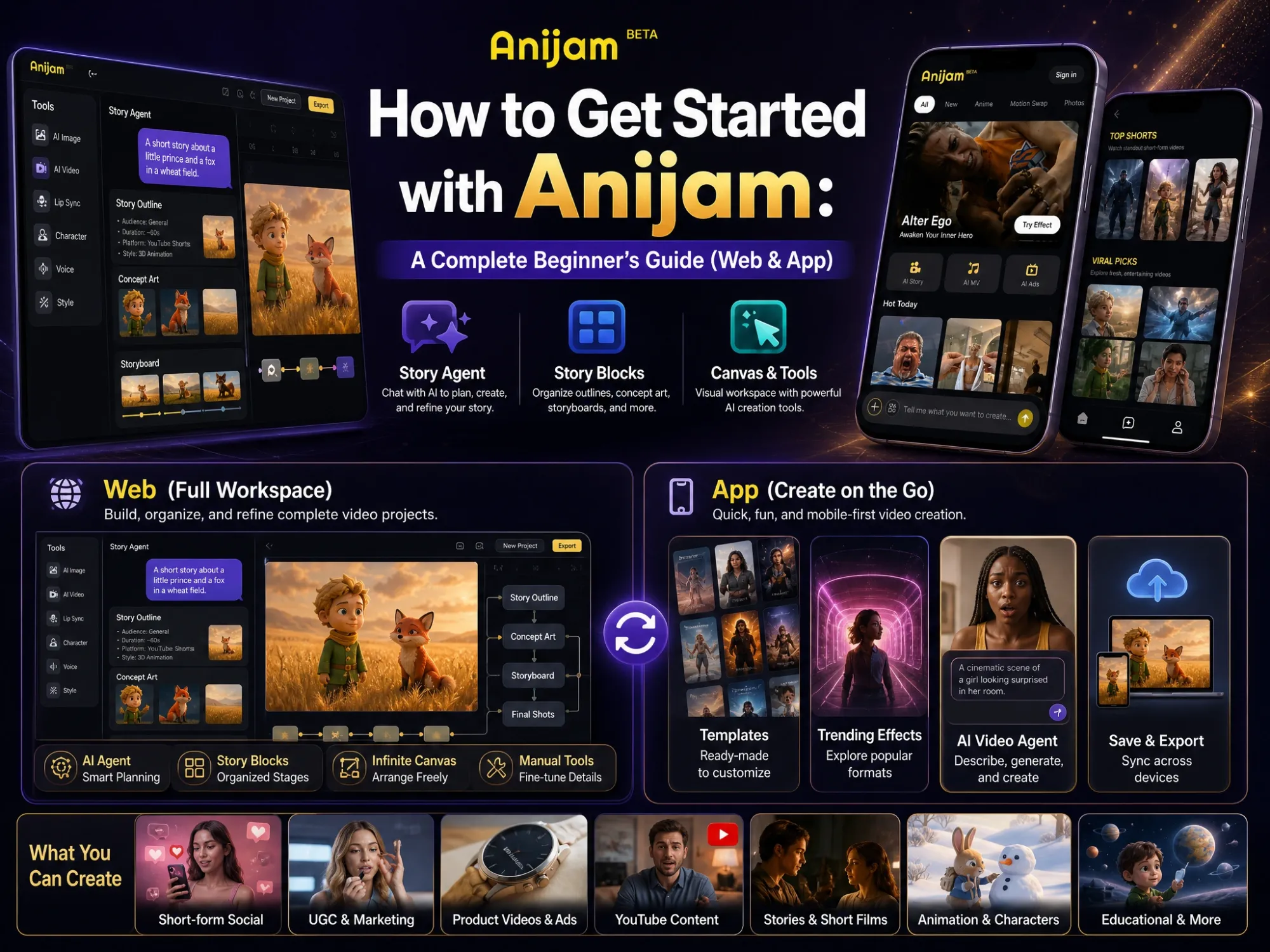
Anijam AI is an all-in-one AI animation platform that turns a photo, prompt, or script into a fully animated video - handling scene generation, style, motion, and character consistency inside a single workspace. It works across both web and app, with projects syncing automatically between them, so you can create anytime, anywhere - pick up right where you left off, whichever device you’re on.
Here’s the actual workflow for making a Ghibli-inspired animation with Anijam’s Ghibli-style animation tool.
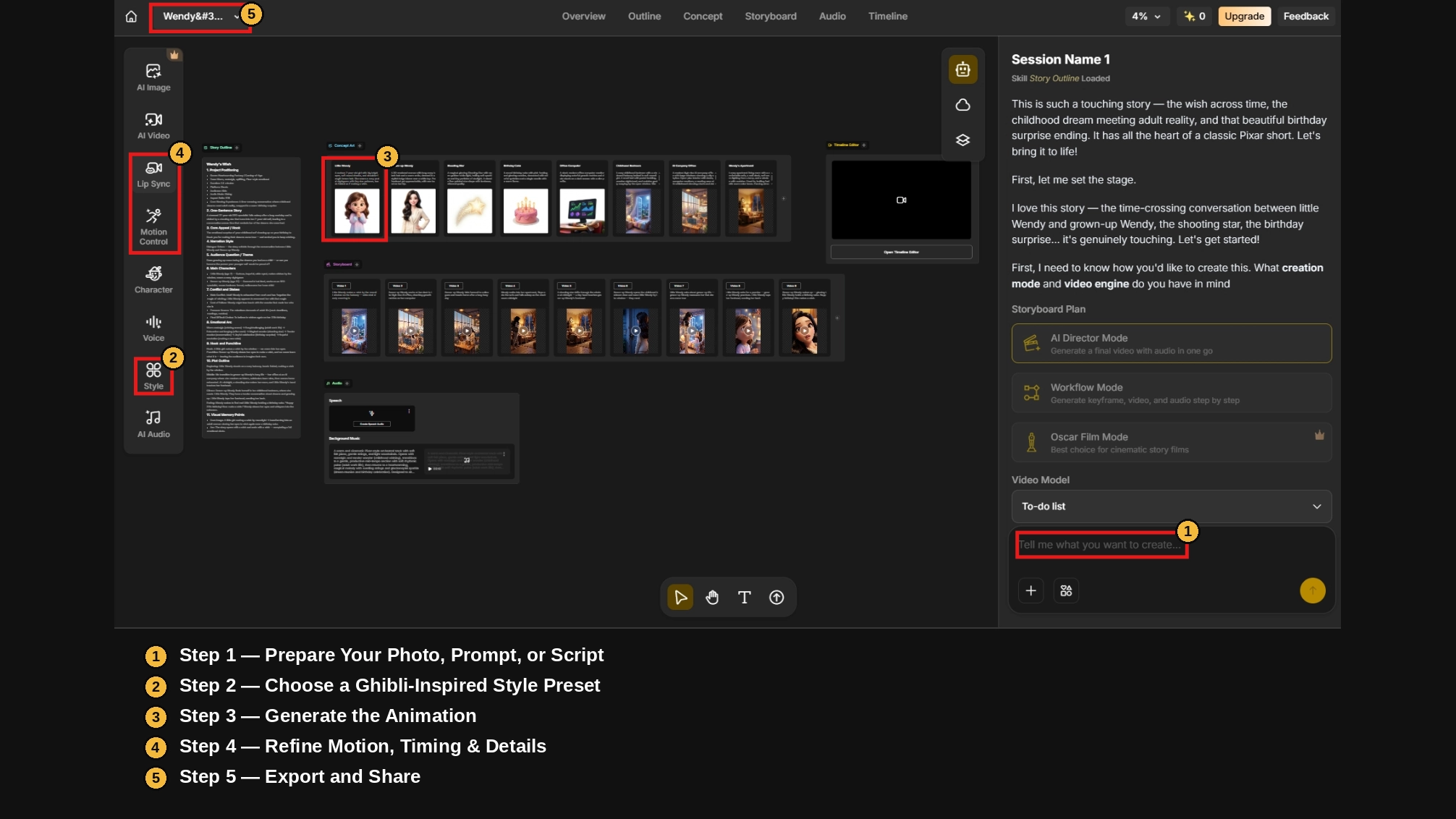
Step 1 - Prepare Your Photo, Prompt, or Script
Start with whatever you have. Upload an existing photo or piece of artwork you want animated, or write a short text prompt or script describing the scene - a character, a setting, and what’s happening in it. Anijam can generate the starting visuals from text alone if you don’t have an image yet.
Step 2 - Choose a Ghibli-Inspired Style Preset
Select a hand-drawn, painterly, or anime-inspired style preset to guide the visual direction. Pair it with descriptive prompt language - “soft natural light,” “painterly background,” “warm muted colors” - so the AI leans toward the Ghibli-inspired look rather than a generic anime render.
Step 3 - Generate the Animation
Click generate and let the AI build out the scene: camera motion, character movement, and environmental detail like wind, light, and background motion, based on your prompt and reference image.
Step 4 - Refine Motion, Timing & Details
Use the timeline editor to adjust pacing, trim or extend a shot, and fine-tune specific motion - slowing down a camera pan, softening a gesture, or adjusting how long a quiet moment holds before cutting away. This is usually what separates a rough first generation from a finished-feeling clip.
Step 5 - Export and Share
Add voice, music, or ambient sound if the scene calls for it, then export the finished animation and share it directly to YouTube, TikTok, or Instagram.
Tips for Getting a More Authentic Ghibli-Inspired Look
A few adjustments make a noticeable difference in how close the final result feels to the aesthetic - here’s a quick-reference guide:
| Element | What to Aim For | Try Adding to Your Prompt |
|---|---|---|
| Lighting | Soft, diffused, natural - not harsh or artificial | ”soft natural lighting,” “golden hour,” “dappled sunlight through leaves” |
| Color | Warm, muted, low-contrast tones | ”warm muted palette,” “pastel tones,” “faded colors” |
| Environment | Rich, lived-in background detail | ”detailed background,” “wind moving through grass,” “layered clouds” |
| Character Motion | Gentle, small, believable gestures | ”subtle movement,” “gentle breathing,” “hair moving in the wind” |
| Pacing & Sound | Slow, observational, quiet | ”slow camera pan,” “ambient nature sound,” “no fast cuts” |
Use Soft, Natural Lighting
Avoid hard studio light or strong artificial contrast. Ghibli-inspired scenes almost always use diffused, natural light - sunlight through a canopy, an overcast afternoon, the warm glow just before sunset.
Choose a Warm, Muted Color Palette
Steer away from high-saturation color. The aesthetic leans on warm, slightly desaturated tones - moss green, dusty blue, faded orange - rather than the bright, punchy palette common in mainstream anime.
Add Environmental Detail (Nature, Texture, Depth)
Background detail carries a lot of the aesthetic. Specify texture and movement in the environment - swaying grass, drifting leaves, layered clouds, cluttered kitchen shelves - rather than leaving the background generic.
Keep Character Movement Gentle and Expressive
Ghibli-inspired animation rarely relies on fast, exaggerated action. Small, deliberate gestures - a slow blink, hair moving in the wind, a quiet exhale - do more for the aesthetic than big motion.
Pick the Right Music and Ambient Sound
Sound does a lot of the emotional work. Soft ambient audio - wind, birds, distant footsteps, a gentle piano line - reinforces the same quiet mood that makes the ASMR format above work so well, even in a short clip.
Conclusion
Making a Ghibli-inspired animation used to require years of hand-drawn training, or a budget most people don’t have. With AI video tools like Anijam AI, it’s a workflow anyone can run - describe or upload a scene, choose the style, refine the motion, and export, whether you’re on the app or the web.
Whether you’re chasing the slow-paced calm of Ghibli-style ASMR, a quick TikTok transformation, or something closer to a full animated short, the same core habits - soft light, warm color, natural detail, gentle motion - are what make it feel authentic. Start with one short scene, see how close it lands, and build from there.
Frequently Asked Questions
Do I need any animation or drawing skills to make Ghibli-style animation? No. AI handles the actual animation work - generating motion, camera movement, and style - based on your photo, prompt, or script. You’re guiding the process with descriptions and reference images, not drawing or animating frame by frame.
What kind of photos or images work best for Ghibli-style animation? Clear, well-lit images tend to produce the cleanest results - portraits, landscapes, pets, and everyday scenes all work well. Complex, cluttered, or low-resolution source images give the AI less to work with, so a sharp, simple starting image is usually a better foundation than trying to animate something dense and detailed right away.
Can I turn a photo into a Ghibli-style animated video? Yes - this is one of the most common starting points. Upload a photo, apply a Ghibli-inspired style preset, and describe the motion you want (a breeze, a gesture, a camera pan) to animate it.
How long does it take to make a Ghibli-inspired animation with AI? A short clip - a single scene of a few seconds to about a minute - can typically be generated and refined within one working session, compared to the weeks or months traditional hand-drawn animation requires for comparable footage.
Is there a free way to make Ghibli-style animation? Yes - Anijam offers free credits to get started, which you can earn by signing up and through daily login check-ins. That’s enough to try out Ghibli-style animation and get a feel for the workflow. For heavier use, longer clips, or commercial projects, paid plans unlock additional credits and features.
by Evan
Evan is an AI content creator and video technology writer at Anijam AI, focused on how generative AI is transforming storytelling and video production. He shares social trends, creative workflows, prompt strategies, and practical insights to help creators turn ideas into engaging videos and visual content.