![How to Make Minecraft Animation with AI [5 Top AI Animators 2026]](https://static.anistudio.ai/www/blog/minecraft-animation/minecraft-animation-feature-image.webp)
How to Make Minecraft Animation with AI [5 Top AI Animators 2026]
Minecraft content never really goes out of style - but right now, it’s having a very specific kind of moment. Scroll through TikTok and you’ll run into the “Blockify Me” filter everywhere: people uploading a selfie and getting turned into a blocky, voxel-style Minecraft character in seconds.
It’s a fun trend on its own. But it’s also a preview of something bigger. AI can now take that same idea much further - turning a text description or a single photo into a fully animated Minecraft scene, complete with movement, camera angles, and even lip-synced dialogue.
This guide covers what Minecraft animation actually is, compares five of the top AI tools making it possible in 2026, walks through exactly how to build your own animated Minecraft video with Anijam, and breaks down the trending photo filter behind it all - plus the mistakes to avoid along the way.
What Is Minecraft Animation?
Minecraft animation is the practice of taking Minecraft’s blocky, voxel-based visual style - its characters, mobs, and environments - and bringing it to life outside the game itself, shot by shot.
It’s different from simply recording gameplay footage. Creators build original scenes instead: a custom battle sequence, a comedic skit, or a short cinematic story, all rendered in that unmistakable pixelated, cube-based look.
The format has deep roots in the Minecraft community. Fan-made Minecraft animations have circulated on YouTube and Reddit for well over a decade, and dedicated subreddits regularly showcase everything from hand-animated shorts to stop-motion builds made with LEGO Minecraft sets.
For years, the standard toolkit was software like Mine-imator, Blender, or Blockbench - powerful, but demanding. Making even a short clip meant learning rigging, keyframing, lighting, and rendering pipelines, often taking hours or days of work for a few seconds of footage.
AI has compressed that timeline dramatically. Instead of manually posing every frame, creators can now describe a scene in plain language - “Steve fighting a Creeper at night” - and an AI model generates the full animated sequence in minutes.
5 Top AI Minecraft Animators Compared
Not every AI Minecraft tool does the same job. Some specialize in turning a single photo into a quick clip; others are built for full animated scenes with characters, motion, and dialogue. Here’s how five of the more established options compare.
| Tool | Best For | Key Features | Free Tier |
|---|---|---|---|
| Anijam | Full animated Minecraft scenes with characters, motion & dialogue | Text/image-to-animation, dedicated Minecraft style library, ready-to-use Minecraft animation templates, character consistency, motion control, multilingual lip sync, watermark-free HD export | Yes - free to start, browser-based, no download |
| Media io Minecraft AI Video Generator | Turning a single photo into a quick Minecraft-style clip | Upload a photo and it auto-converts into a short, blocky animated video with AI-generated music, no manual editing required | Limited free usage; check site for current plan |
| Revid ai | Creators who want an all-in-one content suite | 40+ bundled tools including dedicated Minecraft parkour and animation categories with community example templates | 3 free videos, no card required; paid plans from ~$39/month |
| TopMediai | Stylized, model-driven generation | Built on Veo 3 and Kling models; includes a video-extender feature plus ready-made viral prompt templates and game-specific sound effects | Free/paid tiers available; check site for current pricing |
| Short ai | Generate-then-publish workflows | 12+ parkour/animation styles, 1,000+ AI voices, built-in social scheduler and analytics dashboard | Free/paid tiers available; check site for current pricing |
How to Make Minecraft Animation with Anijam
Anijam AI is an all-in-one AI animation platform built around a simple idea: describe your scene by chatting with the AI, and it builds the animation for you. Its AI agent handles character design, environment generation, camera movement, and voice syncing from a single text description.
Anijam’s Minecraft Animation Maker lets you generate voxel-style Minecraft animations directly in your browser, no software to download - and it’s also available through Anijam’s mobile app, so you can create on the go.
Here’s an example of what a Minecraft animation made with Anijam looks like:
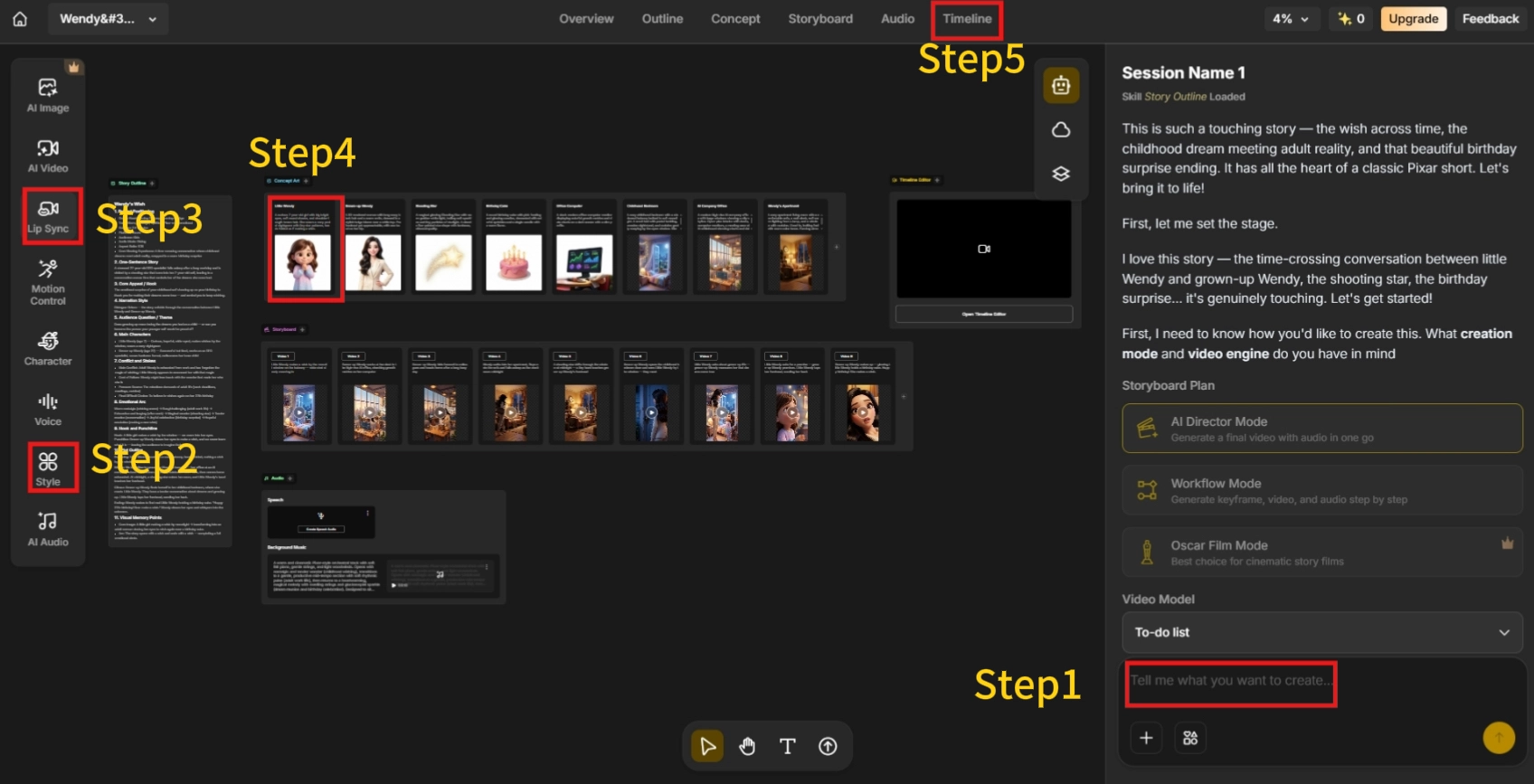
Step 1: Describe Your Minecraft Scene or Story
Type your idea in plain language: your characters (Steve, Alex, or a custom hero), the setting (Overworld, Nether, or the End), and the action (a battle, a build, a comedic skit).
Step 2: Choose Your Minecraft Visual Style
Pick from Anijam’s Minecraft-inspired style library, featuring voxel-block aesthetics and game-accurate color palettes.
Step 3: Customize Characters, Motion & Voice
Adjust your character’s appearance, expressions, and movement with the built-in editor, then add dialogue through AI-generated voice or your own uploaded audio for lip sync.
Step 4: Generate Your Animation
Anijam’s AI renders the full sequence - characters, environment, and camera movement - based on your description.
Step 5: Fine-Tune, Export & Share
Adjust pacing and scene order in the timeline editor, then export in HD, watermark-free, ready for YouTube, TikTok, or Instagram.
Tips for Better Minecraft AI Animations
- Be specific about action and setting - Instead of “Steve in a cave,” try “Steve sneaking through a dark cave, torch in hand, tense camera shake.” More descriptive detail gives the AI more to work with.
- Keep one scene focused on one action - Trying to cram mining, fighting, and building into a single generation often leads to messy, rushed transitions. One clear action per generation reads better.
- Use motion control for key movements - If a walk cycle or attack animation doesn’t look quite right, adjust it directly through motion control rather than re-generating from scratch.
- Lock in character details early - Describing your character’s appearance the same way across prompts helps keep them visually consistent from scene to scene.
Copy-and-Paste Minecraft Animation Prompts
Not sure where to start? Here are a few ready-to-use prompt examples covering different Minecraft animation styles:
- Steve and Alex sprinting through a blocky biome, a pixelated Creeper explosion in the background, cinematic camera pan, voxel art style, dynamic lighting.
- A Minecraft village at sunset, torchlight flickering on cobblestone walls, villagers going about their day, low-angle cinematic shot, warm nostalgic color palette.
- A Minecraft hero charging into battle against the Ender Dragon, dramatic slow-motion effect, purple particle effects, expressive blocky character motion, End City backdrop.
- An underwater Minecraft scene with glowing sea lanterns, tropical fish darting between coral reefs, a blocky character exploring ocean ruins, dreamy blue atmosphere.
- A Creeper sneak attack in a dark cave, flickering torch shadows, tense camera shake, voxel explosion, comedic timing.
[Trending] “Minecraft Blockify Me” Filter on TikTok
Minecraft’s blocky aesthetic has always had a strong presence on social media, and lately it’s fueling a new wave of interest: the “Minecraft Blockify Me” filter.
The filter lets users upload a selfie and instantly get turned into a pixelated, voxel-style Minecraft character. It’s spread across TikTok and CapCut with dozens of tutorial videos showing people how to apply it, and it regularly shows up under hashtags like #minecraftblockifyme and #minecraftfilter.
Alongside it, creators have also been using Minecraft-themed overlay filters - frames styled after in-game achievement pop-ups or game-screen effects - to turn ordinary photos and couple/friend content into Minecraft-flavored posts.
The appeal is simple: it takes seconds, requires no design skill, and taps into one of gaming’s most active fan communities.
How to Try It Yourself with Anijam
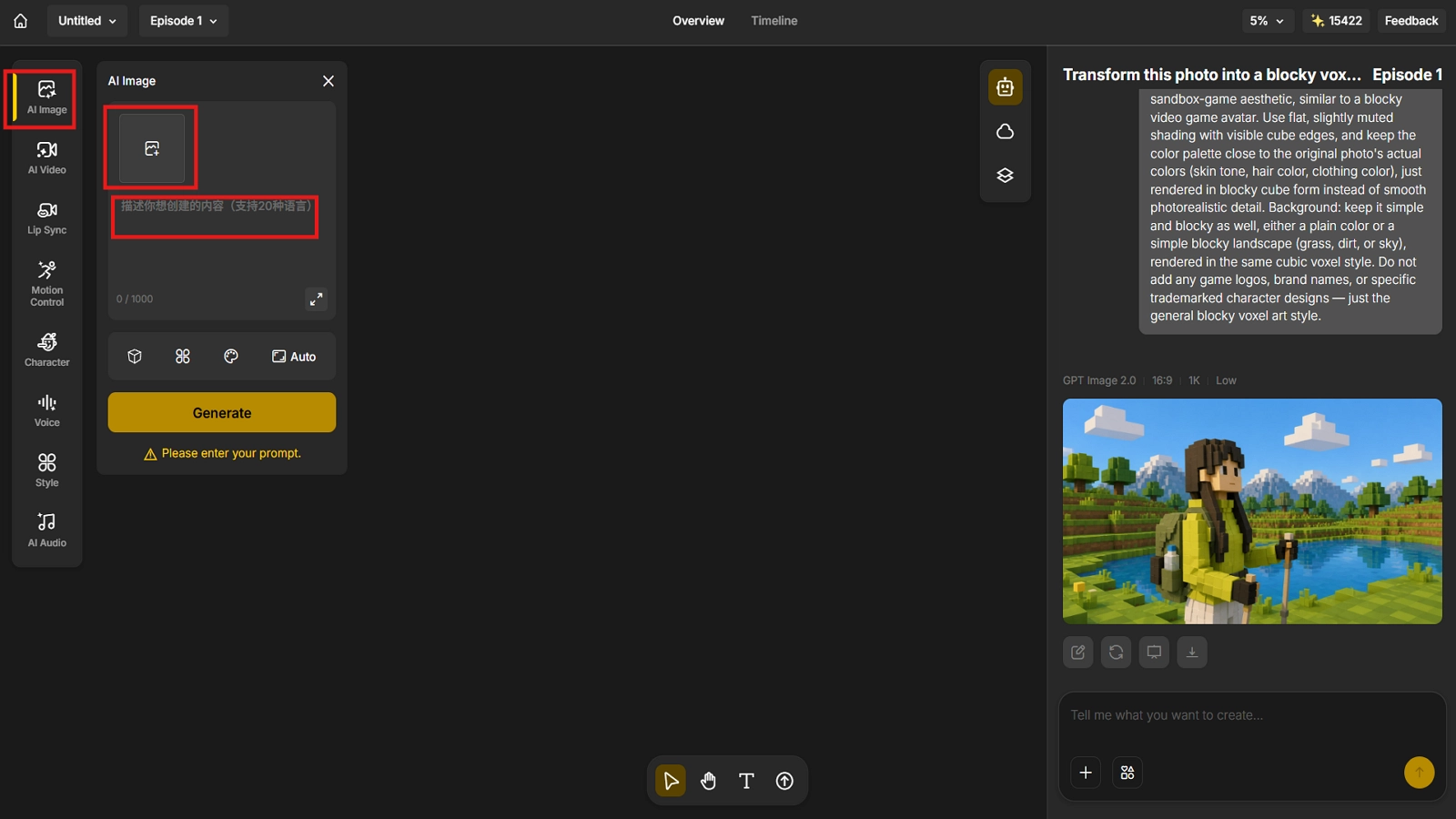
On Anijam, the process is just four steps:
- Create a project - start a new project on Anijam’s canvas.
- Find the AI Image tool - select the Image tool from Anijam’s toolset.
- Upload your photo - upload the photo you want to “Minecraft-ify” - a selfie, a pet photo, anything.
- Add your prompt - describe the look you want, for example: “Transform this photo into a blocky voxel-style character, keeping the same pose and expression. Rebuild the face, hair, and clothing out of chunky cube blocks, using a color palette close to the original photo. Keep the background simple and blocky too - no logos or trademarked designs.”
Common Mistakes When Making AI Minecraft Animations
Most rough results don’t come from a bad tool - they come from a few avoidable habits. Here’s what tends to trip creators up.
1. Using Low-Quality or Cluttered Source Images
A blurry, low-resolution screenshot, or a photo packed with too many competing elements, makes it harder for the AI to identify the main subject clearly. The result is often a blurrier or distorted output.
Fix: use a clear, well-lit source image with an uncluttered background and an obvious main subject.
2. Losing Character or Style Consistency
A character whose appearance shifts between shots - different skin, gear, or proportions - is one of the fastest ways to make an animation look artificial. This isn’t unique to Minecraft content, either: a publicly documented AI video generation bug report from Adobe’s community forum described how, even when instructed to only interpolate between a fixed start and end frame, the AI still introduced motion that wasn’t in either reference image, breaking the intended consistency.
Fix: describe your character’s appearance consistently across prompts, and use tools that support character-consistency or reference-locking features.
3. Overloading One Generation with Too Many Actions
Asking a single generation to cover too much ground - mining, then fighting, then building, all in one clip - usually produces rushed, jumbled transitions rather than a clean sequence.
Fix: focus each generation on one simple action or scene, then stitch multiple generations together for a longer story.
4. Skipping Iteration and Fine-Tuning
Many creators generate once, aren’t happy with the result, and stop there. In practice, adjusting prompt details or regenerating a couple of times often improves the output significantly.
Fix: treat the first generation as a draft. Refine the prompt, tweak the description, and regenerate rather than abandoning the idea after one attempt.
Conclusion
Minecraft animation has never been more accessible than it is right now. What used to take real technical skill and hours of manual work can now happen through a text prompt or a single uploaded photo.
Whether you’re starting from the viral Blockify Me filter on TikTok or building a full animated short, the tools compared in this guide each solve a slightly different problem - from quick photo-to-clip conversion to full scene generation with character consistency and lip sync.
If you want to go from a single idea, prompt, or photo to a finished, watermark-free Minecraft animation without touching a timeline editor from scratch, Anijam AI is built to handle the entire pipeline in one place.
Frequently Asked Questions
What is a Minecraft animation maker?
A Minecraft animation maker is a tool that lets you create animated videos using Minecraft-style characters, environments, and aesthetics, without building or recording inside the actual game. Options range from dedicated software like Mine-imator, which requires manual keyframing and rigging, to AI-powered platforms like Anijam, where you describe a scene in text and the AI generates the full animation automatically.
Is it free to make Minecraft animation with Anijam?
Yes. You can sign in and claim daily free credits to try out Anijam’s Minecraft Animation Maker - generating Minecraft-style animated videos directly in your browser, no software download required, with core features like character customization, AI voice, and lip sync included.
Can I make my Minecraft character talk in the animation?
Yes, on tools that include lip-sync features. Anijam, for example, includes a dedicated lip-sync engine that matches mouth movement and expression to either an uploaded voice recording, typed dialogue converted into AI-generated speech, or a voice chosen from a multilingual voice library.
Do I need animation experience to make a Minecraft animation with AI?
No. That’s the main difference between AI tools and traditional software like Mine-imator or Blender. AI-based platforms are designed around plain-language descriptions rather than manual rigging or keyframing, so no prior animation skill is required to get a usable result.
How long does it take to make a Minecraft animation with AI?
Most AI Minecraft animation tools, including Anijam, generate a clip in anywhere from under a minute to a few minutes, depending on the length and complexity of the scene - a fraction of the hours or days traditional animation software can require.
by Evan
Evan is an AI content creator and video technology writer at Anijam AI, focused on how generative AI is transforming storytelling and video production. He shares social trends, creative workflows, prompt strategies, and practical insights to help creators turn ideas into engaging videos and visual content.